1Click Text Highlighter & Marker 2.0.1
Marks text with a click or selection. Simply press Alt or Option to activate. Easy to use.
As of June 2026, 1Click Text Highlighter & Marker 2.0.1 has 288 users and a 4.20/5 rating from 5 reviews in the Productivity category.
Usersup 5.5 percent+5.5%
288
288
Ratingno change0%
4.20
5 reviews
Reviewsno change0%
5
Version
2.0.1
Manifest V3
History
7 snapshotsTracking since Apr 1, 2026.
View as table
| Date | Users | Rating | Reviews | Version |
|---|---|---|---|---|
| Apr 1, 2026 | 273 | 4.20 | 5 | 2.0.1 |
| Apr 18, 2026 | 283 | 4.20 | 5 | 2.0.1 |
| Apr 28, 2026 | 277 | 4.20 | 5 | 2.0.1 |
| May 8, 2026 | 279 | 4.20 | 5 | 2.0.1 |
| May 15, 2026 | 289 | 4.20 | 5 | 2.0.1 |
| May 24, 2026 | 291 | 4.20 | 5 | 2.0.1 |
| Jun 5, 2026 | 280 | 4.20 | 5 | 2.0.1 |
| Now | 288 | 4.20 | 5 | 2.0.1 |
Permissions & access
- Permissions
- storage
- Host access
- None declared
Screenshots

About
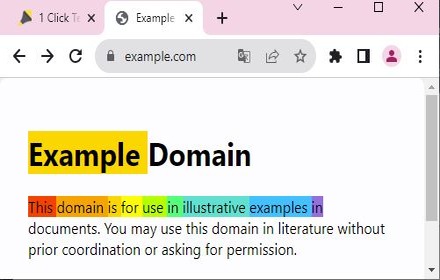
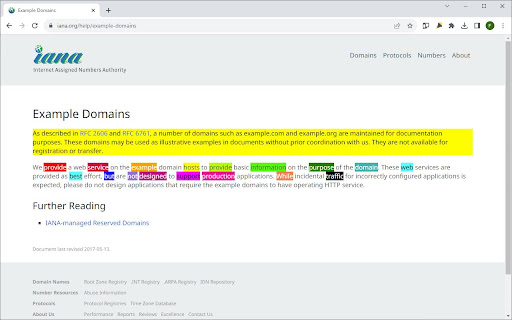
Highlight what matters with 1 Click Text Marker 2.0. Dive into long texts without losing focus, because with 1-Click Text Marker 2.0, highlighting essential points has never been this seamless.

📌 Why Choose 1-Click Text Marker 2.0?

• One-Tap Magic: Click on a word or drag over a passage - highlighting is a breeze.
• Precision, Guaranteed: No more partial word highlights. Get clean, full-word marking every time.
• Customize Your Palette: From subtle shades to bold hues, choose the perfect color for your context.
• Undo in a Snap: Made an error? Revert highlights with the same ease.

Please note:
1) There is a short loading time when a website first loads as the extension only starts when it is sure the website has fully loaded. after upt to 2 or 3 seconds you can highlight.

2) The extension was only tested in google chrome, not other chromium based browsers.

3) The highlighting does not work in pdfs or locally stored html pages. There is also a small number of websites where the highlighting feature may not work as expected.


------------------------------------------------------------------------------------------------------------------------
What's new in Version 2.0.1?

• Enhanced Highlighting Algorithm: Effortlessly select with improved precision. Whether it's a single word or an entire passage, get perfect highlights every time.
• Expanded Color Palette: More shades, more customization! Choose from an even wider range of colors to match your mood or the content's context.
• Smart Undo Feature: Made a mistake? No worries! Reverting highlights instantly with a single click now works even better and more intuitively.
• Optimized Performance: Faster, smoother, and more reliable. Experience lag-free highlighting even on the longest of web pages. Ready shortly after the page loads.
• Intuitive User Interface: A sleeker design ensures you get the most out of every feature, without any hassle. The new onboarding page gives you an easy introduction of how highlighting works.


- bugs fixed: issue when copying large texts fixed

I'm thrilled to present this revamped and fully optimized version of 1 Click Text Marker that allows you to highlight text with absolute ease. Whether you click on a word or drag to select, 1 Click Text Marker 2.0 just works, and all highlights are reversible just as easily. No need to be accurate when selecting text to highlight, the extension ensures that entire words are highlighted for a cleaner look. With a diverse color palette you can pick the perfect shade for every context. Experience effortless highlighting and enhance your reading, research, or browsing with 1 Click Text Marker 2.0.

To contribute or submit issues visit: https://github.com/Felixberlingfn/1click-highlighter
Technical
- Version
- 2.0.1
- Manifest
- V3
- Size
- 1.06MiB
- Min Chrome
- 88
- Languages
- 1
- Featured
- No
Metadata
- ID
- emblnilgmphckfkocfghpmdghiplmpnp
- Developer ID
- u4f86aed84cf9121153fb78fa6490c50c
- Developer Email
- [email protected]
- Created
- Aug 9, 2023
- Last Updated (Store)
- Nov 22, 2025
- Last Scraped
- Jun 5, 2026
- Website
- —
- Privacy Policy
- —
Similar extensions
Alternatives to 1Click Text Highlighter & Marker 2.0.1, ranked by description similarity.

Highlight text
Highlight selected text and manage highlights per page.
362
★ 5.0

Highlighter Extension
Discover highlighter extension that auto-colors your keywords; finds and highlights what’s vital instantly!
1.0K
★ 5.0

Chrome Highlighter — Free Text & Word Highlighter for Webpages
Highlight words on any webpage with custom colors. Manage your list easily and boost focus while studying or researching.
145
★ 3.7

GlowMarkr
Persistent text highlighter with comments.
15
★ 5.0

Text Highlighter
Activate this Extension to highlight text with different colors on any webpage through one click.
75
★ 3.7

MultiHighlight
Advanced text highlighting with real-time style updates for any webpage.
996
★ 3.5
markerNote - web, PDF highlighter & notes
Persistent PDF highlighter. Highlight text & insert into notes in markdown format. Auto-organize notes by date, domain. sync Gdrive
2.0K
★ 4.4

Web Highlighter - Save Text Highlights
Highlight important text on any website. Your highlights are saved automatically.
54
Data sourced from the Chrome Web Store · last verified Jun 5, 2026.