
CrosKeys by CrosExperts
Unlock your Chromebook's potential with a powerful keyboard launcher!
As of May 2026, CrosKeys by CrosExperts has 225 users and a 5.00/5 rating from 2 reviews in the Workflow & Planning category.
Usersdown 5.1 percent−5.1%
225
225
Ratingno change0%
5.00
2 reviews
Reviewsno change0%
2
Version
CrosKeys - 1.0
Manifest V3
History
2 snapshotsTracking since Apr 25, 2026.
View as table
| Date | Users | Rating | Reviews | Version |
|---|---|---|---|---|
| Apr 25, 2026 | 237 | 5.00 | 2 | CrosKeys - 1.0 |
| May 22, 2026 | 231 | 5.00 | 2 | CrosKeys - 1.0 |
| Now | 225 | 5.00 | 2 | CrosKeys - 1.0 |
Permissions & access
- Permissions
- inputstoragenotificationstabsalarmscontextMenusttsoffscreen
- Host access
- <all_urls>
Screenshots

About
🌟 𝗪𝗛𝗔𝗧'𝗦 𝗡𝗘𝗪
- Added Side-panel support.
- Added message notifying users of deprecation.

🗝️ 𝗨𝗡𝗟𝗢𝗖𝗞 𝗬𝗢𝗨𝗥 𝗞𝗘𝗬𝗕𝗢𝗔𝗥𝗗 ⌨️
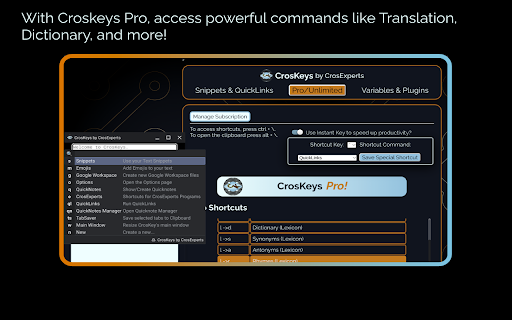
- Missing PowerToys & Alfred on ChromeOS? CrosKeys expands Search to include more timesaving commands.
- Keep your hands on the keyboard by using any text field as a launching pad.
- CrosKeys integrates with Google Workspace, Notion, Figma, and more!
- You don’t need Android or Web specific tools. CrosKeys works everywhere!*

🔤 𝗧𝗘𝗫𝗧 𝗙𝗢𝗥𝗠𝗔𝗧𝗧𝗜𝗡𝗚 & 𝗙𝗢𝗡𝗧𝗦
- Change selected text to UPPERCASE, lowercase, and other formatting options.
- Pro/Unlimited users get full access to Unicode fonts, allowing you to type in special fonts anywhere.
- This includes 𝐼𝑡𝑎𝑙𝑖𝑐𝑠, 𝙼𝚘𝚗𝚘𝚜𝚙𝚊𝚌𝚎, 𝐁𝐨𝐥𝐝, and more!
-  Paste some randomly generated Lorem Ipsum text wherever you need it!

👍🏿 𝗨𝗡𝗜𝗖𝗢𝗗𝗘 𝗦𝗬𝗠𝗕𝗢𝗟𝗦 & 𝗘𝗠𝗢𝗝𝗜𝗦
- Tired of memorizing codes for characters? Access Unicode symbols with a quick command!
- Search a massive library of Unicode emojis!
- (╯°益°)╯彡┻━┻ Don't flip the table, Kaomojis are here too!
- Match your emojis to your skin color in the Options page!
- No more fighting with different emoji plugins, CrosKeys’ emojis work everywhere!

✂️ 𝗧𝗘𝗫𝗧 𝗘𝗫𝗣𝗔𝗡𝗦𝗜𝗢𝗡
- Tired of typing the same thing over and over? Want to avoid typos? Use text expansion!
- Unlike Play Store apps or other extensions, CrosKeys works in both the Web and Android environments. And coming soon…Linux support!
- Save up to 5 snippets of text for later, then recall them!
- CrosKeys Pro members, get unlimited snippets for quick typing anywhere!

📋 𝗖𝗟𝗜𝗣𝗕𝗢𝗔𝗥𝗗 𝗠𝗔𝗡𝗔𝗚𝗘𝗥
- Press ALT + \ to access the CrosKeys Clipboard window.
- Expand the Chrome OS Clipboard history with up to 20 items!
- Highlight tabs and add them to the CrosKeys Clipboard with a click!
- Drop text, images, and files into the Clipboard Manager to save for later!
- Drag from the Clipboard Manager to send files between the Android, Linux, and Chrome Environments!
- Sequentially paste by pressing Shift + Enter.
- Search and share your Clipboard easily!
- CrosKeys Pro members can save thousands of entries to their history!

📝 𝗤𝗨𝗜𝗖𝗞𝗡𝗢𝗧𝗘𝗦
- Jot down your thoughts for later from the Candidate Window!
- Save up to 5 notes as a free user!
- Share your notes with others, to Android apps on your machine, or download them as plain text files!
- CrosKeys Pro members can save unlimited QuickNotes!

🔗 𝗤𝗨𝗜𝗖𝗞𝗟𝗜𝗡𝗞𝗦
- Keep your most important sites just a few clicks away!
- Choose to open them in Tabs or Windows depending on your use-case.
- Enter up to 5 links as a free user and an unlimited amount as a CrosKeys Pro member!
- Become a true power-user by launching Deep-Links from any text-field!

🦾 𝗖𝗥𝗢𝗦𝗞𝗘𝗬𝗦 𝗣𝗥𝗢
Access pro features for $14.99 if you only need access to expanded Text Snippets, QuickNotes, QuickLinks, and up to 500 Clipboard History items.

- Unlimited Text Snippets, QuickNotes, QuickLinks, and up to 9999 Clipboard history entries!

🔒 𝗦𝗧𝗔𝗬 𝗣𝗥𝗜𝗩𝗔𝗧𝗘 & 𝗦𝗘𝗖𝗨𝗥𝗘
- We use the latest, most secure extension technologies from Google to accomplish what we do. Manifest Version 3 keeps you safe from harmful extensions and we embrace it wholeheartedly.

- Chrome extension keyboards like CrosKeys cannot log information typed in a password field, keeping you secure!

- Still worried? Don’t be! Just turn off CrosKeys with a simple shortcut:  “CTRL + Space.” When you need it again, turn it back on with the same keys!

- CrosKeys Pro payments are handled by Stripe. This system is used and trusted by Google, Amazon, Zoom, and others.

- CrosKeys Pro sign-ups are handled through ExtensionPay. This library is open-source, allowing you to read and verify every line of code contained within it.

*Linux developer mode not yet supported.
**https://developers.google.com/apps-script/guides/services/quotas

𝗔𝗗𝗗𝗜𝗧𝗜𝗢𝗡𝗔𝗟 𝗜𝗡𝗙𝗢𝗥𝗠𝗔𝗧𝗜𝗢𝗡
- Some CrosKeys Pro features require an internet connection.
- We developed CrosKeys for Chrome OS and it will not work on Windows, Mac OS, or Linux.

https://www.crosexperts.com

https://www.crosexperts.com/privacy-policy

For full patch notes and support, visit us on our subreddit:
https://www.reddit.com/r/CrosExperts/
Technical
- Version
- CrosKeys - 1.0
- Manifest
- V3
- Size
- 11.58MiB
- Min Chrome
- 114
- Languages
- 1
- Featured
- No
Metadata
- ID
- akiaafoeijpibmbbfaebhkhccepbdgfi
- Developer ID
- u542fe136c8a1836dedf66bbe005874b9
- Developer Email
- [email protected]
- Created
- Dec 25, 2021
- Last Updated (Store)
- Oct 8, 2023
- Last Scraped
- May 22, 2026
- Website
- crosexperts.com
- Support URL
- https://www.reddit.com/r/CrosExperts/
- Privacy Policy
- https://www.crosexperts.com/privacy-policy
Similar extensions
Alternatives to CrosKeys by CrosExperts, ranked by description similarity.

CrosManager - A Web-based System Monitor
Take charge of your Chromebook with focused monitoring tools!
346
★ 4.7

ProKeys
Save time and effort in emails, etc. with ProKeys! Define snippets, do math in browser, auto complete braces, and much more.
70.0K
★ 4.4

Makro - Text Expander: Free, Private, Encrypted
Free text expander with Smart Rewrite, encrypted cloud sync, and 25+ placeholders. Create shortcuts that expand instantly anywhere.
127
★ 5.0

Keyboard Shortcuts
Map custom keyboard shortcuts to any Chrome browser command
18

Shortkeys (Custom Keyboard Shortcuts)
Custom keyboard shortcuts for your browser
100.0K
★ 3.4

Copy Text Easily
Extension that lets you view and reuse clipboard history with drag and drop, and copy text with one click
30.0K
★ 3.9
Clipboard Manager and Text Expander - Clipboard History Pro
Save, organize & instantly access clipboard history in Chrome. Sync across devices, create text snippets & boost productivity
100.0K
★ 4.0

NexoPad: Expansor de Texto, Snippets, Enlaces, Notas y Asistente de Chat IA
Tu herramienta all-in-one: expansor de texto, respuestas rápidas, plantillas, notas, enlaces y asistente de IA en tu navegador.
51
★ 5.0
Data sourced from the Chrome Web Store · last verified May 22, 2026.