
Scorsync Meet Autofill
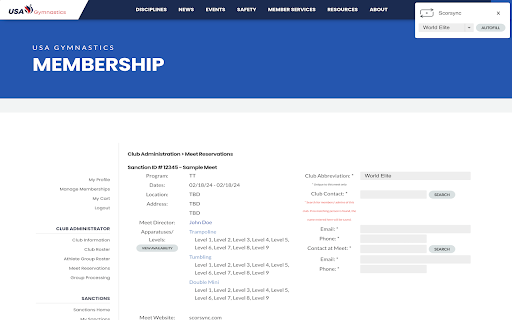
Autofills athlete levels for meet registration.
As of May 2026, Scorsync Meet Autofill has 33 users in the Productivity category.
Usersdown 2.9 percent−2.9%
33
33
Ratingno change0%
—
— reviews
Reviewsno change0%
—
Version
1.0.2
Manifest V3
History
3 snapshotsTracking since Apr 1, 2026.
View as table
| Date | Users | Rating | Reviews | Version |
|---|---|---|---|---|
| Apr 1, 2026 | 34 | — | — | 1.0.2 |
| Apr 29, 2026 | 35 | — | — | 1.0.2 |
| May 26, 2026 | 41 | — | — | 1.0.2 |
| Now | 33 | — | — | 1.0.2 |
Permissions & access
- Permissions
- tabsactiveTabstoragescripting
- Host access
- *://members.usagym.org/*
Screenshots
About
Scorsync Meet Autofill is a Chrome extension designed to enhance the efficiency of filling out athlete levels on meet registration forms. Built specifically for coaches and team managers, our tool seamlessly integrates with USA Gymnastics Meet Registration, allowing for instant, error-free form completion.

Features at a Glance:

Club Selection: Choose from a dynamically populated list of clubs retrieved directly from Scorsync, ensuring that your data is always up-to-date and accurate.

Autofill Functionality: With a single click, autofill athlete levels based on the selected club, significantly reducing manual input and the risk of errors.

User-Friendly Interface: Our floating UI design is not only intuitive but also non-intrusive, providing a smooth user experience without navigating away from the registration page.

Persistent Selections: Thanks to Chrome's storage capabilities, Scorsync Meet Autofill remembers your last club selection, making repeated form submissions faster and more convenient.

How It Works:

After installing Scorsync Meet Autofill, navigate to the meet registration page on the USA Gymnastics website. Our extension automatically detects the page and presents a discreet, floating interface. From there, you can select your club from the dropdown menu and click "Autofill" to populate the athlete levels instantly.

Privacy and Security:

Your privacy is paramount. Scorsync Meet Autofill operates transparently, requiring minimal permissions to function. We don't track or store any personal information beyond your club selection preference, which is kept locally on your device for convenience.

Getting Started:

Install Scorsync Meet Autofill from the Chrome Web Store.
Navigate to your meet registration page.
Open the extension's UI, select your club, and hit "Autofill".
Experience the ease of automated form filling!
For support, feedback, or more information, visit our website or contact our support team. Enhance your meet registration process with Scorsync Meet Autofill today – where efficiency meets accuracy.
Technical
- Version
- 1.0.2
- Manifest
- V3
- Size
- 87.83KiB
- Min Chrome
- 88
- Languages
- 1
- Featured
- No
Metadata
- ID
- ekcgjgeefekofjjhkmlnhnfgndepedde
- Developer ID
- u36def0eadcd26ab5eb9f10875140eb08
- Developer Email
- [email protected]
- Created
- Jan 28, 2024
- Last Updated (Store)
- Jan 28, 2025
- Last Scraped
- May 26, 2026
- Website
- scorsync.com
- Support URL
- —
- Privacy Policy
- https://scorsync.com/privacy-policy
Similar extensions
Alternatives to Scorsync Meet Autofill, ranked by description similarity.

Figure Skating PPC Autofill
Auto-fills Planned Program Content for figure skaters.
13

Form Autofill
Form Autofill Assistance
14

Filldin - Smart Form Filling Solution
Intelligent form filling with OCR text extraction, CSV/XLSX processing, and secure profile management.
32

Easy Autofill: Secure Profile-Based Fill Out and Form Filling
Effortlessly auto-fill your form data across websites. Secure, easy to use, and free to try.
2.0K
★ 2.8

Prefill AI
AI-powered auto-fill for Microsoft Forms. Automatically monitors and fills event registration forms with your saved profile data.
13

Smart Form Fill
Smart Form Fill is a Chrome extension that automatically fills out forms using your personal data.
19

QuickForm - Autofill & Form Filler
Record any form once, autofill it forever in one click. Works on React & complex web apps. Free, private, no account needed.
50.0K
★ 4.4

Form Autofill Extension
Autofill forms with data from a backend service.
21
Data sourced from the Chrome Web Store · last verified May 26, 2026.