
Resonance
Monitors website resource usage, network requests in a simple, organized dashboard.
As of May 2026, Resonance has 3 users and a 5.00/5 rating from 1 reviews in the Developer Tools category.
Usersup 50.0 percent+50.0%
3
3
Ratingno change0%
5.00
1 reviews
Reviewsno change0%
1
Version
1.1
Manifest V3
History
2 snapshotsTracking since Apr 29, 2026.
View as table
| Date | Users | Rating | Reviews | Version |
|---|---|---|---|---|
| Apr 29, 2026 | 2 | 5.00 | 1 | 1.1 |
| May 26, 2026 | 4 | 5.00 | 1 | 1.1 |
| Now | 3 | 5.00 | 1 | 1.1 |
Permissions & access
- Permissions
- tabswebRequestwebNavigationstoragedebugger
- Host access
- <all_urls>
Screenshots


About
Resonance is a lightweight extension that helps you easily monitor and debug network activity for any webpage. Open the popup to see a breakdown of all network requests—such as scripts, images, stylesheets, and more — along with their status codes, load times, and whether or not they’re served from cache.

Detailed Resource Dashboard
Instantly see all network requests grouped by category (Script, Image, StyleSheet, etc.).

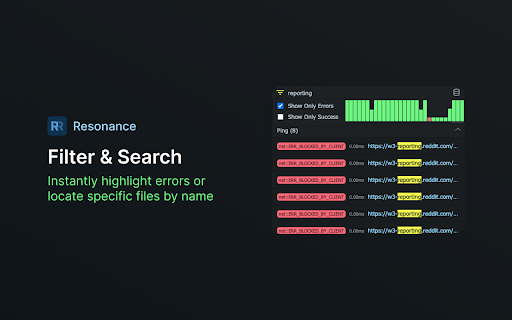
Filtering & Search
Narrow down requests by success or error codes, or quickly locate resources by name/URL.

Graph Visualization
A timeline-like bar chart highlights all requests in chronological order, color-coded by status.

Accordion-Style Groups
Collapse or expand entire resource categories to keep your view clutter-free.

How It Works

1. Install the Extension: Add Resonance to Chrome.
2. Open the Popup: Click the Resonance icon to open a dashboard showing requests made by the current page.
3. Real-Time Updates: See new requests appear automatically, along with their load times and status codes.
4. Filter & Search: Quickly zero in on errors, or type a keyword to find particular files.

Privacy & Data

Resonance does not send your browsing data to any external servers. All collected information (network requests, statuses, etc.) is stored locally in chrome.storage.
Technical
- Version
- 1.1
- Manifest
- V3
- Size
- 25.21KiB
- Min Chrome
- 88
- Languages
- 1
- Featured
- No
Metadata
- ID
- ejoenjgjafjacebocohaodimeclkefge
- Developer ID
- u4cd8238a6dc16e28f2362539d44f4b09
- Developer Email
- [email protected]
- Created
- Dec 31, 2024
- Last Updated (Store)
- Dec 31, 2024
- Last Scraped
- May 26, 2026
- Website
- —
- Support URL
- —
- Privacy Policy
- —
Similar extensions
Alternatives to Resonance, ranked by description similarity.

Network Request Analyzer
Analyzes the timing of all network requests on the current page
212
★ 5.0

Network Diagnostics Dashboard
Tab-based dashboard for network diagnostics with a modern UI.
16

TechTracer
An extension for monitoring and analyzing network traffic
3

Tab Resource Usage Dashboard
Monitor tab resource usage in real-time. Identify which tabs are slowing down Chrome with
detailed memory and performance…
85

SparkVault Network Inspector
Search, View and Monitor Your Network Traffic Efficiently.
40
★ 5.0

API Response Viewer
Captures, formats, and displays API responses in a clean interface for easy debugging and analysis of web applications.
130
★ 1.0

JSON Response Viewer
Simple JSON responses viewer
579
★ 5.0

Reqpane
Capture API calls, detect errors, and export to Claude Code for debugging
91
★ 5.0
Data sourced from the Chrome Web Store · last verified May 26, 2026.