
TurboPlay Video Manager
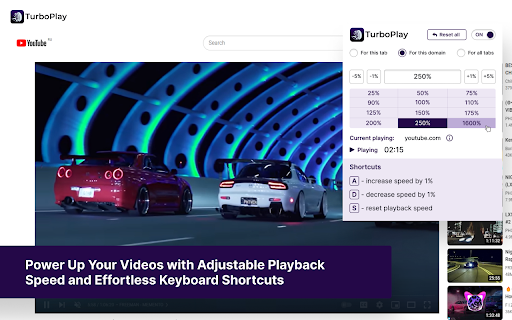
Power Up Your Videos with Adjustable Playback Speed and Effortless Keyboard Shortcuts
As of June 2026, TurboPlay Video Manager has 10,000 users and a 4.59/5 rating from 32 reviews in the Workflow & Planning category.
Usersno change0%
10.0K
10,000
Ratingno change0%
4.59
32 reviews
Reviewsno change0%
32
Version
1.0.4
Manifest V3
History
1 snapshotsTracking since May 3, 2026.
View as table
| Date | Users | Rating | Reviews | Version |
|---|---|---|---|---|
| May 3, 2026 | 10.0K | 4.59 | 32 | 1.0.4 |
| Now | 10.0K | 4.59 | 32 | 1.0.4 |
Permissions & access
- Permissions
- scriptingalarmsstorage
- Host access
- <all_urls>
Screenshots
About
🚀 TurboPlay Video Manager - Power Up Your Videos with Adjustable Playback Speed and Effortless Keyboard Shortcuts

✨ Elevate Your Video Experience with TurboPlay Video Manager!

TurboPlay Video Manager is the ultimate browser extension for video enthusiasts, providing customizable playback speed and intuitive keyboard shortcuts. Whether you're watching content on YouTube, Vimeo, or any generic HTML5 video player, TurboPlay ensures you have full control over your viewing experience.

🎥 Key Features:
- 🌍 Universal Compatibility: Works seamlessly with popular platforms like YouTube, Vimeo, and most HTML5 video players.
- 🎚️ Adjustable Playback Speed: Set your desired speed in percentage to watch videos at your preferred pace.
- ⌨️ Intuitive Keyboard Shortcuts:
  - ➕ Press "A" to increase playback speed by 1%
  - ➖ Press "D" to decrease playback speed by 1%
  - 🔄 Press "S" to reset speed to normal

📌 Use Cases:
- 🎓 Students & Researchers: Speed up lectures or slow down tutorials for better comprehension.
- 🎬 Content Creators: Review and analyze videos more efficiently.
- 🍿 Casual Viewers: Enjoy entertainment at your own pace, whether speeding up slow content or savoring details in slow motion.
- 🌍 Language Learners: Adjust speed to better understand spoken language in foreign videos.

🎯 Who Benefits from TurboPlay Video Manager?
- 📚 Students & Educators: Optimize learning with flexible playback speeds.
- 🎞️ Video Editors & Reviewers: Quickly navigate through content.
- 🎧 Podcast & Audiobook Listeners: Speed up or slow down spoken content for better retention.
- 🎮 Gamers & Streamers: Rewatch gameplay at custom speeds for strategy analysis.

💡 Why Choose TurboPlay Video Manager?
- ✅ User-Friendly: Simple and intuitive controls.
- ⏳ Time-Saving: Adjust video playback effortlessly.
- 🔗 Seamless Integration: Works across multiple platforms without hassle.
- 🚀 Boost Productivity: Learn faster, review quicker, and consume content more efficiently.

🔥 Take control of your video experience with TurboPlay Video Manager today!
Technical
- Version
- 1.0.4
- Manifest
- V3
- Size
- 1.35MiB
- Min Chrome
- 88.0
- Languages
- 1
- Featured
- Yes
Metadata
- ID
- ehhbjkehfcjlehkfpffogeijpinlgjik
- Developer ID
- u1e1f35309e84d5d4e3aa77817ecb5157
- Developer Email
- [email protected]
- Created
- Jul 8, 2023
- Last Updated (Store)
- Mar 11, 2025
- Last Scraped
- Jun 2, 2026
- Website
- —
- Support URL
- —
Similar extensions
Alternatives to TurboPlay Video Manager, ranked by description similarity.

Video Speed Controller – Speed Up & Increase Video speed!
Easily adjust the playback speed with a user-friendly interface.
1.0K
★ 5.0

Video Playback Speed (2x-4x-16x)
Control video playback speed from 0.25x to 16x on any website. Modern dark UI with slider and manual input controls.
10.0K
★ 4.9

SpeedBang - Multiplatform Video Speed Booster
Universal video speed controller for all platforms. Control 0.25x to 16x speed with keyboard shortcuts and site memory.
51
★ 5.0

HTML5 Video Speed Control
Speed up or slow down any HTML5 videos on any website.
40.0K
★ 4.5

Youtube Custom Speed Control
Control YouTube playback speed with ease.
46
★ 4.0

VidRate Video Speed Controller
Enhance Your Video Playback with VidRate: Speed Control, Keyboard Shortcuts, and Universal Compatibility!
10.0K
★ 4.8

YouTube Custom Playback
Adds custom playback speeds (2.25x to 16x) to the YouTube video player.
130
★ 5.0

Video Speed Controller
Video Speed Controller for netflix video, primevideo, hotstar, etc.
100.0K
★ 4.6
Data sourced from the Chrome Web Store · last verified Jun 2, 2026.