
Time Tracker
This is a free time tracker button for the most popular services, such as: Trello, ClickUp, Asana, Notion, Jira, etc.
As of June 2026, Time Tracker has 424 users in the Workflow & Planning category.
Usersup 14.0 percent+14.0%
424
424
Ratingno change0%
—
— reviews
Reviewsno change0%
—
Version
1.7
Manifest V3
History
10 snapshotsTracking since Apr 1, 2026.
View as table
| Date | Users | Rating | Reviews | Version |
|---|---|---|---|---|
| Apr 1, 2026 | 372 | — | — | 1.7 |
| Apr 16, 2026 | 377 | — | — | 1.7 |
| Apr 22, 2026 | 381 | — | — | 1.7 |
| Apr 27, 2026 | 396 | — | — | 1.7 |
| May 4, 2026 | 377 | — | — | 1.7 |
| May 10, 2026 | 369 | — | — | 1.7 |
| May 15, 2026 | 365 | — | — | 1.7 |
| May 21, 2026 | 374 | — | — | 1.7 |
| May 28, 2026 | 388 | — | — | 1.7 |
| Jun 4, 2026 | 416 | — | — | 1.7 |
| Now | 424 | — | — | 1.7 |
Permissions & access
- Permissions
- scriptingstoragetabscontextMenus
- Host access
- *://*.logwork.com/*, *://logwork.com/*, http://*/*, https://*/*
Screenshots
About
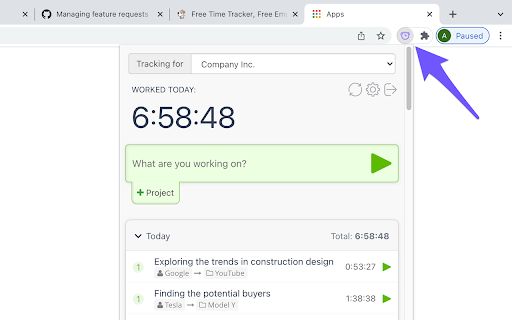
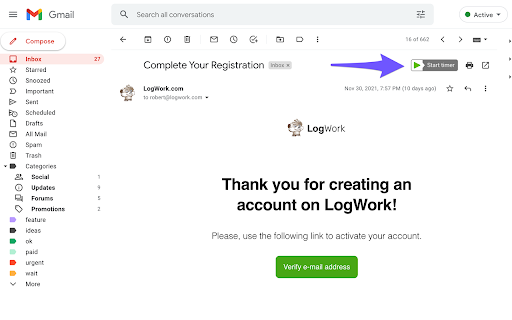
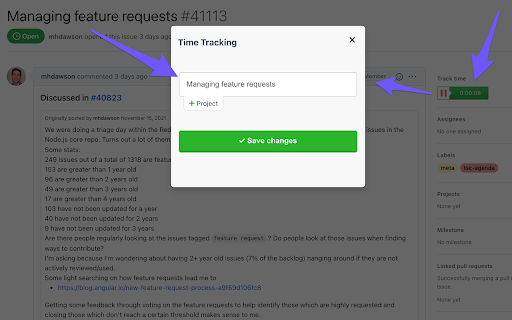
LogWork Time Tracker helps you understand where your time really goes without changing your workflow. It adds a small start and stop timer button directly inside the web apps you already use, so you can track time in one click and avoid tab switching.

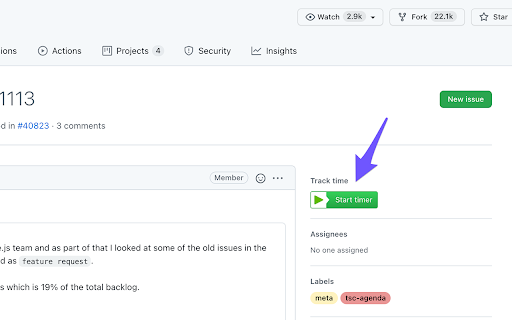
We provide 59+ direct embedded integrations. This means the timer button works inside supported websites and can automatically capture the context of what you are working on and save it into your time entry, such as the task name, card title, issue key, project name, or email subject.

So instead of typing details manually, each tracked entry is created with the right information, and later you can open LogWork to see clear timesheets and detailed reports by task, project, and client.

Supported tools:

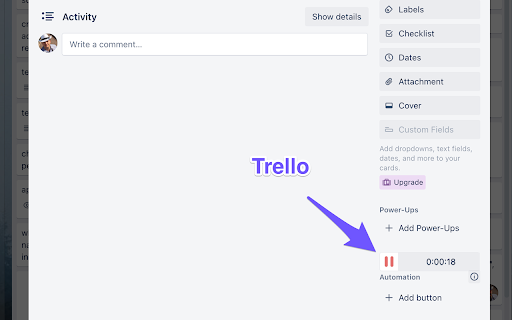
Trello: Track time on cards while working in boards and lists.
ClickUp: Track time on tasks and list items while managing your workload.
Asana: Track time on tasks while updating progress and completing work.
Notion: Track time while editing pages and working with database items.
Jira: Track time on issues during development, testing, and reviews.

Why you need it
- Track time on tasks, emails, projects, and clients: Keep accurate records for billing, payroll, and planning.
- Improve estimates and productivity: See real effort per task and identify time drains.
- Stay focused: Logging time takes seconds, so you keep momentum and do not forget entries.

Timesheets and reports in LogWork

Tracked time can be synced to LogWork, where you can generate:
- Timesheets for day, week, or month
- Detailed task and project reports with totals and breakdowns
- Client reports for transparent sharing and invoicing
Technical
- Version
- 1.7
- Manifest
- V3
- Size
- 593KiB
- Min Chrome
- 88
- Languages
- 10
- Featured
- No
Metadata
- ID
- ehagagfefdlncfmdnnegoagdemnfehdc
- Developer ID
- u497f6ed56a0c70c0d947c72e17078ecb
- Developer Email
- [email protected]
- Created
- Dec 25, 2020
- Last Updated (Store)
- Feb 27, 2026
- Last Scraped
- Jun 4, 2026
- Website
- logwork.com
- Support URL
- https://logwork.com/blog/contact-us
- Privacy Policy
- https://app.logwork.com/privacy
Similar extensions
Alternatives to Time Tracker, ranked by description similarity.

TimeWise - Smart Timesheet
Stop asking users to reconstruct the past - capture the present instead. By Abhishek Sharmale
3
Tracking Time | Time Tracker Button
Enhance your preferred web project manager with the Time Tracker Button and get automatic timesheets.
30.0K
★ 4.4

WebWork Time Tracker
The simplest way to track your work hours.
1.0K
★ 4.0

Task Log
Effortlessly track time, manage tasks, and generate invoices. Organize projects, and streamline your workflow with Task Log
49
★ 5.0

Time Keeper
A simple time logger for work. Track tasks, boost productivity, and stay organized with this Chrome extension.
3.0K
★ 4.8

JIRA Time Tracker
Локальный трекинг времени по задачам Jira без автозаписи в worklog
12
★ 5.0

Work Time Tracker Pro
Advanced browser-based work time tracking with comprehensive analytics, daily/monthly reports, and productivity insights.
9
★ 5.0

Site Time Tracker
Track time spent on different websites with monthly report generation for clients
11
Data sourced from the Chrome Web Store · last verified Jun 4, 2026.