
Duplicate Browser Screen
Duplicate a window, screen, or browser tab using Chrome's picker (window preselected). Includes zoom, pan, and utility options.
As of June 2026, Duplicate Browser Screen has 929 users and a 4.33/5 rating from 3 reviews in the Productivity category.
Usersup 13.7 percent+13.7%
929
929
Ratingno change0%
4.33
3 reviews
Reviewsno change0%
3
Version
3.7
Manifest V3
History
5 snapshotsTracking since Apr 1, 2026.
View as table
| Date | Users | Rating | Reviews | Version |
|---|---|---|---|---|
| Apr 1, 2026 | 817 | 4.33 | 3 | 3.7 |
| Apr 21, 2026 | 841 | 4.33 | 3 | 3.7 |
| May 6, 2026 | 890 | 4.33 | 3 | 3.7 |
| May 18, 2026 | 902 | 4.33 | 3 | 3.7 |
| Jun 1, 2026 | 949 | 4.33 | 3 | 3.7 |
| Now | 929 | 4.33 | 3 | 3.7 |
Permissions & access
- Permissions
- system.displaystorage
- Host access
- None declared
Screenshots


About
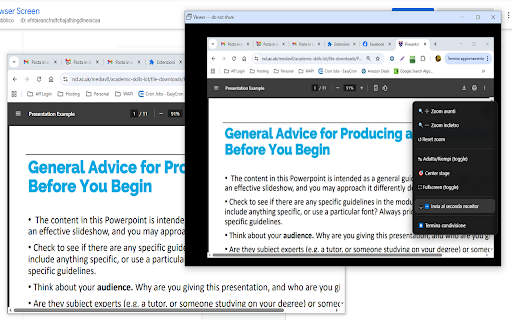
Duplicate Browser Screen allows users to duplicate any browser window and move the duplicate to a second screen. This functionality is especially useful in presentations, karaoke sessions, or multitasking scenarios where the same content needs to be displayed on multiple monitors.

With Duplicate Chrome Screen, users can open their browser, activate the extension, and select the window they want to duplicate. The duplicated window can then be moved to a different monitor, making it perfect for events like karaoke, where the lyrics need to be displayed on a separate screen while the main window remains under control.

The same applies to presentations or live streaming, where presenters and streamers can keep an eye on the main content while showing it to their audience on a different screen. The extension offers seamless performance with minimal lag between the original and duplicated windows.

It’s intuitive, quick to use, and requires no complicated setups, making it accessible to everyone, from beginners to professionals. Duplicate Chrome Screen is an essential tool for anyone who needs to mirror content across screens effortlessly and efficiently, whether for entertainment, work, or teaching purposes.

                                               🎯 Why you’ll love it

🔁 Duplicate to a second monitor in a click

⚡ Low-latency viewing for smooth, near-real-time playback

🧭 Simple workflow: open the browser, click Duplicate Screen, pick what to share (Window/Screen/Tab), then drag the viewer to the other display

                                               🧰 Helpful controls

🔍 Zoom in/out (with keyboard and wheel)

✋ Pan the view when zoomed

↹ Fit / Fill (double-click to toggle)

🎯 Center stage (reset position)

⛶ Fullscreen

🖱️ Right-click menu with quick actions

                                                  🎬 Great for

📽️ Presentations & events — keep controls on your main screen, show content on the second

🎤 Karaoke — lyrics on the external display, controls stay private

🎓 Classrooms & training — share exactly what students need to see

📺 Live streams & demos — manage the primary window while the audience sees the output

                                            🔒 Privacy-friendly
Runs entirely in your browser—no accounts, no uploads, no complicated setup.
Technical
- Version
- 3.7
- Manifest
- V3
- Size
- 23.16KiB
- Min Chrome
- 88
- Languages
- 1
- Featured
- No
Metadata
- ID
- efnbieancfndfchajalhingdlneoicaa
- Developer ID
- u01e5f5dd223da0382cfd6bd2837866e2
- Developer Email
- [email protected]
- Created
- Oct 18, 2024
- Last Updated (Store)
- Sep 22, 2025
- Last Scraped
- Jun 1, 2026
- Website
- —
- Support URL
- —
- Privacy Policy
- https://www.kantokaraoke.com/terms.html
Similar extensions
Alternatives to Duplicate Browser Screen, ranked by description similarity.
ScreenClip - Screenshot, Comment & Annotate
Take screenshots, add annotations & comments
70.0K
★ 3.7

Split Screen
Dynamically splits the current tab into multiple windows side by side on the current screen.
386
★ 5.0

Tabs Refresh Switch
Switch between tabs every x seconds,Reload tabs every x minutes, Put browser in fullscreen, Reload startup pages
32
★ 3.0

Chrome Full Screen
Use Chrome Full Screen with one click on the fullscreen button through the force fullscreen extension or shortcut for max window.
851
★ 4.9

ScreenGo - Screen Recorder
Record screen, tabs, or custom areas with audio. Edit and trim recordings. Fast, private, and watermark-free.
15

Window Recorder
Window Recorder – reliable screen recorder for Chrome browser. Handy window tool for screenshots and video capture in your browser.
824
★ 4.2

Tab Redesign - Split-Screen Layout
Achieve precise multi-window split-screen functionality with a single click.
1.0K
★ 4.2

Split Screen Pro - Browser Tab Split-Screen Tool
In the same browser window, display multiple tabs in split-screen mode with one click, and freely adjust the proportions.
2.0K
★ 4.4
Data sourced from the Chrome Web Store · last verified Jun 1, 2026.