
ELA-Everyday Language Assistant
AI reading companion for language learners: text-to-speech, translation, word lookup, and fully customizable AI actions.
As of June 2026, ELA-Everyday Language Assistant has 45 users and a 3.50/5 rating from 2 reviews in the Education category.
Usersno change0%
45
45
Ratingno change0%
3.50
2 reviews
Reviewsno change0%
2
Version
0.5.0
Manifest V3
90-day change · In the last 90 days this extension 1 version update.
History
8 snapshotsTracking since Apr 6, 2026.
View as table
| Date | Users | Rating | Reviews | Version |
|---|---|---|---|---|
| Apr 6, 2026 | 45 | 3.50 | 2 | 0.4.5 |
| Apr 18, 2026 | 40 | 3.50 | 2 | 0.4.5 |
| Apr 23, 2026 | 46 | 3.50 | 2 | 0.4.5 |
| May 12, 2026 | 46 | 3.50 | 2 | 0.5.0 |
| May 17, 2026 | 45 | 3.50 | 2 | 0.5.0 |
| May 24, 2026 | 44 | 3.50 | 2 | 0.5.0 |
| May 31, 2026 | 39 | 3.50 | 2 | 0.5.0 |
| Jun 6, 2026 | 41 | 3.50 | 2 | 0.5.0 |
| Now | 45 | 3.50 | 2 | 0.5.0 |
Changelog
- Apr 23, 2026description
This AI tool is designed to enhance your English skills, employing advanced AI technologies including Text to Speech (TTS) and Large Language Model (LLM) to facilitate your learning.

Its user-friendly and highly customizable nature makes it ideal not only for English learners but also for professionals and scholars who need to read specialized English materials. Additionally, it can be used to learn other languages, significantly boosting your efficiency in both work and study.


## How to config
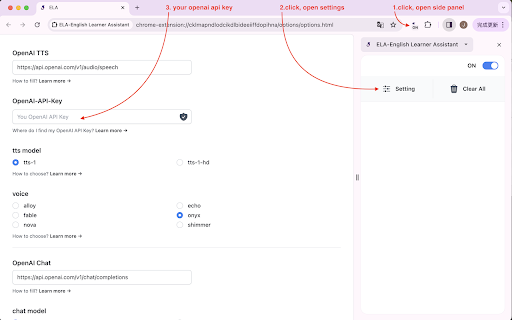
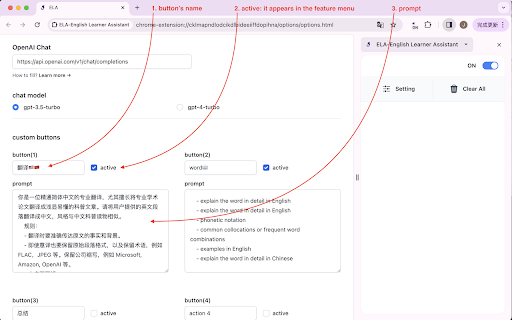
Open "Settings" and enter your OpenAI-API-Key, select a voice model, and set up custom buttons.


## How to use
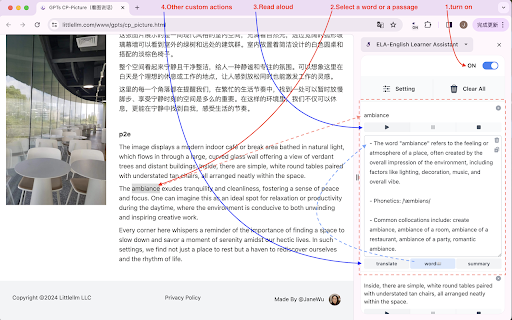
1. Open the side panel, turn on the switch at the top right corner.
2. Select the text paragraph you want to process. The text will appear in the side panel.
3. Click the [Play] button below the text to start reading aloud.
4. Use the [Translate to Chinese] and [Look up words] buttons to access these specific functions.


## Description of button functions
- On/OFF: on, the content selected on the webpage will appear in the side panel.
- Setting: Parameter settings. You can specify the AI model for sound and language in the settings.
- Clear all: Clear all contents in the side panel.

- Play: Play/Continue playing/Replay
- Pause: Pause
- Stop: Stop playback. After stopped, clicking play again will regenerate the sound and play it.

- Translate: Translate English into Chinese.
- word:Look up words
- Custom functions

## shortcut to Open/Close the side panel

"windows": "Ctrl+Shift+S"
"mac": "Command+Shift+S"
"chromeos": "Ctrl+Shift+S"
"linux": "Ctrl+Shift+S"

p.s. After closing the sidebar, all content currently on the sidebar will be deleted.

## update

0.4.5(2025 - 01 - 21)
### New Features
- **Audio Download**: Download generated audio as MP3 files with one click

### Improvements
- Enhanced code quality and security
- Fixed XSS vulnerabilities
- Improved error handling

### Bug Fixes
- Fixed Service Worker registration issues
- Fixed various encoding and configuration errors

0.4.4(2025 - 01 - 19) :
Code Refactoring: Complete code refactoring and comprehensive test coverage (265 test cases)
Improvements: Created shared storage module, improved error handling, fixed sidepanel parameter update issues
Update: Disabled debug mode, updated supported models (gpt-4o, gpt-4o-mini)

0.4.3(2025 - 01 - 10) :
Build System: Upgraded Parcel bundler from v1 to v2
Feature: Added automatic version synchronization script
Fix: Fixed build script execution order

0.4.2(2025 - 12 - 28) :
- update: models

0.4.1(2024 - 7 - 31) :
- add: llm model gpt-4o-mini
- remove: llm model gpt-3.5-turbo

0.4.0(2024 - 5 - 19) :
- add: Loop playback
- add: edit the original content

0.3.2(2024 - 5 - 14) :
- add model gpt-4o


## How to find us
github:  https://github.com/janewu77/ela-extension
Struggling to read articles in a foreign language? ELA uses AI (GPT-4o) to help you translate, look up words, and read text aloud — all in a clean side panel. Works with English, German, French, Japanese, Spanish, and any language you're learning. Customize your own AI prompts for a personalized learning experience. Simply select any text and the side panel instantly captures it, ready for you to listen to, translate, or explore. Whether you're an English learner tackling unfamiliar vocabulary, a German learner reading news articles, a professional working through technical documents, or a researcher navigating academic papers, ELA keeps you in your reading flow without switching tabs or apps. ## Key Features - Text-to-Speech: Hear any selected text read aloud in natural-sounding voices powered by OpenAI TTS. - Pre-configured AI buttons: Comes with default buttons for Chinese translation and word lookup, ready to use out of the box. - Fully customizable buttons: Replace or extend the default buttons with your own prompt-based actions — tailor ELA to any language, subject, or workflow. - Multi-language support: Not limited to English. Use ELA to listen to and study content in any language — German, French, Japanese, and more. Custom buttons can be configured for any language pair or learning task. - Flexible voice settings: Choose your preferred OpenAI TTS voice model in Settings. ## How to Set Up 1. Open the extension's Settings page. 2. Enter your OpenAI API key. 3. Select a voice model. 4. Optionally, add custom AI buttons with your own prompts. ## How to Use 1. Open the side panel and turn on the toggle in the top-right corner. 2. Select any text on a webpage — it will automatically appear in the side panel. 3. Click [Play] to have the text read aloud. 4. Use the pre-configured [Translate] and [Word Lookup] buttons, or any custom buttons you've set up in Settings. ## Button Reference - On/Off toggle: Enables or disables automatic text capture from the webpage. - Settings: Opens the configuration page for API key, voice model, and custom buttons. - Clear All: Removes all content from the side panel. - Play: Plays, resumes, or replays the audio. - Pause: Pauses playback. - Stop: Stops playback. The next time you press Play, the audio will be regenerated. - Translate / Word Lookup: Pre-configured default buttons — translate text to Chinese and look up words out of the box. These can be modified or replaced in Settings. - Download: Downloads the generated audio as an MP3 file. Only enabled after audio has been successfully generated. - Custom buttons: Your own AI-powered actions, defined in Settings. Add as many as you need for any language or task. ## Privacy & Permissions • All your settings — including your API key and custom prompts — are stored locally in Chrome Storage. Nothing is sent to any server operated by ELA. • Your API key is used solely to make requests to the AI provider you've configured (e.g. OpenAI). It is never shared with or accessible by the extension developer. • The extension is only activated when you explicitly interact with it — it does not run in the background or monitor your browsing. • storage permission: saves your API key, voice model preference, and custom button prompts locally on your device. ELA is fully open source. You can inspect the code at any time on GitHub: https://github.com/janewu77/ela-extension ## Keyboard Shortcut to Open/Close the Side Panel - Windows / ChromeOS / Linux: Ctrl+Shift+S - Mac: Command+Shift+S Note: Closing the side panel will clear all content currently displayed in it. No account required. No data collected. ## [0.5.0] - 2026-04-19 ### Updated - **AI Model Upgrade** - Updated default chat model from `gpt-4.1-mini` to `gpt-5.4-mini` - Replaced invalid model IDs with the correct GPT-5.4 series: - `gpt-5-nano` → `gpt-5.4-nano` - `gpt-5-mini` → `gpt-5.4-mini` - `gpt-5.2` → `gpt-5.4` - Removed non-existent TTS model `gpt-4o-mini-tts-2025-12-15` - Retained `gpt-4.1-nano`, `gpt-4.1-mini`, `gpt-4.1`, and `gpt-4o-mini` for backward compatibility - Apr 23, 2026short_description
Master English! Equipped with advanced TTS and LLM technology, this tool offers personalized learning to boost your language skills.
AI reading companion for language learners: text-to-speech, translation, word lookup, and fully customizable AI actions.
- Apr 23, 2026name
ELA-English Learner Assistant
ELA-Everyday Language Assistant
Permissions & access
- Permissions
- storagesidePanel
- Host access
- None declared
Screenshots


About
Struggling to read articles in a foreign language? ELA uses AI (GPT-4o) to help you translate, look up words, and read text aloud — all in a clean side panel. Works with English, German, French, Japanese, Spanish, and any language you're learning. Customize your own AI prompts for a personalized learning experience.

Simply select any text and the side panel instantly captures it, ready for you to listen to, translate, or explore. Whether you're an English learner tackling unfamiliar vocabulary, a German learner reading news articles, a professional working through technical documents, or a researcher navigating academic papers, ELA keeps you in your reading flow without switching tabs or apps.


## Key Features
- Text-to-Speech: Hear any selected text read aloud in natural-sounding voices powered by OpenAI TTS.
- Pre-configured AI buttons: Comes with default buttons for Chinese translation and word lookup, ready to use out of the box.
- Fully customizable buttons: Replace or extend the default buttons with your own prompt-based actions — tailor ELA to any language, subject, or workflow.
- Multi-language support: Not limited to English. Use ELA to listen to and study content in any language — German, French, Japanese, and more. Custom buttons can be configured for any language pair or learning task.
- Flexible voice settings: Choose your preferred OpenAI TTS voice model in Settings.


## How to Set Up
1. Open the extension's Settings page.
2. Enter your OpenAI API key.
3. Select a voice model.
4. Optionally, add custom AI buttons with your own prompts.


## How to Use
1. Open the side panel and turn on the toggle in the top-right corner.
2. Select any text on a webpage — it will automatically appear in the side panel.
3. Click [Play] to have the text read aloud.
4. Use the pre-configured [Translate] and [Word Lookup] buttons, or any custom buttons you've set up in Settings.


## Button Reference
- On/Off toggle: Enables or disables automatic text capture from the webpage.
- Settings: Opens the configuration page for API key, voice model, and custom buttons.
- Clear All: Removes all content from the side panel.
- Play: Plays, resumes, or replays the audio.
- Pause: Pauses playback.
- Stop: Stops playback. The next time you press Play, the audio will be regenerated.
- Translate / Word Lookup: Pre-configured default buttons — translate text to Chinese and look up words out of the box. These can be modified or replaced in Settings.
- Download: Downloads the generated audio as an MP3 file. Only enabled after audio has been successfully generated.
- Custom buttons: Your own AI-powered actions, defined in Settings. Add as many as you need for any language or task.


## Privacy & Permissions
• All your settings — including your API key and custom prompts — are stored locally in Chrome Storage. Nothing is sent to any server operated by ELA.
• Your API key is used solely to make requests to the AI provider you've configured (e.g. OpenAI). It is never shared with or accessible by the extension developer.
• The extension is only activated when you explicitly interact with it — it does not run in the background or monitor your browsing.
• storage permission: saves your API key, voice model preference, and custom button prompts locally on your device.

ELA is fully open source. You can inspect the code at any time on GitHub: https://github.com/janewu77/ela-extension


## Keyboard Shortcut to Open/Close the Side Panel
- Windows / ChromeOS / Linux: Ctrl+Shift+S
- Mac: Command+Shift+S

Note:
Closing the side panel will clear all content currently displayed in it.
No account required. No data collected.


## [0.5.0] - 2026-04-19

### Updated
- **AI Model Upgrade**
  - Updated default chat model from `gpt-4.1-mini` to `gpt-5.4-mini`
  - Replaced invalid model IDs with the correct GPT-5.4 series:
    - `gpt-5-nano` → `gpt-5.4-nano`
    - `gpt-5-mini` → `gpt-5.4-mini`
    - `gpt-5.2` → `gpt-5.4`
  - Removed non-existent TTS model `gpt-4o-mini-tts-2025-12-15`
  - Retained `gpt-4.1-nano`, `gpt-4.1-mini`, `gpt-4.1`, and `gpt-4o-mini` for backward compatibility
Technical
- Version
- 0.5.0
- Manifest
- V3
- Size
- 156KiB
- Min Chrome
- 88
- Languages
- 2
- Featured
- No
Metadata
- ID
- eepeblbmpkloajddpjlibamomldfhdga
- Developer ID
- u271d7e161c49a91349499d25eca4a34e
- Developer Email
- [email protected]
- Created
- Apr 15, 2024
- Last Updated (Store)
- Apr 24, 2026
- Last Scraped
- Jun 6, 2026
- Website
- —
- Support URL
- —
- Privacy Policy
- https://janewu77.github.io/ela-extension/privacy.html
Similar extensions
Alternatives to ELA-Everyday Language Assistant, ranked by description similarity.

AI Reading Assistant
Using advanced AI language models to explain selected text and summarize web pages just with one quick click
99
★ 5.0

LingKuma - Language Learning
Learn any language on the web
388
★ 5.0

AudioPilot-AI听力学习助手
看视频学外语,听不懂随时问,一键获取翻译结果。
6

LinBridges - AI 深度翻译与语言私教
支持22种语言的AI翻译扩展,集成划词翻译、截图OCR、语音朗读、助学助记、生词本等功能,提供专业的语言学习体验
11

AI英语学习助手
AI驱动的英语学习工具,支持豆包与 DeepSeek,可在 Key 页按需启用。
5

Native Speech: Pronunciation, Translation & Text to Speech
Translate any selected text for free. Practice pronunciation and listen to native speech with a NativeSpeech account.
156
★ 5.0

AI English Speaking Practice
Practice English speaking with real-time AI feedback
57

English Advanced Grammar Highlighter
Learn advanced English vocabulary and grammar with inline highlights and explanations.
5
Data sourced from the Chrome Web Store · last verified Jun 6, 2026.