
Native Speech: Pronunciation, Translation & Text to Speech
Translate any selected text for free. Practice pronunciation and listen to native speech with a NativeSpeech account.
As of June 2026, Native Speech: Pronunciation, Translation & Text to Speech has 156 users and a 5.00/5 rating from 4 reviews in the Education category.
Usersup 33.3 percent+33.3%
156
156
Ratingno change0%
5.00
4 reviews
Reviewsup 33.3 percent+33.3%
4
Version
1.1.3
Manifest V3
90-day change · In the last 90 days this extension 1 version update, changed permissions.
History
10 snapshotsTracking since Apr 2, 2026.
View as table
| Date | Users | Rating | Reviews | Version |
|---|---|---|---|---|
| Apr 2, 2026 | 117 | 5.00 | 3 | 1.1.2 |
| Apr 17, 2026 | 124 | 5.00 | 3 | 1.1.2 |
| Apr 24, 2026 | 126 | 5.00 | 4 | 1.1.2 |
| May 1, 2026 | 130 | 5.00 | 4 | 1.1.2 |
| May 8, 2026 | 137 | 5.00 | 4 | 1.1.2 |
| May 13, 2026 | 144 | 5.00 | 4 | 1.1.2 |
| May 19, 2026 | 144 | 5.00 | 4 | 1.1.3 |
| May 25, 2026 | 136 | 5.00 | 4 | 1.1.3 |
| Jun 1, 2026 | 142 | 5.00 | 4 | 1.1.3 |
| Jun 7, 2026 | 144 | 5.00 | 4 | 1.1.3 |
| Now | 156 | 5.00 | 4 | 1.1.3 |
Changelog
- May 13, 2026description
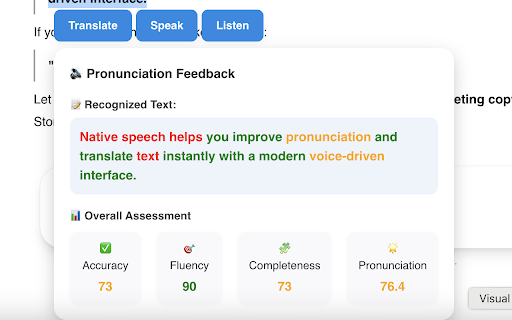
Practice speaking, listening, and translation with AI-powered real-time speech assessment. Select text on any website and start learning instantly. Supports all English accents and other languages.

Step-by-step Instructions:
1. Install the extension.
2. On any website, select any text — you should see a list of buttons: "Translate", "Listen", "Practice" and "Ask AI". Click any of them to get started.
3. Use the extension window to adjust the target language or select a preferred voice. You can also show or hide feature buttons.
4. Toggle Disable/Enable extension easily on right click.
Enjoy!
Practice speaking, listening, and translation with AI-powered real-time speech assessment. Select text on any website and start learning instantly. Supports all English accents and other languages.

Translate any selected text for free. Practice pronunciation and listen to native speech with a NativeSpeech account.

Step-by-step Instructions:
1. Install the extension.
2. On any website, select any text — you should see a list of buttons: "Translate", "Listen", "Practice" and "Ask AI". Click any of them to get started.
3. Use the extension window to adjust the target language or select a preferred voice. You can also show or hide feature buttons.
4. Toggle Disable/Enable extension easily on right click.
Enjoy!

Privacy & Policy: https://nativespeech.app/privacy-policy
- May 13, 2026short_description
Real-time AI speech assessment for speaking, listening, and translation. Practice selected text on any site.
Translate any selected text for free. Practice pronunciation and listen to native speech with a NativeSpeech account.
- May 13, 2026permissions
storage, contextMenus, scripting, activeTab
storage, contextMenus, activeTab
Permissions & access
- Permissions
- storagecontextMenusactiveTab
- Host access
- <all_urls>
Screenshots


About
Practice speaking, listening, and translation with AI-powered real-time speech assessment. Select text on any website and start learning instantly. Supports all English accents and other languages.

Translate any selected text for free. Practice pronunciation and listen to native speech with a NativeSpeech account.

Step-by-step Instructions:
1. Install the extension.
2. On any website, select any text — you should see a list of buttons: "Translate", "Listen", "Practice" and "Ask AI". Click any of them to get started.
3. Use the extension window to adjust the target language or select a preferred voice. You can also show or hide feature buttons.
4. Toggle Disable/Enable extension easily on right click.
Enjoy!

Privacy & Policy: https://nativespeech.app/privacy-policy
Technical
- Version
- 1.1.3
- Manifest
- V3
- Size
- 310KiB
- Min Chrome
- 88
- Languages
- 1
- Featured
- No
Metadata
- ID
- hnnnmelcpiibopogaehhhhpkmfbeajjg
- Developer ID
- u81d7928c9a4536bccd52b1ff94189e07
- Developer Email
- [email protected]
- Created
- Apr 18, 2025
- Last Updated (Store)
- May 11, 2026
- Last Scraped
- Jun 7, 2026
- Website
- nativespeech.app
- Support URL
- https://nativespeech.app/contact
- Privacy Policy
- https://nativespeech.app/privacy-policy
Similar extensions
Alternatives to Native Speech: Pronunciation, Translation & Text to Speech, ranked by description similarity.

AI English Speaking Practice
Practice English speaking with real-time AI feedback
57

Pronounce: Speech and Pronunciation Checker
Speak confidently with instant feedback on any conversation from an AI speech coach.
30.0K
★ 4.1

Phonicly.ai: Practice American Accent
Learn and practice American accent with instant feedback for selected words using Phonicly's AI-Powered pronunciation training.
37
★ 4.9

USETHEVOICE
Overview
Usethevoice is an extension that brings a personal narrator to your browser. Now you can turn any webpage into audiobook…
3
★ 5.0

Pronounce Words
Speak English better with Pronounce Words. Hear the correct way to say any English word. Improve your pronunciation.
4.0K
★ 4.6

Text Reader and Translator
Reads aloud and translates selected text
59
★ 4.5

AI Language Learning
Use AI Language Learning app to learn a language faster with simple explanations, examples & tips as if it were your learning coach
162
★ 5.0

AI Translator
Instant AI translation, grammar analysis, and usage examples.
48
★ 5.0
Data sourced from the Chrome Web Store · last verified Jun 7, 2026.