
Bilingual Reader
Split screen and read translated content side by side
As of June 2026, Bilingual Reader has 964 users and a 4.83/5 rating from 6 reviews in the Workflow & Planning category.
Usersup 6.3 percent+6.3%
964
964
Ratingdown 0.6 percent−0.6%
4.83
6 reviews
Reviewsdown 14.3 percent−14.3%
6
Version
1.1.1
Manifest V3
History
3 snapshotsTracking since Apr 22, 2026.
View as table
| Date | Users | Rating | Reviews | Version |
|---|---|---|---|---|
| Apr 22, 2026 | 907 | 4.86 | 7 | 1.1.1 |
| May 12, 2026 | 971 | 4.83 | 6 | 1.1.1 |
| Jun 7, 2026 | 931 | 4.83 | 6 | 1.1.1 |
| Now | 964 | 4.83 | 6 | 1.1.1 |
Permissions & access
- Permissions
- storageactiveTab
- Host access
- None declared
Screenshots


About
version 1.1.1: bugfix for translate API error;

---
Bilingual Reader is a browser extension designed to enhance your reading experience by providing side-by-side translations of web articles. It helps users easily read and compare original text with translated content.

##Features

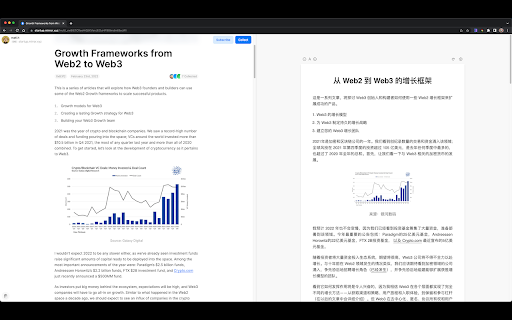
* One-Click Split-Screen Translation: Translate web articles with a single click, displaying the original and translated content side by side for easy comparison.
* Focused Translation: The extension only translates the main content of a web page, providing a more focused and enjoyable reading experience.
* Synchronized Scrolling and Text Highlighting: As you scroll through the original text, the translated content scrolls automatically. Selecting a paragraph in the original text highlights the corresponding translated paragraph.
* Adjustable Font Size: Easily modify the font size in the reader to suit your reading preferences.
* Customizable Settings: Set your default font and target language for translations, streamlining your user experience.

## Installation

1. Visit the Chrome Web Store or the browser's extension store and search for "Bilingual Reader".
2. Click the "Add to Chrome" button (or the equivalent for your browser) to install the extension.

## Usage

1. Navigate to the web article you want to translate.
2. (Optional) Pin the Bilingual Reader icon to your toolbar to make your experience more great!
3. Click the Bilingual Reader icon in your browser toolbar to activate the split-screen translation.
4. (Optional) Adjust the font size, default font, and target language in the extension settings, if desired.
5. Enjoy an enhanced reading experience with side-by-side translations!

## Support

If you find any websites having layout/ui/translation issues when using Bilingual Reader, please [create an issue](https://github.com/zamia/bilingual-reader/issues) in our GitHub repository.
Technical
- Version
- 1.1.1
- Manifest
- V3
- Size
- 1.16MiB
- Min Chrome
- 88
- Languages
- 1
- Featured
- Yes
Metadata
- ID
- ecbgnkobdpgmofceoljghglggimcckab
- Developer ID
- u640782dae4eb3798d2cb13e9ed021d33
- Developer Email
- [email protected]
- Created
- Apr 12, 2023
- Last Updated (Store)
- Nov 22, 2023
- Last Scraped
- Jun 7, 2026
- Website
- —
- Privacy Policy
- —
Similar extensions
Alternatives to Bilingual Reader, ranked by description similarity.
Translator
Translate words and phrases while browsing the web, using Google translator.
60.0K
★ 4.1

ScTranslator - Translator, Page Translator, Dictionary
Translate selected text with multiple sources, Webpage translating that have 3 display modes... An all-in-one translation extension.
20.0K
★ 4.9

translate_park_chrome_extension
Translate Park Chrome Extension
—

Bionify | Read faster!
Open source text converter designed to help you read faster!
10.0K
★ 4.7

SubtitleEasy
This extension allows you to view two captions at the same time on Coursera/Apple WWDC sessions.
31

Quick Translate
This extension provides quick translation of selected texts
30.0K
★ 3.7

Translator - Select to Translate
Translate words and phrases while browsing the web using the Google Translator. Full page translator.
60.0K
★ 4.2

SnapTranslate — OneClick Tools
Instantly translate selected text without leaving the page. Privacy-first, no account required.
—
Data sourced from the Chrome Web Store · last verified Jun 7, 2026.