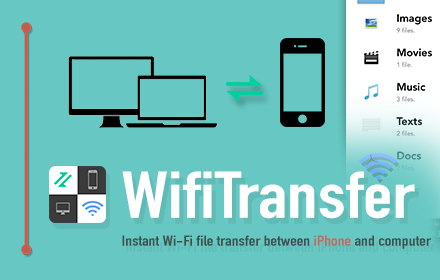
WifiTransfer - Instant wireless file transfer
Wirelessly transfer files between your computer and mobile phone over local network with a single tap.
As of June 2026, WifiTransfer - Instant wireless file transfer has 8,000 users and a 2.86/5 rating from 173 reviews.
Usersdown 11.1 percent−11.1%
8.0K
8,000
Ratingno change0%
2.86
173 reviews
Reviewsdown 1.1 percent−1.1%
173
Version
1.1.0
90-day change · In the last 90 days this extension lost 1.0K users.
History
2 snapshotsTracking since Apr 1, 2026.
View as table
| Date | Users | Rating | Reviews | Version |
|---|---|---|---|---|
| Apr 1, 2026 | 9.0K | 2.86 | 175 | 1.1.0 |
| May 3, 2026 | 9.0K | 2.85 | 174 | 1.1.0 |
| Now | 8.0K | 2.86 | 173 | 1.1.0 |
Permissions & access
- Permissions
- system.networkwebview
- Host access
- None declared
Screenshots



About
The easiest way to transfer files between iPhones or with computers!
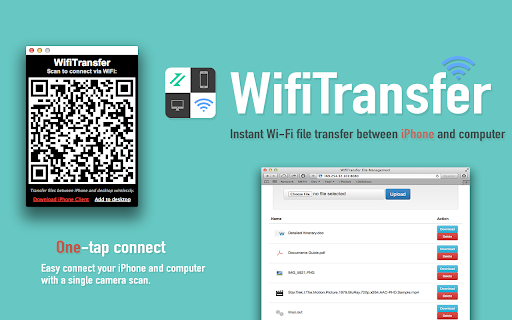
WifiTransfer enables fast wireless file transfer between iPhones or with computers with a simple scan.

► Up to 10MB/s wireless transfer with only one single scan
WifiTransfer enables simple and ultra fast file transfer between iPhones over Wi-Fi networks. Without any additional setup, just a QRCode scan will do.

► Manage iPhone files from desktop (locally or remotely)
In addition to transfer files between iPhone/iPad, you can also remotely manage files on your iPhone right from your desktop computer. Supported browsers: Safari, Chrome, FireFox, Internet Explorer

► Import files from various sources
You can import files either from other apps, over the internet, from local photo library or from Dropbox.

► Multiple File types support
The transferred items are classified automatically into 6 categories according to their type with database based search method.
JPEG, PNG, MOV, MP4, MP3, WAV, CAF, PDF Docs(.pdf), Text(.txt), RTF(.rtf), MS Word(.doc, .docx), MS Excel (.xls, .xlsx), MS PowerPoint(.ppt, .pptx), Pages(.pages), Numbers(.numbers), Keynote(.keynote), HTML(.html, .htm) and more.

► Responsive feedback
If you have any suggestion or recommendation about new features, please contact us:
[email protected]

* How to use (iPhone and Computer)
1) Make sure that the iPhone and the computer are connected to the same local network or the same Wi-Fi network.
2) Open WifiTransfer desktop client and scan the QRCode with the iPhone client, connection will get established immediately.
3) Download or upload files.
Technical
- Version
- 1.1.0
- Manifest
- —
- Size
- 532KiB
- Min Chrome
- 33.0
- Languages
- 52
- Featured
- No
Metadata
- ID
- ebmnhcblgohjilfjffdkfikgpakhgajc
- Developer ID
- ua19d601c20276cc7b80df30c3f436bc8
- Developer Email
- —
- Created
- May 26, 2014
- Last Updated (Store)
- Oct 21, 2014
- Last Scraped
- Jun 2, 2026
- Website
- —
- Support URL
- —
- Privacy Policy
- —
Similar extensions
Alternatives to WifiTransfer - Instant wireless file transfer, ranked by description similarity.

Photo Transfer App
Wirelessly Send & Receive Photos & Videos between iPad, iPhone, iPod touch, Android & Computer
10.0K
★ 3.2

Eii File Transfer
Fast, secure, and simple file transfer between your devices with a 6-digit code.
32
★ 5.0

No Attachments
Transfer files between local devices (within the same building) without lengthy and insecure uploads and downloads.
69
★ 4.5

Media Beam
Peer-to-peer file and text sharing over WebRTC.
5

Bittenfile
Connects your devices. Easily transfer your files from your smartphone to your pc or vice versa.
5
★ 1.0
TextSync - Computer as iPhone keyboard
Turns your computer into a real time wireless keyboard for your iPhone
853
★ 2.5

Pic to PC
Transfer photos from your phone into any file upload, paste anywhere, or save to PC — no app, no account, no cloud.
29

Dropew - transfer file and text
Easily transfer files and text between your devices.
637
★ 5.0
Data sourced from the Chrome Web Store · last verified Jun 2, 2026.