
Salesforce Flow Extension
Shows tooltips on flow elements and exposes flow information with GPT queries
As of June 2026, Salesforce Flow Extension has 3,000 users and a 4.63/5 rating from 16 reviews in the Developer Tools category.
Usersup 50.0 percent+50.0%
3.0K
3,000
Ratingup 0.4 percent+0.4%
4.63
16 reviews
Reviewsdown 11.1 percent−11.1%
16
Version
1.1.11
Manifest V3
90-day change · In the last 90 days this extension gained 1.0K users, 2 version updates, changed permissions.
History
6 snapshotsTracking since Apr 1, 2026.
View as table
| Date | Users | Rating | Reviews | Version |
|---|---|---|---|---|
| Apr 1, 2026 | 2.0K | 4.61 | 18 | 1.1.7 |
| Apr 21, 2026 | 2.0K | 4.59 | 17 | 1.1.7 |
| May 6, 2026 | 2.0K | 4.63 | 16 | 1.1.7 |
| May 10, 2026 | 2.0K | 4.63 | 16 | 1.1.9 |
| May 27, 2026 | 3.0K | 4.63 | 16 | 1.1.9 |
| Jun 19, 2026 | 2.0K | 4.63 | 16 | 1.1.9 |
| Now | 3.0K | 4.63 | 16 | 1.1.11 |
Changelog
- Jun 19, 2026description
A simple browser extension that adds tooltips to Salesforce flows and displays a table of elements in the flow, allowing requests to OpenAI GPT to explain/summarize the flow.

The extension runs on the browser and first checks whether a Salesforce page is open.

If so, then calls the Salesforce tooling API and gets the flow metadata/definition.

Then it adds a tooltip with relevant information on each of the flow elements.

The button "View Definition" opens a frame containing the flow definition in a table with a short explanation and buttons to submit questions about the flow to OpenAI GPT.

The privacy policy is at https://sites.google.com/view/mybrowserextensions/home

This extension does not handle personal or sensitive user data. It only communicates with Salesforce and OpenAI to request data to display on the screen and nothing else is sent to any other server.

The source code can be found at:  https://github.com/Fernando-Fernandez/SalesforceFlowExtension
A simple browser extension that adds tooltips to Salesforce flows and displays a table of elements in the flow, allowing requests to OpenAI GPT to explain/summarize the flow.

The extension runs on the browser and first checks whether a Salesforce page is open.

If so, then calls the Salesforce tooling API and gets the flow metadata/definition.

Then it adds a tooltip with relevant information on each of the flow elements.

The button "View Definition" opens a frame containing the flow definition in a table with a short explanation and buttons to submit questions about the flow to OpenAI GPT.

The privacy policy is at https://sites.google.com/view/mybrowserextensions/home

This extension does not handle personal or sensitive user data. It only communicates with Salesforce and a AI provider (OpenAI, Anthropic, Google, etc) to request data to display on the screen and nothing else is sent to any other server.

The source code can be found at:  https://github.com/Fernando-Fernandez/SalesforceFlowExtension
- Jun 19, 2026host_permissions
https://*.salesforce.com/*, https://*.visual.force.com/*, https://*.lightning.force.com/*, https://*.cloudforce.com/*, https://*.visualforce.com/*
http://localhost:11434/*, https://*.salesforce.com/*, https://*.salesforce-setup.com/*, https://*.visual.force.com/*, https://*.lightning.force.com/*, https://*.cloudforce.com/*, https://*.visualforce.com/*
- Jun 19, 2026permissions
cookies
cookies, storage, declarativeNetRequestWithHostAccess
Permissions & access
- Permissions
- cookiesstoragedeclarativeNetRequestWithHostAccess
- Host access
- http://localhost:11434/*, https://*.salesforce.com/*, https://*.salesforce-setup.com/*, https://*.visual.force.com/*, https://*.lightning.force.com/*, https://*.cloudforce.com/*, https://*.visualforce.com/*
Screenshots
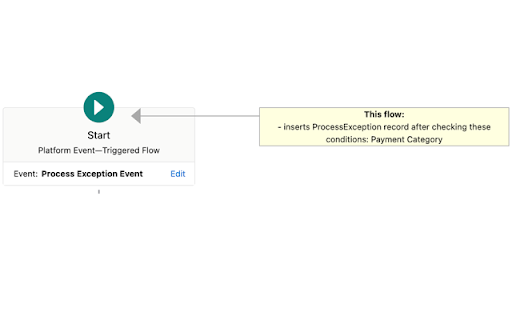


About
A simple browser extension that adds tooltips to Salesforce flows and displays a table of elements in the flow, allowing requests to OpenAI GPT to explain/summarize the flow.

The extension runs on the browser and first checks whether a Salesforce page is open.

If so, then calls the Salesforce tooling API and gets the flow metadata/definition.

Then it adds a tooltip with relevant information on each of the flow elements.

The button "View Definition" opens a frame containing the flow definition in a table with a short explanation and buttons to submit questions about the flow to OpenAI GPT.

The privacy policy is at https://sites.google.com/view/mybrowserextensions/home

This extension does not handle personal or sensitive user data. It only communicates with Salesforce and a AI provider (OpenAI, Anthropic, Google, etc) to request data to display on the screen and nothing else is sent to any other server.

The source code can be found at:  https://github.com/Fernando-Fernandez/SalesforceFlowExtension
Technical
- Version
- 1.1.11
- Manifest
- V3
- Size
- 9.16MiB
- Min Chrome
- 88
- Languages
- 1
- Featured
- No
Metadata
- ID
- dpeebajhbigfamnhmnlabecogegimodb
- Developer ID
- uf62ed138a40a223b668de71a4f2a4157
- Developer Email
- [email protected]
- Created
- Mar 27, 2023
- Last Updated (Store)
- Jun 15, 2026
- Last Scraped
- Jun 19, 2026
- Website
- —
- Privacy Policy
- https://sites.google.com/view/mybrowserextensions/home
Similar extensions
Alternatives to Salesforce Flow Extension, ranked by description similarity.
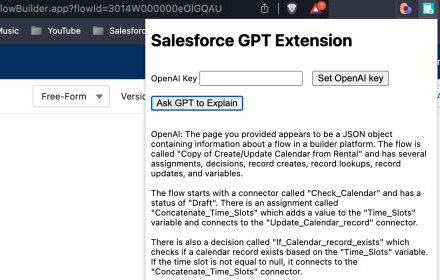
GPT Extension for Salesforce
Gets a GPT answer about a Salesforce item (flow, debug, class, formula, etc).
41
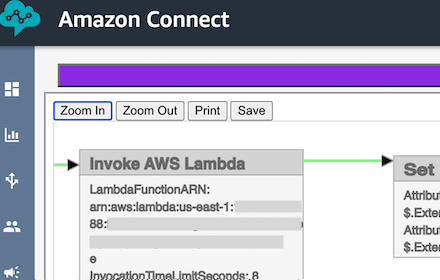
Amazon Connect Flow Extension
Displays detailed diagram for Amazon Connect flows and modules
76

Salesforce Field Usage Extension
Reports Salesforce field usage and trends to help with data quality and other issues.
95

GPT Extension for Jira, Bitbucket and Confluence
Gets a GPT answer about a Jira ticket, Confluence page, Bitbucket source code, commit or pull request
9

Salesforce Flow MetaData Downloader
Download & Analyse Salesforce flow MetaData with a single click directly from Salesforce Lightning.
2.0K
★ 5.0

Why Salesforce
Stuff that Salesforce should have added already... Adding flow and user tabs into setup.
10.0K
★ 4.8

SF Query Editor Helper
Make Salesforce query results exportable as CSV download
18

Salesforce LogXplorer
Read Apex and API logs in a very easy and quick way.
153
★ 5.0
Data sourced from the Chrome Web Store · last verified Jun 19, 2026.