
Image Harvester
Download images on web pages precisely and efficiently.
As of June 2026, Image Harvester has 46 users in the Workflow & Planning category.
Usersup 48.4 percent+48.4%
46
46
Ratingno change0%
—
— reviews
Reviewsno change0%
—
Version
1.5.5
Manifest V3
History
3 snapshotsTracking since Apr 1, 2026.
View as table
| Date | Users | Rating | Reviews | Version |
|---|---|---|---|---|
| Apr 1, 2026 | 31 | — | — | 1.5.5 |
| May 3, 2026 | 35 | — | — | 1.5.5 |
| Jun 2, 2026 | 34 | — | — | 1.5.5 |
| Now | 46 | — | — | 1.5.5 |
Permissions & access
- Permissions
- activeTabdownloadsstoragescripting
- Host access
- None declared
Screenshots


About
Download the images you want with a single click!

This extension downloads images by type. For example, on a news webpage, images among the news article are of type A. Beside the article, there are usually one or two sidebars that display relevant news, and images in this area belong to type B. After telling this extension the type of your target images, it can download all images of the same type with one click.

Steps to use:
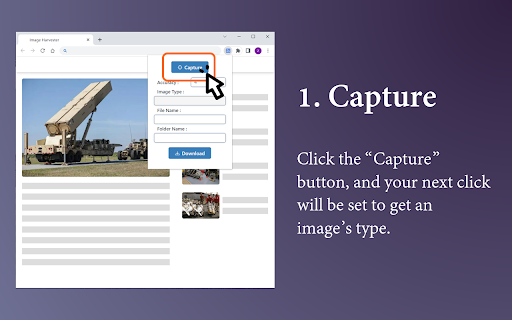
1. Get the type of images you want to download: click the "Capture" button, then click any of your target images. This image's type will be analyzed and filled automatically in the "Image Type" input box.
2. Click the "Download" button. All images of the above type will be downloaded to your browser's default download directory.
(For a better user experience, please uncheck "Ask where to save each file before downloading" in browser settings.)

Other functions:
1. Accuracy: increase this value, images about to download may be less but more accurate; decrease this value, more but less accurate images may be downloaded. After changing this value, remember to use the "Capture" button again.
2. "File Name" input box: If you want to name the images about to download with a uniform prefix name, type the name in this input box. If you leave this box blank, all images will have default names.
3. "Folder Name" input box: If you want a new folder to be created in your default download directory to store images about to download, type the name in this input box. If you leave this box blank, all images will be downloaded right in browser's default download directory.

Generally, once you have captured an image type on one website, you don't need to capture it again whenever you want to download images. Just click on the "Download" button. Because the type information has been saved in this extension and it is universal within this website. However, if you need to download images from another website, remember to use the "Capture" button first.

If you encounter any issues (e.g. this extension doesn't work on a specific webpage), or have any suggestions, please leave your comment.
Technical
- Version
- 1.5.5
- Manifest
- V3
- Size
- 21.54KiB
- Min Chrome
- 88
- Languages
- 1
- Featured
- Yes
Metadata
- ID
- donelpfiheoggajkjbihfkafonenbgbi
- Developer ID
- u16162ad4f643b4579c8ae5edd1a937e8
- Developer Email
- [email protected]
- Created
- Apr 10, 2023
- Last Updated (Store)
- Jan 9, 2024
- Last Scraped
- Jun 2, 2026
- Website
- —
- Support URL
- —
- Privacy Policy
- —
Similar extensions
Alternatives to Image Harvester, ranked by description similarity.

Image downloader - picture and photos saver
Find and download images from any web pages. Filter or select all at once to bulk download.
200.0K
★ 4.8

Mass Image Downloader
Quickly and easily download images from web pages with just one click.
25

Image Downloader - Bulk Image Downloader & Filter
Download images from any webpage with advanced filtering, bulk download, and preview features. Fast, easy, and powerful!
27

Image Save as Type (JPG, PNG, WebP)
Save images in JPG, PNG, and WebP formats with a single click from the context menu
120

Image Downloader - High Quality
Download images from supported web pages and save them to your device with a single click.
11

WebP / Avif image converter
Convert Webp, Avif and other types of image before saving.
100.0K
★ 3.8

Image Downloader
Get Web Images and Download
106
★ 5.0

Save image as Type
Save images as PNG, JPG or WebP format directly from the context menu with custom size options
319
Data sourced from the Chrome Web Store · last verified Jun 2, 2026.