
WebP / Avif image converter
Convert Webp, Avif and other types of image before saving.
As of June 2026, WebP / Avif image converter has 100,000 users and a 3.76/5 rating from 225 reviews in the Workflow & Planning category.
Usersno change0%
100.0K
100,000
Ratingdown 0.8 percent−0.8%
3.76
225 reviews
Reviewsup 7.7 percent+7.7%
225
Version
1.3.2
Manifest V3
90-day change · In the last 90 days this extension 1 version update.
History
3 snapshotsTracking since Apr 23, 2026.
View as table
| Date | Users | Rating | Reviews | Version |
|---|---|---|---|---|
| Apr 23, 2026 | 100.0K | 3.79 | 209 | 1.3.1 |
| Apr 26, 2026 | 100.0K | 3.77 | 223 | 1.3.2 |
| Jun 6, 2026 | 100.0K | 3.77 | 224 | 1.3.2 |
| Now | 100.0K | 3.76 | 225 | 1.3.2 |
Permissions & access
- Permissions
- storagedownloadscontextMenus
- Host access
- *://*/*
Screenshots


About
WebP / Avif image Converter: convert, download and store images from the web just the way you want.

How does it work?
After downloading the extension you get a new button *Convert and Save image as* in the image context menu (When you right click on an image). Now the image is being processed and downloaded based on your preferences. Conversion to JPG, PNG and WebP are supported.

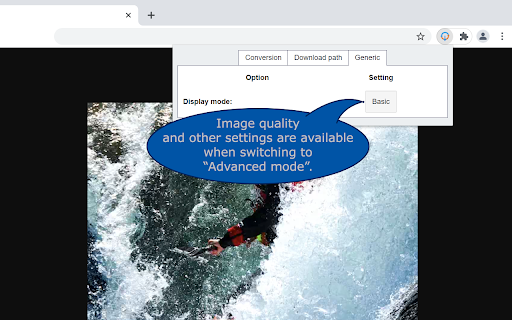
These preferences can be set in the option menu that you can reach by clicking on the extensions’ browser button located on the top right of your browser next to the address bar.

Note that the "browser button" may be hidden. If you want to quickly change the settings pin it to your extension bar. This can be done by clicking on the "extension" (looks like a puzzle piece) next to the hamburger menu / user login. Find the button and click on "pin".

What can you configure?

* Image conversion types
For each image type you can select if and to what image type it is supposed to be converted to. (JPG, PNG or WebP).

* Download location
To keep downloads sorted you can specify your preferred download location and filename. The Download location and filenames can include information of the time and date of downloading, image origin and image format. The exact details can be found in the extension.
Note that download locations are always relative to your download folder.

* Actions (Advanced section)
You can change the default autodetect behavior into a fixed task without changing your autodetect settings. This can be useful when you temporarily only want to download images without converting them yet but still want to store them on the specified location. Or if you only want to download PNG files for example.

* Popup layout (Advanced section)
 For quick access specify which tab you want to open by default.

* Generic (Advanced section)
To optimize your workflow you can turn off the popup that suggests  download location and filename.

Faq

   * The image that was downloaded and converted did not converted to the intended filetype.
    Webp /Avif image converter uses the actual file data to determine the file type not the url.

    Therefor, you may experience that a conversion may be different than what you may expect if you look at the url.
    Also file extensions are corrected to the appropriate extension in these cases if you turned off conversion for the specific file type.

  * The extension does not converts the image but gives back a .htm file and/or filenames that do not reflect the original filename.

Please make sure other extensions are not intervening with the download process, for example download managers. Webp /Avif image converter uses a different route to download the (converted) image than the regular "save as" function. This route may lead to conflicts with some download managers and producing unexpected results.

Permission justification
  * storage:      Allows the extension to save your settings.
  * downloads:    Allows the extension to initiate a file download for the converted image.
  * contextMenus: Allows the extension to add the "convert and save" button to the image contextmenu
  *  <all_urls>:  Allows the extension to download the image before converting the it.
Technical
- Version
- 1.3.2
- Manifest
- V3
- Size
- 42.75KiB
- Min Chrome
- 88
- Languages
- 1
- Featured
- Yes
Metadata
- ID
- pbcfbdlbkdfobidmdoondbgdfpjolhci
- Developer ID
- u7314d75416feb0eb08271b5510b53e17
- Developer Email
- [email protected]
- Created
- Nov 26, 2019
- Last Updated (Store)
- Mar 27, 2026
- Last Scraped
- Jun 20, 2026
- Website
- —
- Support URL
- —
- Privacy Policy
- —
Similar extensions
Alternatives to WebP / Avif image converter, ranked by description similarity.

Right Click Any Image Converter
Instantly Convert any images to any different formats (PNG, JPG, HEIC, WEBP...) with just a right-click menu.
620
★ 4.2

Image Save as Type (JPG, PNG, WebP)
Save images in JPG, PNG, and WebP formats with a single click from the context menu
120

Image Format Converter
Effortlessly convert your images to different formats directly in your browser with the Image Format Converter extension!
2.0K
★ 3.7

Image Format Selector
Right-click images and choose the format (JPG, PNG, WEBP) to save them.
7
★ 5.0

Converter App Image Converter Extension
Connects your Chrome browser with the converter API and allows you to convert web images to another format from the context menu.
1.0K
★ 4.6

Image Converter & Compressor
Convert images between JPG, PNG and WebP and control compression directly in your browser.
35
★ 5.0

Save Image As PNG/JPG/WebP
Convert images to PNG, JPG, or WebP format with ease. Simply right-click on any image and select your desired format.
5.0K
★ 3.3

Convert WebP to JPG
Use Convert WebP to JPG to effortlessly change WebP to JPG, making it simple to turn WebP into JPG with one click.
1.0K
★ 4.4
Data sourced from the Chrome Web Store · last verified Jun 20, 2026.