Sita Screenshot Full Page™
Capture Webpage visible, Capture Full Page Website And Share Online
As of June 2026, Sita Screenshot Full Page™ has 1,000 users and a 4.00/5 rating from 3 reviews in the Workflow & Planning category.
Usersno change0%
1.0K
1,000
Ratingno change0%
4.00
3 reviews
Reviewsup 50.0 percent+50.0%
3
Version
2.0.1
Manifest V3
History
1 snapshotsTracking since May 3, 2026.
View as table
| Date | Users | Rating | Reviews | Version |
|---|---|---|---|---|
| May 3, 2026 | 1.0K | 4.00 | 2 | 2.0.1 |
| Now | 1.0K | 4.00 | 3 | 2.0.1 |
Permissions & access
- Permissions
- storageactiveTabscripting
- Host access
- None declared
Screenshots


About
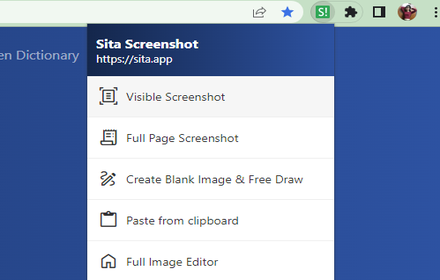
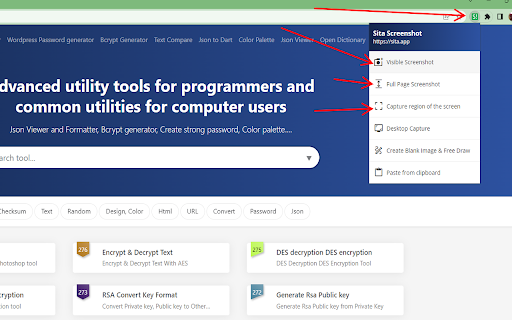
Take a picture of the entire screen or part of the web page screen.
It is very simple to use and has many utilities to edit images after taking screenshots of web pages.
No registration or login required, everything is free.

SUPPORT FULL SCREEN CAPTURE.
The utility allows to capture the full screen of the website, then you can edit the image, add text to the image, very good for you as a tester when testing the website.

SUPPORTS CAPTURING THE ENTIRE VISIBLE PART OF THE WEB PAGE
The visible part of the website is understood as the part displayed on the computer screen, the software supports capturing this display part.

SUPPORT FREE PHOTO SHARING
Photos after being taken can be uploaded online for free, without advertising, without charge. Everything is completely free.

This Sita Screenshot screenshot tool is part of my collection of developer and tester utilities on https://sita.app.
Everything is free, for my own work and for the rest of the team, and I hope it's useful to everyone.

DETAILS ON PRIVACY
The extension only collects user data (screenshots, browser URL, etc.) for the purpose of capturing screenshots, and in the moment the user requests the capture. Image processing and data storage are performed locally on the user's device.
Technical
- Version
- 2.0.1
- Manifest
- V3
- Size
- 316KiB
- Min Chrome
- 88
- Languages
- 30
- Featured
- No
Metadata
- ID
- dolfolohclejfclnoaekbloahmmpdcil
- Developer ID
- uc91d547ef531c372f781eda91411a9b6
- Developer Email
- [email protected]
- Created
- Oct 20, 2022
- Last Updated (Store)
- Mar 10, 2023
- Last Scraped
- Jun 2, 2026
- Website
- https://codezi.pro/
- Support URL
- https://codezi.pro/about
- Privacy Policy
- https://sita.app/policy
Similar extensions
Alternatives to Sita Screenshot Full Page™, ranked by description similarity.

Screenshot - Webpage Screen Capture
Convenient screenshot tool. Capture, edit and save them to jpeg, gif or png, drop comments and share.
60.0K
★ 4.4

Easy Screenshot
Capture full-page screenshots instantly. Manually select any part of the page to capture exactly what you need.
4

Recorder & Screenshot | Sitespedia - Screen Video Recorder & Screenshot
Take screenshots entirely or partially of websites, annotate them, and manage them in a centralized place.
6

Webpage Screenshot - Entire page screenshot!
Since 2015 The most popular tool for your day to day. Whole page screenshot, sharing and much more.
200.0K
★ 4.7

Screenety - Screen Recorder & Annotation Tool
Screenshot tool
154
★ 5.0

Full Page Screen Capture
Enable this extension to capture screenshots whether it's a visible screen, crop capture andfull-page screen
70.0K
★ 3.9

Easy Screenshot
Capture parts of the screen
19
★ 1.0

Full Page Screenshot - Screen Capture
Screenshot tool for making a full page or partial screen capture with further edit, text adding and download.
3.0K
★ 4.3
Data sourced from the Chrome Web Store · last verified Jun 2, 2026.