
Quick Inspect Element
Quickly inspect HTML elements with a simple mouse hover.
As of June 2026, Quick Inspect Element has 1,000 users and a 4.20/5 rating from 10 reviews in the Developer Tools category.
Usersno change0%
1.0K
1,000
Ratingno change0%
4.20
10 reviews
Reviewsno change0%
10
Version
1.1.1
Manifest V3
Permissions & access
- Permissions
- storageidentity
- Host access
- None declared
Screenshots

About
Simplify your web development workflow with Quick Inspect Element!

Ever wished you could inspect HTML elements swiftly without the hassle of opening DevTools? Now you can! The extension lets you dive deep into website elements effortlessly, allowing you to streamline your workflow and boost productivity.

**********

Setup:

- Install the extension from the Chrome Web Store.

- Open the extension from browser toolbar and login with your Google account.

- Hover on the element while holding Ctrl-key to quickly inspect the element.

**********

Key Features:

- Boost productivity: Speed up your development process by eliminating the need to open DevTools every time you want to inspect an element.

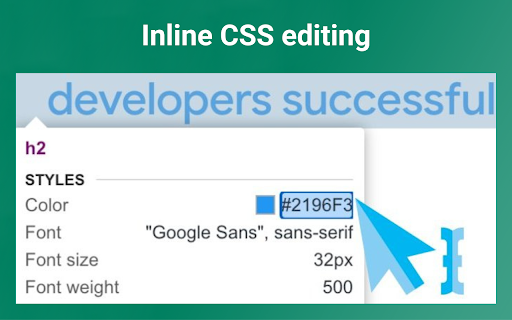
- Inline CSS editing: Quickly edit and experiment with element CSS.

- Native interface: Enjoy the user interface that you already love in Chrome DevTools.

**********

Install Quick Inspect Element now and revolutionize your web development experience!
Technical
- Version
- 1.1.1
- Manifest
- V3
- Size
- 360KiB
- Min Chrome
- 88
- Languages
- 1
- Featured
- No
Metadata
- ID
- dohlilhbkbmfjnaaeieffljfccgbcdoc
- Developer ID
- u142743b8c36ac8d693c314707fb3b358
- Developer Email
- [email protected]
- Created
- Nov 9, 2023
- Last Updated (Store)
- Apr 22, 2025
- Last Scraped
- Jun 4, 2026
- Website
- —
- Support URL
- —
- Privacy Policy
- —
Similar extensions
Alternatives to Quick Inspect Element, ranked by description similarity.

Web Inspector
Use Web Inspector tool as a CSS viewer and website inspector for any page. It is a browser plugin for google chrome inspect element.
943
★ 4.6

Inspect Element
Use Inspect element – a CSS viewer with Chrome inspect element shortcut. Learn how to inspect element easily using this simple tool!
3.0K
★ 4.8

UI Inspector - Visual CSS Editor
Inspect and visually edit elements and their CSS directly on the page for faster design and UI debugging.
4.0K
★ 4.0

Inspectify
Quickly copy HTML element data-{id}/input-id attributes for developers, QA, and designers.
18

Inspect Element
Inspect element for content, and margin.
20.0K
★ 2.9

Element Inspect
Inspect padding, margin, tag, class, and size by hovering over elements.
156
★ 5.0

JSX Element Inspector
Extract JSX code from any HTML element on any webpage. Perfect tool for React developers to convert HTML to JSX instantly.
19

Developer DOM Inspector
Inspect DOM elements visually
68
★ 5.0
Data sourced from the Chrome Web Store · last verified Jun 4, 2026.