
Free Reaction
Sync the original copyrighted content with YouTube reaction videos using your own subscription.
As of June 2026, Free Reaction has 22 users and a 5.00/5 rating from 1 reviews in the Functionality & UI category.
Usersup 4.8 percent+4.8%
22
22
Ratingno change0%
5.00
1 reviews
Reviewsno change0%
1
Version
1.1
Manifest V3
90-day change · In the last 90 days this extension 1 version update, changed permissions.
History
6 snapshotsTracking since Apr 9, 2026.
View as table
| Date | Users | Rating | Reviews | Version |
|---|---|---|---|---|
| Apr 9, 2026 | 21 | 5.00 | 1 | 1.0 |
| Apr 20, 2026 | 16 | 5.00 | 1 | 1.0 |
| Apr 25, 2026 | 22 | 5.00 | 1 | 1.0 |
| May 2, 2026 | 24 | 5.00 | 1 | 1.1 |
| May 9, 2026 | 25 | 5.00 | 1 | 1.1 |
| Jun 8, 2026 | 21 | 5.00 | 1 | 1.1 |
| Now | 22 | 5.00 | 1 | 1.1 |
Changelog
- Apr 25, 2026permissions
tabs, activeTab, scripting, storage, sidePanel, declarativeNetRequest
storage, sidePanel, declarativeNetRequest
Permissions & access
- Permissions
- storagesidePaneldeclarativeNetRequest
- Host access
- *://*.youtube.com/*, *://*.crunchyroll.com/*
Screenshots
About
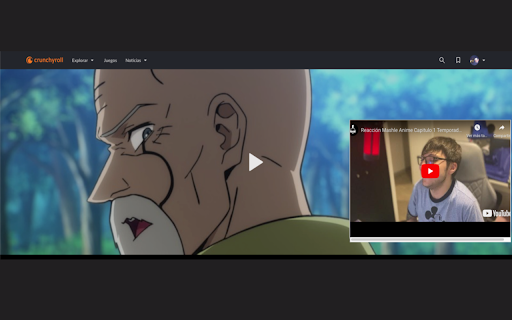
Free Reaction lets you watch reaction videos the way they're meant to be seen — with the original content playing alongside the reactor, perfectly synced.

  The problem
  Reactors can't include copyrighted content in their videos. So you're left watching someone react to something you can't see. You either have to find the original and manually sync it yourself, or just deal with it.

  The solution
  When a reactor adds a simple tag to their video description, Free Reaction detects it and shows a "Watch with Anime" button. Click it, and the original video loads in a side panel using your own streaming subscription. Playback syncs automatically — play, pause, seek —
  everything stays in lockstep.

  How it works
  1. Open a YouTube reaction video that supports Free Reaction
  2. Click the sync button that appears below the video
  3. The original episode opens in a side panel via your Crunchyroll subscription
  4. Playback syncs automatically — the original starts exactly when the reactor starts watching

  For reactors
  Add this block to your YouTube video description to make your videos compatible:

  [FREE_REACTION]
  episode: https://www.crunchyroll.com/watch/EPISODE_ID
  start_at: 120
  [/FREE_REACTION]

  - episode: Link to the original content
  - start_at: Seconds into your video when the content begins

  No piracy. No workarounds.
  The viewer uses their own paid subscription. The reactor uploads only their reaction. Free Reaction just connects the two.
Technical
- Version
- 1.1
- Manifest
- V3
- Size
- 97.84KiB
- Min Chrome
- 88
- Languages
- 1
- Featured
- No
Metadata
- ID
- dnjfoljmledpdphbilpfcpmgjmcnbiic
- Developer ID
- uf41c3c29c2567ba8b0864f4d8a54d4b0
- Developer Email
- [email protected]
- Created
- Feb 15, 2024
- Last Updated (Store)
- Apr 21, 2026
- Last Scraped
- Jun 8, 2026
- Website
- reaction-free.com
- Support URL
- —
- Privacy Policy
- —
Similar extensions
Alternatives to Free Reaction, ranked by description similarity.

ClipChat
Provides an AI enhanced comment section under every YouTube video.
35
★ 5.0

Crunchyroll Censor
Censors Crunchyroll episode titles and maintains the mystery of each episode.
128
★ 5.0

RatioMeter for YouTube
Displays a tier rating for YouTube videos based on their like/dislike ratio.
14

Blocki
Hides YouTube comments and seek bar to prevent spoilers
4

JAPAN AI Translator
[Description]
Master Japanese content without language barriers using Real-time AI Subtitles.
Forget stiff, robotic machine…
23
★ 5.0

PiP Extension for Crunchyroll
Enable picture-in-picture mode for Crunchyroll's video player.
2.0K
★ 3.6

ReelControl
Add a progress bar and playback controls to YouTube Shorts, Instagram, and Facebook Reels.
3.0K
★ 3.9

YouTube Dislike Viewer
Use YouTube Dislike Viewer to return dislike counts. See full likes and dislikes data while watching videos with this extension.
8.0K
★ 4.0
Data sourced from the Chrome Web Store · last verified Jun 8, 2026.