
Vernier Graphical Analysis
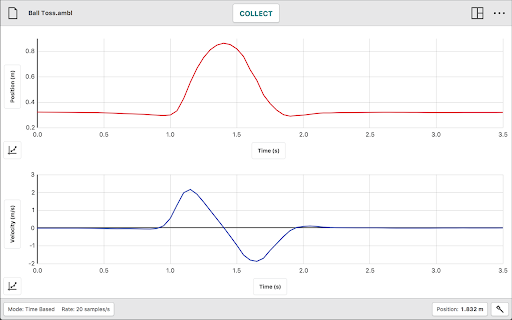
Graphical Analysis™ is a tool for science students to collect, graph, and analyze data from Vernier sensors.
As of May 2026, Vernier Graphical Analysis has — users and a 2.71/5 rating from 141 reviews.
Usersno change0%
—
—
Ratingno change0%
2.71
141 reviews
Reviewsno change0%
141
Version
6.0.2-3611
Manifest V2
History
1 snapshotsTracking since Apr 30, 2026.
Not enough history yet for this metric — the chart fills in as we collect more snapshots.
View as table
| Date | Users | Rating | Reviews | Version |
|---|---|---|---|---|
| Apr 30, 2026 | — | 2.71 | 141 | 6.0.2-3611 |
| Now | — | 2.71 | 141 | 6.0.2-3611 |
Permissions & access
- Permissions
- storagepowersystem.memorymdnsclipboardWriteclipboardReadnotificationshidusb
- Host access
- http://*/*, https://*.execute-api.us-west-2.amazonaws.com/*, https://ga-experiment-library.s3-us-west-2.amazonaws.com/
Screenshots


About
IMPORTANT: This is the final release of this application.

In early 2025, Google is removing the ability to use apps in the Chrome Packaged App format.

To continue using Graphical Analysis, use the Progressive Web App (PWA) format replacement by going to graphicalanalysis.app in your Chrome browser.

We strongly recommend ChromeOS 128 or later. Older ChromeOS versions may have Bluetooth connectivity problems on some Chromebooks.

--------------------------------------------------------------------------

Graphical Analysis™ is a tool for science students to collect, graph, and analyze data from Vernier sensors.

Sensor data-collection support:
• Vernier Go Direct® sensors - with Bluetooth® wireless technology and USB connectivity
• Vernier Go Wireless® Heart Rate and Go Wireless Exercise Heart Rate monitors
• Vernier LabQuest® sensors used with LabQuest 3, LabQuest 2, LabQuest Stream, LabQuest Mini, or Go!Link® interfaces
• Vernier Go!Temp® and Go!Motion® USB sensors

Additional experiment options:
• Data Sharing via Wi-Fi connection to LabQuest 2 or Logger Pro® 3
• Manual Entry

Note: Sensor data collection and Data Sharing require the purchase of hardware from Vernier Software & Technology. Manual entry of data can be performed without a hardware purchase. For more information on Data Sharing, visit http://www.vernier.com/css

Key Features - Data Collection
• Multi-sensor data-collection support
• Time Based, Event Based, Drop Counting, and Photogate data-collection modes
• Configurable data-collection rate and duration for time-based data collection
• Optional triggering of time-based data collection based on sensor value
• Customizable unit display on supported sensors
• Sensor calibrations
• Option to zero and reverse sensor readings
• Graph match feature for use with motion detectors
• Manual entry of data from keyboard and clipboard

Key Features - Data Analysis
• Display one, two, or three graphs simultaneously
• View data in a table or show a graph and table side-by-side
• Draw Predictions on a graph to uncover misconceptions
• Examine, interpolate/extrapolate, and select data
• Use Tangent tool to show instantaneous rates of change of the data
• Find area under a curve using the Integral tool
• Apply Statistics calculations to find mean, min, max, and standard deviation
• Perform curve fits, including linear, quadratic, natural exponent, and more
• Add calculated columns based on existing data to linearize data or investigate related concepts

Key Features - Collaboration and Sharing
• Create text annotations and add graph titles
• Export graphs and data for printing and inclusion in lab reports
• Save files (.gambl file format) to the Cloud for exchange with Graphical Analysis on other Chromebooks™, Windows® and macOS® computers, and iOS and Android™ devices
• Export data in .CSV format for analysis of data in spreadsheet software such as Excel, Google Sheets, and Numbers
• Adjust font sizes for easier viewing when presenting to your class

Vernier Software & Technology has over 35 years of experience in providing effective learning resources for understanding experimental data in science and math classrooms. Graphical Analysis is a part of the extensive system of sensors, interfaces, and data-collection software from Vernier for science and STEM education.
Technical
- Version
- 6.0.2-3611
- Manifest
- V2
- Size
- 32.31MiB
- Min Chrome
- 108
- Languages
- 27
- Featured
- No
Metadata
- ID
- dncgedbnidfkppmdgfgidcepclnokpkb
- Developer ID
- ud58b936b443a17c6bd5f02f2d83b3eb8
- Developer Email
- [email protected]
- Created
- Jun 21, 2012
- Last Updated (Store)
- Oct 4, 2024
- Last Scraped
- May 28, 2026
- Website
- graphicalanalysis.app
- Privacy Policy
- —
Similar extensions
Alternatives to Vernier Graphical Analysis, ranked by description similarity.

Vernier Spectral Analysis
Vernier Spectral Analysis is a tool for science students to collect and analyze data from Vernier spectrophotometers.
—
★ 5.0

GlobiLab
Wireless data collection for Chromebook with up to 15 built-in science sensors
The GlobiLab software for Chromebook makes K-12…
—
★ 1.0

Vernier Instrumental Analysis
Instrumental Analysis™ allows students to perform chromatography experiments with Vernier's line of Mini GC products.
—

Plotly
Beautiful graphs. Powerful analytics. Online. Free.
8.0K
★ 3.8
NetSupport School Student
The #1 choice for IT educators worldwide, NetSupport School delivers the tools you need to help maximize the effectiveness of…
—
★ 3.2

ClassCalc
~~ClassCalc Test Mode Lockdown for Chromebooks~~
To download ClassCalc on your Chromebook, your school IT admin must whitelist…
—
miniPCR
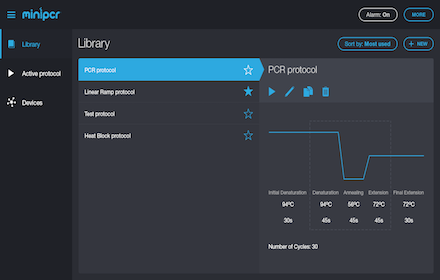
The miniPCR DNA Discovery System
—
★ 5.0
Unknown
—
Data sourced from the Chrome Web Store · last verified May 28, 2026.