
Leitner Box
In the Leitner Box application, you can create new flashcards and quizzes in Markdown and LaTeX format and share them with others
As of May 2026, Leitner Box has 214 users and a 4.33/5 rating from 3 reviews in the Workflow & Planning category.
Usersup 56.2 percent+56.2%
214
214
Ratingno change0%
4.33
3 reviews
Reviewsno change0%
3
Version
1.4.2
Manifest V3
History
3 snapshotsTracking since Apr 1, 2026.
View as table
| Date | Users | Rating | Reviews | Version |
|---|---|---|---|---|
| Apr 1, 2026 | 137 | 4.33 | 3 | 1.4.2 |
| Apr 30, 2026 | 141 | 4.33 | 3 | 1.4.2 |
| May 28, 2026 | 160 | 4.33 | 3 | 1.4.2 |
| Now | 214 | 4.33 | 3 | 1.4.2 |
Permissions & access
- Permissions
- storage
- Host access
- None declared
Screenshots


About
In the Leitner Box application, you can create new flashcards and quizzes in Markdown and LaTeX format and share them with others. In this app, you can create your flashcards in Markdown and LaTeX format.
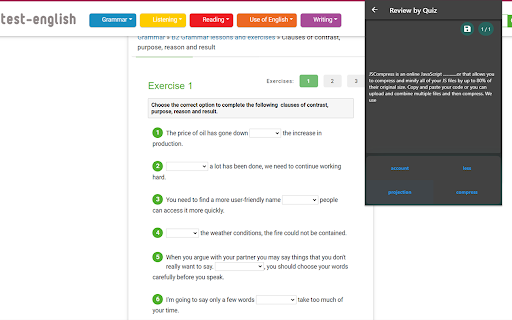
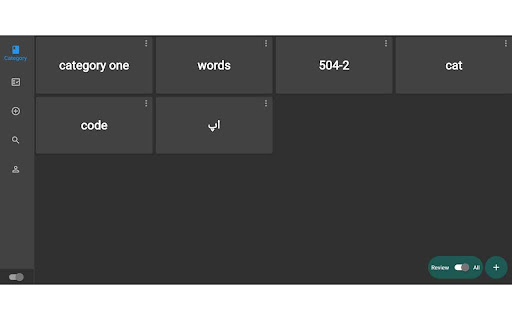
All the flashcards will store on your local device and you can import and export all or specific categories and share them with your friends. All the flashcards will be automatically scheduled to review them consistently.
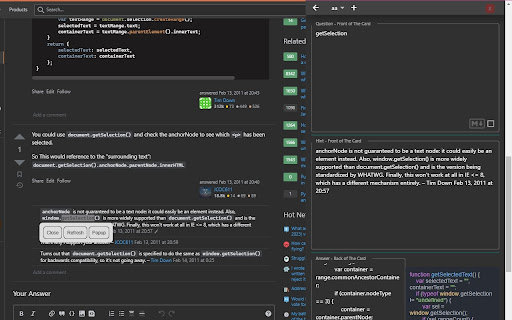
If you add a flashcard by selecting a word in the browser, this extension will automatically save the word and its paragraph to let you review that word in the main context(this way is much better than reviewing something just by its meaning).
You can add an image in Markdown format, for this, you need to copy the image link and past it to your flashcard in markdown format like this:

You can see some of the available commands this app supports in the screenshot section.
This is the sample code(copy inside application to see how its work):
# Here's a Heading
###### Heading level 6
I just love **bold text**.
This is really ***very*** important text.

```python
def sayHi():
print("Hi")
```
$$ \frac{x}{y} $$
My favorite search engine is [Duck Duck Go](https://duckduckgo.com "The best search engine for privacy").
| Tables | Are | Cool |
|----------|:-------------:|------:|
| col 1 is | left-aligned | $1600 |
| col 2 is | centered | $12 |
| col 3 is | right-aligned | $1 |
- First item
- Second item
- Third item
- Indented item
- Indented item
- Fourth item
$$ Take , \frac{x}{y} cup of sugar $$
$$\sqrt{\frac{a}{b}}$$
$$ \sum_{i=1}^{10} t_i $$
$$ x \equiv a $$
$$ \frac{n!}{k!(n-k)!} $$
$$ ^3/_7 $$
$$ k_{n+1} = n^2 + k_n^2 - k_{n-1} $$Technical
- Version
- 1.4.2
- Manifest
- V3
- Size
- 8.41MiB
- Min Chrome
- 88
- Languages
- 1
- Featured
- No
Metadata
- ID
- dmklcjenfgnhjooffcbocbekcpoennei
- Developer ID
- u2c79598bac932ad53e4cf8e184504565
- Developer Email
- [email protected]
- Created
- Sep 3, 2021
- Last Updated (Store)
- Jan 9, 2023
- Last Scraped
- May 28, 2026
- Website
- —
- Support URL
- —
- Privacy Policy
- —
Similar extensions
Alternatives to Leitner Box, ranked by description similarity.

Automated Flashcards
Automate language flashcard creation and practice.
14

NoteGPT: AI Flashcard for Quizlet and Cram
Import Quizlet flashcards. Take AI-powered notes. More integrations coming soon.
8.0K
★ 3.7

flash.me
flashcards, in a flash,... pin this extension on your browser so it works!
—
★ 5.0

Multi-sided Flashcards
Flashcard app with multiple sides, so you can check what you need, when you need.
66
★ 5.0

Paperclips Copilot
Autogenerate flashcards from anything you read on the web (for Anki, Quizlet, and more)
2.0K
★ 4.3

FLQL display questions
Get the .tsv file in the right format and load before starting a game.
1.0K
★ 5.0

Quick Anki Adder
Quick Anki card adder with translate, animated picture (.gif), and text-to-speech (TTS ) resources.
599
★ 1.9

Sheldon AI
Access Sheldon AI - Your AI study assistant for transcripts, flashcards, and PDFs
2
★ 5.0
Data sourced from the Chrome Web Store · last verified May 28, 2026.