
FLQL display questions
Get the .tsv file in the right format and load before starting a game.
As of May 2026, FLQL display questions has 1,000 users and a 5.00/5 rating from 8 reviews in the Workflow & Planning category.
Usersno change0%
1.0K
1,000
Ratingno change0%
5.00
8 reviews
Reviewsno change0%
8
Version
1.5721
Manifest V3
Permissions & access
- Permissions
- activeTabscriptingstorage
- Host access
- None declared
Screenshots




About
I wrote this chrome extension rather hastily as a way of reducing effort and errors for a small group of friends when they copy-pasted question texts from a PDF while reading games on Zoom for season 1 of FLQL. I'm delighted that this plugin has found acceptance among a much larger crowd around the world since. If you have ideas for any features I can include, or if you see any bugs, or perhaps a better name for this plugin, please send them across to [email protected]

Some updates in this version:
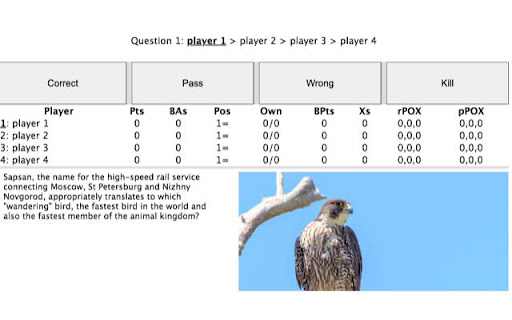
1) Now supports an easy way to include one image per question. Look at the .tsv format here https://docs.google.com/spreadsheets/d/1mj0rD0yKsQo2cOoO9hZhntEknjpTzXf51RVI4QicHdI/edit#gid=0

Image URLs almost always end with '.jpg' or '.png'. You can upload to a site like imgur to get these links for images that you're not directly taking from the internet. Large images are downscaled so that their longest dimension is 680 pixels.

2) markdown for text emphasis and images. Look here for a quick guide https://www.markdownguide.org/basic-syntax/#emphasis .
This is useful if you want to embolden a part of the text ( **text to appear in bold** ), or italicise part of the text ( *text to emphasise* ). Because underscores are used to represent blanks, underscores are taken literally and not parsed for both emphasis and underlines. Asterisks in the middle of a word are parsed as literal asterisks. This feature is untested for horizontal lines, tables, lists, headings, and code blocks.
If you know what you are doing, you can have raw HTML instead of markdown. It might help when you want more images per question, control over the size of images, or change colour of text.

3) A button to display answers. The answer text can support markdown as well (and thus images). This button must be continuously pressed for 1 second to prevent accidental clicks. If you do not want readers to show answers, leave the answerText column in the google sheet blank when creating the tsv.


Features I will explore:
1) a mozilla extension
2) a way to link audio and video
3) text2speech
4) ??? (email [email protected])

I would recommend using google sheets to create the .tsv file to remove UTF-8 conversion artifacts.

Thanks for trying this out!

------------------------------------------------------------------------------------------------------------------------------------------

Instructions:

1) Open the scorecard link
2) Click on the extension icon in the chrome extensions bar (near the address bar at the top usually). You might need to click on the jigsaw piece icon if you can't find it there already.
3) In the tiny popup that opens, upload the questions file as a tsv or txt, and click on load questions.
4) In about a second you should see a message in the start settings page saying "loaded questions". You can now press start. If you do not see this message, refresh the page and try again.

If the extension behaves unexpectedly, refresh the page at any point during the quiz and see if it works now. The scores will be preserved. If you are on an incognito window, you must allow the plugin in incognito (right click extension icon, manage extension).
If this does not work, reach out to whoever shared the .tsv file and [email protected]

The chrome extension only modifies the views on the user's browser. No question data is sent to any server and the extension is automatically disabled by Google on any site that's not the Wikiquiz scorecard. The extension undergoes thorough review for security and privacy

You need to have a recent version of Google Chrome for this to work.
Technical
- Version
- 1.5721
- Manifest
- V3
- Size
- 115KiB
- Min Chrome
- 88
- Languages
- 1
- Featured
- No
Metadata
- ID
- fpcglcmalknekjlefpclncgaofdimmmp
- Developer ID
- u283126dc053cfbd7bb37b67a2d0813dd
- Developer Email
- [email protected]
- Created
- Aug 26, 2021
- Last Updated (Store)
- Apr 18, 2022
- Last Scraped
- May 23, 2026
- Website
- —
- Privacy Policy
- —
Similar extensions
Alternatives to FLQL display questions, ranked by description similarity.

Placeholder
Stop your scrolling and start learning something new instead!
1

Google Classroom Tweaks
Making Google Classroom more productive
1.0K
★ 5.0

Tab-Snap
Get open tab URLs for window, or load a list of URLs into new tabs on this window.
30.0K
★ 4.5

BB WaveNet
Expanded version of WaveNet for Chrome that awesomely transforms selected text into high-quality natural sounding audio.
27
★ 3.0

QuickOWL
Quickly Open Web Links using custom contextmenu with selected text as input
166

Google Gradebook Comment Bank
Comment banks to assist with feedback for Google Gradebook assignments
68

G RTF: Plain to Rich Text
GRTF is Rich Text Format for Google Forms, Twitter, and other non-RTF text boxes... This version is dedicated to #LJTECHi3.
416
★ 5.0

ChatGPT Augment
Enhance chat with ChatGPT-Augment: auto-continue, macros, token count, prompts, JSON format.
155
★ 3.0
Data sourced from the Chrome Web Store · last verified May 23, 2026.