
JSON MASTER - Offline JSON Beautifier & Viewer
Format and display JSON with color scheme and language switching
As of May 2026, JSON MASTER - Offline JSON Beautifier & Viewer has 46 users and a 5.00/5 rating from 6 reviews in the Developer Tools category.
Usersup 15.0 percent+15.0%
46
46
Ratingno change0%
5.00
6 reviews
Reviewsno change0%
6
Version
1.3
Manifest V3
History
3 snapshotsTracking since May 6, 2026.
View as table
| Date | Users | Rating | Reviews | Version |
|---|---|---|---|---|
| May 6, 2026 | 40 | 5.00 | 6 | 1.3 |
| May 17, 2026 | 42 | 5.00 | 6 | 1.3 |
| May 31, 2026 | 44 | 5.00 | 6 | 1.3 |
| Now | 46 | 5.00 | 6 | 1.3 |
Permissions & access
- Permissions
- storage
- Host access
- None declared
Screenshots

About
JSON MASTER - Offline JSON Beautifier & Viewer

Transform and visualize your JSON data with this powerful offline tool. No data transmission, no tracking - your data never leaves your device.

Key Features

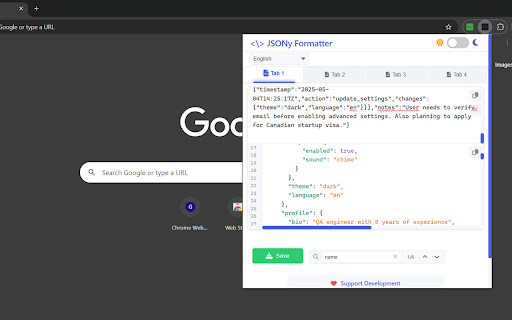
Format and beautify JSON with automatic syntax highlighting
Multiple tabs for working with several JSON files simultaneously
Light and dark themes with smooth transitions
Code editor features including line numbers and jump-to-line navigation
Real-time search with highlighted matches and keyboard navigation
Easy file saving and clipboard operations
Support for 9 interface languages

How to Use

1. Paste your JSON data into the input area
2. Watch it instantly format with proper indentation and highlighting
3. Navigate through the formatted JSON using line numbers
4. Use the search feature to find specific keys or values
5. Copy the formatted JSON or save it to a file
6. Switch between tabs to work with multiple JSON structures
7. Use keyboard shortcuts Alt+1-4 to switch tabs and Ctrl+Tab to cycle through them

All processing happens locally in your browser - work confidently with sensitive data knowing it stays on your device.
Technical
- Version
- 1.3
- Manifest
- V3
- Size
- 22.94KiB
- Min Chrome
- 88
- Languages
- 1
- Featured
- No
Metadata
- ID
- dkmnkgkcciocbmbjdnjeclfepnlhilpp
- Developer ID
- ub36e4082742bb931ef39e1f2e5d48d93
- Developer Email
- [email protected]
- Created
- May 5, 2025
- Last Updated (Store)
- May 28, 2025
- Last Scraped
- May 31, 2026
- Website
- —
- Support URL
- —
- Privacy Policy
- —
Similar extensions
Alternatives to JSON MASTER - Offline JSON Beautifier & Viewer, ranked by description similarity.

JSON Formatter Pro
Format, validate, diff JSON with tree view, query, convert & 60+ themes. The ultimate JSON toolkit for developers.
1

Auto JSON Formatter
Automatically formats JSON API responses
16

JSON Formatter Everywhere
Automatically formats JSON responses in any tab, not just raw JSON pages.
3

JSON Formatter - JSONLY
Beautiful JSON formatter with modern UI - format, validate, and beautify JSON data
5

JSON Beautifier
Format, highlight, and inspect JSON with syntax coloring, collapsible tree view, minify toggle, copy, and light/dark theme.
16

Pretty JSON Viewer Pro
Instantly beautify JSON/XML responses on any webpage with syntax highlighting, search, and TypeScript interface generation
8

NextJSON - JSON Parser, Editor, and Formatter
Format, edit, and explore JSON — tree view, graph visualization, JQ queries, diff, and URL fetch. Fully local, zero data sent.
62
★ 5.0

JSON Beautifier Pro
Professional JSON Beautifier, Validator, Editor, and Comparator with on-page detection.
11
Data sourced from the Chrome Web Store · last verified May 31, 2026.