
Sundial: Google Calendar Reimagined for Enterprise Schedulers
Schedule meetings faster with tools built for enterprise teams — directly inside Google Calendar.
As of June 2026, Sundial: Google Calendar Reimagined for Enterprise Schedulers has 5,000 users and a 4.93/5 rating from 40 reviews in the Workflow & Planning category.
Usersup 66.7 percent+66.7%
5.0K
5,000
Ratingno change0%
4.93
40 reviews
Reviewsdown 2.4 percent−2.4%
40
Version
2.12.9
Manifest V3
90-day change · In the last 90 days this extension gained 2.0K users, 12 version updates.
History
16 snapshotsTracking since Apr 1, 2026.
View as table
| Date | Users | Rating | Reviews | Version |
|---|---|---|---|---|
| Apr 1, 2026 | 3.0K | 4.93 | 41 | 2.5.3 |
| Apr 5, 2026 | 3.0K | 4.93 | 41 | 2.5.4 |
| Apr 16, 2026 | 3.0K | 4.93 | 41 | 2.5.7 |
| Apr 22, 2026 | 4.0K | 4.93 | 40 | 2.5.13 |
| Apr 26, 2026 | 3.0K | 4.93 | 40 | 2.6.0 |
| May 2, 2026 | 3.0K | 4.93 | 40 | 2.7.0 |
| May 7, 2026 | 3.0K | 4.93 | 40 | 2.9.0 |
| May 11, 2026 | 4.0K | 4.93 | 40 | 2.9.2 |
| May 14, 2026 | 3.0K | 4.93 | 40 | 2.10.1 |
| May 18, 2026 | 3.0K | 4.93 | 40 | 2.11.0 |
| May 23, 2026 | 3.0K | 4.93 | 40 | 2.11.1 |
| May 28, 2026 | 4.0K | 4.93 | 40 | 2.11.2 |
| Jun 1, 2026 | 4.0K | 4.93 | 40 | 2.11.3 |
| Jun 6, 2026 | 4.0K | 4.93 | 40 | 2.11.5 |
| Jun 10, 2026 | 4.0K | 4.93 | 40 | 2.12.2 |
| Jun 21, 2026 | 4.0K | 4.93 | 40 | 2.12.3 |
| Now | 5.0K | 4.93 | 40 | 2.12.9 |
Changelog
- May 7, 2026description
Here's how Sundial works:

After installing and signing up, Sundial appears in the left column of Google Calendar.

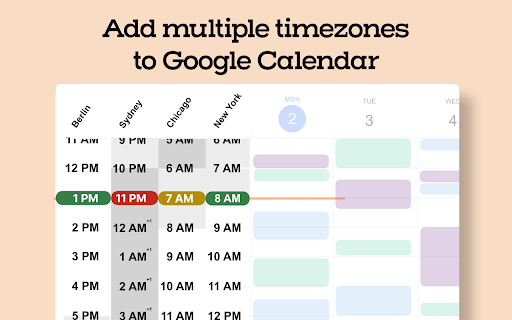
1️⃣ Add Multiple Timezones to Google Calendar
Search for a place or timezone and Sundial adds that timezone to Google Calendar. Add as many as you need. Rename them as you'd like. Reorder them whenever.

2️⃣ Share Times From Time Blocks
Turn "Share times" on in the sidebar. Then drag time blocks on your calendar. Sundial turns them into copyable text, and can adjust it to any timezone. No more timezone mistakes. Here's an example of the text:

Mon: Jan 2: 9-11am EST
Tue, Jan 3: 8-9am EST

Need to adjust to another timezone? Search for a place or timezone in the Sundial, and your copyable text updates instantly. Here’s how it looks:

Mon, Jan 2: 3-5pm CET / 9-11am EST
Tue, Jan 3: 2-3pm CET / 8-9am EST

3️⃣ Bulk Create Calendar Holds
Turn "Share times" on in the sidebar. Then drag the time blocks on your calendar where you want the holds to be placed and click "Create holds". Add your event details as normal and once ready, click "Save holds". Sundial will save the calendar holds for each selected time all at once.

4️⃣ Bulk Delete Calendar Holds
Click on any existing event with the word "Hold" in the title. Then click "Select holds to delete." Sundial displays all holds with the matching title, allowing you to quickly select and delete the ones you want.

5️⃣ Reusable Workspaces
Save your commonly used calendar setups (calendars, timezones, and layout) as reusable workspaces. Open them with one click. Name them to stay organized.

6️⃣ Highlight Events with Issues
Instantly highlight calendar events for missing video links, rooms, guests not attending, etc.

7️⃣ Export Events to Google Sheet (Calendar Audit)
Export events to a Google Sheet in a single click – formatted for a calendar audit and instantly ready for your customization and review.

8️⃣ See Proposed Times Overlaid on Your Calendar
Give Sundial dates and times mentioned in text and it visually displays them on your calendar. No more remembering proposed times or timezone conversions.

➡️ Sundial Pricing
- Free Plan: 75 credits per month. That's about 10 meetings. Most actions use 1 credit.
- See paid plans at www.trysundial.ai/pricing

Thank you for trying Sundial. I hope you find it helpful!

➡️ Terms and Conditions
We collect your email address after you sign up. There is no other personal information that we collect. We never share or sell your information. We also track which features you use and how often you use them, solely to improve the extension and enhance your experience.

By installing the extension, you agree to and acknowledge:
www.trysundial.ai/terms-of-service
www.trysundial.ai/privacy
Here's how Sundial works:

After installing and signing up, Sundial appears in the left column of Google Calendar.

1️⃣ Add Multiple Timezones to Google Calendar
Search for a place or timezone and Sundial adds that timezone to Google Calendar. Add as many as you need. Rename them as you'd like. Reorder them whenever.

2️⃣ Share Times From Time Blocks
Turn "Share times" on in the sidebar. Then drag time blocks on your calendar. Sundial turns them into copyable text, and can adjust it to any timezone. No more timezone mistakes. Here's an example of the text:

Mon: Jan 2: 9-11am EST
Tue, Jan 3: 8-9am EST

Need to adjust to another timezone? Search for a place or timezone in the Sundial, and your copyable text updates instantly. Here’s how it looks:

Mon, Jan 2: 3-5pm CET / 9-11am EST
Tue, Jan 3: 2-3pm CET / 8-9am EST

3️⃣ Bulk Create Calendar Holds
Turn "Share times" on in the sidebar. Then drag the time blocks on your calendar where you want the holds to be placed and click "Create holds". Add your event details as normal and once ready, click "Save holds". Sundial will save the calendar holds for each selected time all at once.

4️⃣ Bulk Delete Calendar Holds
Click on any existing event with the word "Hold" in the title. Then click "Select holds to delete." Sundial displays all holds with the matching title, allowing you to quickly select and delete the ones you want.

5️⃣ Reusable Workspaces
Save your commonly used calendar setups (calendars, timezones, and layout) as reusable workspaces. Open them with one click. Name them to stay organized.

6️⃣ Highlight Events with Issues
Instantly highlight calendar events for missing video links, rooms, guests not attending, etc.

7️⃣ Export Events to Google Sheet (Calendar Audit)
Export events to a Google Sheet in a single click – formatted for a calendar audit and instantly ready for your customization and review.

8️⃣ See Proposed Times Overlaid on Your Calendar
Give Sundial dates and times mentioned in text and it visually displays them on your calendar. No more remembering proposed times or timezone conversions.

➡️ Sundial Pricing
- Free Plan: 75 credits per month. That's about 10 meetings. Most actions use 1 credit.
- See paid plans at www.trysundial.ai/pricing

Thank you for trying Sundial. I hope you find it helpful!

➡️ Terms and Conditions
We collect your email address after you sign up. There is no other personal information that we collect. We never share or sell your information. We also track which features you use and how often you use them, solely to improve the extension and enhance your experience.

By installing the extension, you agree to and acknowledge:
www.trysundial.ai/terms-of-service
www.trysundial.ai/privacy

The use of raw or derived user data received from Workspace APIs will adhere to the Google User Data Policy, including the Limited Use requirements.
Permissions & access
- Permissions
- storagebackgroundactiveTabscripting
- Host access
- https://calendar.google.com/*
Screenshots


About
Here's how Sundial works:

After installing and signing up, Sundial appears in the left column of Google Calendar.

1️⃣ Add Multiple Timezones to Google Calendar
Search for a place or timezone and Sundial adds that timezone to Google Calendar. Add as many as you need. Rename them as you'd like. Reorder them whenever.

2️⃣ Share Times From Time Blocks
Turn "Share times" on in the sidebar. Then drag time blocks on your calendar. Sundial turns them into copyable text, and can adjust it to any timezone. No more timezone mistakes. Here's an example of the text:

Mon: Jan 2: 9-11am EST
Tue, Jan 3: 8-9am EST

Need to adjust to another timezone? Search for a place or timezone in the Sundial, and your copyable text updates instantly. Here’s how it looks:

Mon, Jan 2: 3-5pm CET / 9-11am EST
Tue, Jan 3: 2-3pm CET / 8-9am EST

3️⃣ Bulk Create Calendar Holds
Turn "Share times" on in the sidebar. Then drag the time blocks on your calendar where you want the holds to be placed and click "Create holds". Add your event details as normal and once ready, click "Save holds". Sundial will save the calendar holds for each selected time all at once.

4️⃣ Bulk Delete Calendar Holds
Click on any existing event with the word "Hold" in the title. Then click "Select holds to delete." Sundial displays all holds with the matching title, allowing you to quickly select and delete the ones you want.

5️⃣ Reusable Workspaces
Save your commonly used calendar setups (calendars, timezones, and layout) as reusable workspaces. Open them with one click. Name them to stay organized.

6️⃣ Highlight Events with Issues
Instantly highlight calendar events for missing video links, rooms, guests not attending, etc.

7️⃣ Export Events to Google Sheet (Calendar Audit)
Export events to a Google Sheet in a single click – formatted for a calendar audit and instantly ready for your customization and review.

8️⃣ See Proposed Times Overlaid on Your Calendar
Give Sundial dates and times mentioned in text and it visually displays them on your calendar. No more remembering proposed times or timezone conversions.

➡️ Sundial Pricing
- Free Plan: 75 credits per month. That's about 10 meetings. Most actions use 1 credit.
- See paid plans at www.trysundial.ai/pricing

Thank you for trying Sundial. I hope you find it helpful!

➡️ Terms and Conditions
We collect your email address after you sign up. There is no other personal information that we collect. We never share or sell your information. We also track which features you use and how often you use them, solely to improve the extension and enhance your experience.

By installing the extension, you agree to and acknowledge:
www.trysundial.ai/terms-of-service
www.trysundial.ai/privacy

The use of raw or derived user data received from Workspace APIs will adhere to the Google User Data Policy, including the Limited Use requirements.
Technical
- Version
- 2.12.9
- Manifest
- V3
- Size
- 581KiB
- Min Chrome
- 88
- Languages
- 1
- Featured
- Yes
Metadata
- ID
- dkcgdknimgiffognmpiheegpfkkmcapk
- Developer ID
- u5b0b0f5feb108e1735be356acd5b6236
- Developer Email
- [email protected]
- Created
- Apr 7, 2023
- Last Updated (Store)
- Jun 19, 2026
- Last Scraped
- Jun 21, 2026
- Website
- trysundial.ai
- Support URL
- —
- Privacy Policy
- https://trysundial.ai/privacy
Similar extensions
Alternatives to Sundial: Google Calendar Reimagined for Enterprise Schedulers, ranked by description similarity.

SideTimeTable
A side panel extension that shows your today's events.
146
★ 5.0

Scheduling Calendar
This Scheduling Calendar: Manage events, calendar reminders & sync calendars. Join video meetings in a shared calendar app.
5.0K
★ 4.5

Add to Calendar
Add events to Google Calendar directly from selected text.
98
★ 2.5

Overlappr - Timezone Extension for Google Calendar
Add multiple timezones to Google Calendar and share available slots in just 3 clicks.
69
★ 5.0

Timebar: A world clock and meeting planner for your side panel
Convert time zones, plan meetings & create calendars events from the side panel. Works with Google, Apple, Outlook & more calendars.
210
★ 5.0

Daily Planner
Manage daily tasks with a beautiful calendar. Add tasks with date/time, view on monthly calendar, and mark as completed.
60
★ 5.0

Extra Time Zones for Google Calendar
Add multiple timezones to Google Calendar
109
★ 4.0

Calendar Check
Find optimal meeting times by checking calendar availability
3
Data sourced from the Chrome Web Store · last verified Jun 21, 2026.