
SRead
AI-Powered Smart Reading Assistant
As of May 2026, SRead has 119 users and a 5.00/5 rating from 2 reviews in the Productivity category.
Usersup 60.8 percent+60.8%
119
119
Ratingno change0%
5.00
2 reviews
Reviewsno change0%
2
Version
1.4
Manifest V3
History
3 snapshotsTracking since Apr 1, 2026.
View as table
| Date | Users | Rating | Reviews | Version |
|---|---|---|---|---|
| Apr 1, 2026 | 74 | 5.00 | 2 | 1.4 |
| May 1, 2026 | 68 | 5.00 | 2 | 1.4 |
| May 30, 2026 | 80 | 5.00 | 2 | 1.4 |
| Now | 119 | 5.00 | 2 | 1.4 |
Permissions & access
- Permissions
- activeTabwebNavigationtabsstorage
- Host access
- http://*/*, https://*/*
Screenshots

About
Introduction

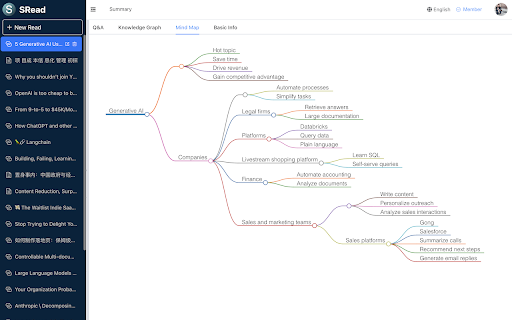
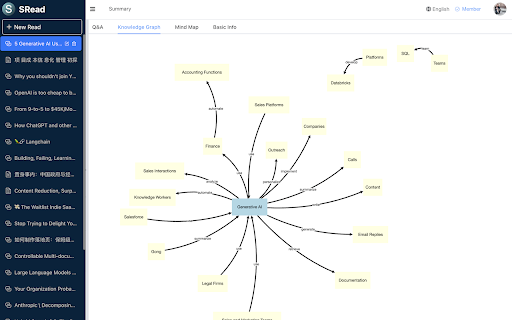
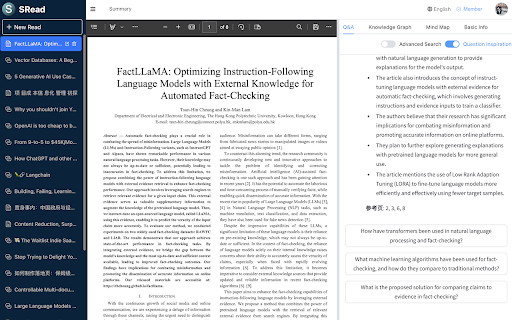
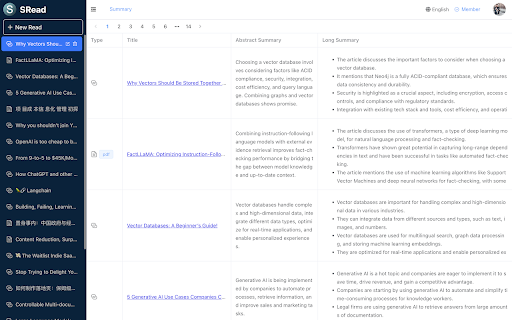
SRead is a smart reading assistant, whether you enjoy reading articles or viewing electronic papers, you can utilize SRead for assisted reading. SRead supports intelligent summarization, capable of extracting key information from the reading material and summarizing it; additionally, it can perform intelligent Q&A, answering any relevant information within the article. Moreover, SRead's mind map feature can help readers quickly grasp the outline of the entire piece.

Chrome Extension

The new Chrome extension of SRead brings a major upgrade to the browser reading experience. Once this extension is installed, users can directly enjoy all the features of SRead on Chrome browser without the need to download any additional applications. This extension includes a simplified toolbar, making it easy for users to quickly access the intelligent summarization, intelligent Q&A, and mind-mapping features while reading. Another important feature of this extension is that it can automatically recognize web page content, providing real-time intelligent assistance to users, making the reading experience smoother and more efficient.

Installation and Usage

Installing the SRead Chrome extension is very straightforward. Users first need to log on to the SRead website (https://sread.ai), and register/login with Gmail or WeChat. Then visit the Chrome Web Store, search for "SRead", and click the "Add to Chrome" button. Once the installation is complete, the SRead icon will appear on the toolbar, clicking the icon activates the extension and users can start using it.

Online Reading Examples

The SRead Chrome extension can be used for browsing online articles. For instance, when you are reading a technical blog, just navigate to the page of the article, then click the SRead Chrome extension icon, its intelligent summarization feature can help you quickly understand the main points of the article. Meanwhile, if there are contents in the article that you do not understand, you can directly use the intelligent Q&A feature without leaving the current page.
Technical
- Version
- 1.4
- Manifest
- V3
- Size
- 138KiB
- Min Chrome
- 88
- Languages
- 1
- Featured
- No
Metadata
- ID
- djkpliikoblbphjhnifhlmadkednkmlk
- Developer ID
- u6f3bd492cc9673c3ae0fab25627aad73
- Developer Email
- [email protected]
- Created
- Oct 17, 2023
- Last Updated (Store)
- Oct 25, 2023
- Last Scraped
- May 30, 2026
- Website
- —
- Support URL
- —
- Privacy Policy
- https://sread.ai/privacy
Similar extensions
Alternatives to SRead, ranked by description similarity.

ReadSmart
A Chrome extension to summarize web content.
9
★ 5.0

Smart Reader
Introducing Smart Reader: Your Ultimate Reading Companion
Say goodbye to eye strain and hello to effortless reading with Smart…
10

SpeedRead
Speed reading tool with context menu integration
130

Readfast
Get concise summaries of any webpage. Choose language, length, and bullet points.
4

Intelligible Readers
Read out loud user-selected text.
3

ReadScore
Analyze readability, generate AI summaries, and use focused reading tools.
9
★ 5.0

Side Reader
Read PDF beside ChatGPT, Claude and Deepseek.
841
★ 5.0

Article Summarizer with OpenAI
Instantly summarize and analyze web articles using OpenAI's powerful language models and Mozilla's Readability.
5
★ 5.0
Data sourced from the Chrome Web Store · last verified May 30, 2026.