
Tailwind CSS Inspector - Visual Design Analyzer & Code Exporter
Inspect CSS visually. Extract colors, fonts, spacing. Export to Tailwind CSS & React components. Built for frontend developers.
As of June 2026, Tailwind CSS Inspector - Visual Design Analyzer & Code Exporter has 26 users in the Developer Tools category.
Usersup 62.5 percent+62.5%
26
26
Ratingno change0%
—
— reviews
Reviewsno change0%
—
Version
1.0.1
Manifest V3
History
7 snapshotsTracking since Apr 1, 2026.
View as table
| Date | Users | Rating | Reviews | Version |
|---|---|---|---|---|
| Apr 1, 2026 | 16 | — | — | 1.0.1 |
| Apr 16, 2026 | 15 | — | — | 1.0.1 |
| Apr 23, 2026 | 18 | — | — | 1.0.1 |
| Apr 30, 2026 | 19 | — | — | 1.0.1 |
| May 7, 2026 | 18 | — | — | 1.0.1 |
| May 23, 2026 | 22 | — | — | 1.0.1 |
| Jun 2, 2026 | 20 | — | — | 1.0.1 |
| Now | 26 | — | — | 1.0.1 |
Permissions & access
- Permissions
- storageactiveTabscripting
- Host access
- None declared
Screenshots




About
🎨 **Tailwind CSS Inspector** is a visual CSS inspection tool that lets you analyze any website's design and export it as Tailwind CSS classes or React components. Built for frontend developers who work with Tailwind CSS.

### ✨ FREE Features

**Smart Inspector**
Hover over any element to see its complete styles:
- Typography: font family, size, weight, line-height
- Colors: text and background with HEX codes
- Spacing: padding and margins visualized
- Dimensions: width and height
- Layout: flexbox and grid properties

**Color Picker**
- Pick colors from any website with pixel precision
- 11x11 magnifier grid for accurate selection
- Click to copy HEX codes instantly

**Keyboard Shortcuts**
- Press **B** to lock the inspector panel
- Press **T** to toggle transparent mode
- Press **ESC** to stop inspecting

---

### 🚀 PRO Features ($5 Lifetime)

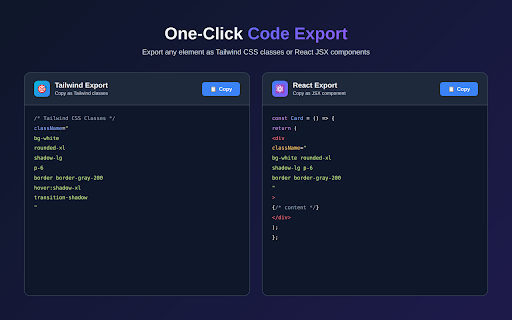
**Tailwind CSS Export**
Convert any element's styles to Tailwind classes with one click:
- Automatic pixel-to-Tailwind conversion (16px → `p-4`)
- Intelligent color matching with Tailwind's palette
- Complete utility class coverage
- Supports spacing, typography, colors, layout, borders, shadows

**React Component Export**
Generate production-ready JSX snippets:
- Clean JSX syntax with Tailwind classes
- Proper `className` attributes
- Preserves HTML structure
- Ready for Next.js, React, or any JSX project

**Style Guide Generator**
Extract design systems from any webpage:
- All colors used on the page with HEX codes
- All fonts with weights and sizes
- Export as JSON or Tailwind config
- Perfect for design documentation

**Asset Grabber**
Download images and graphics:
- All images (JPG, PNG, WebP, SVG)
- CSS background images
- Bulk download with one click
- Preview thumbnails with dimensions

---

### 🎯 Who Is This For?

**Frontend Developers**
- Build with Tailwind CSS faster
- Convert designs to code quickly
- Learn Tailwind patterns from real websites

**UI/UX Designers**
- Extract color palettes and typography
- Analyze competitor designs
- Document design systems

**Teams**
- Speed up design-to-code handoffs
- Standardize component libraries
- Maintain design consistency

---

### 🔒 Privacy

Tailwind CSS Inspector works entirely locally in your browser. No data is sent to external servers. The only network request is for payment verification (ExtensionPay).

---

### ⚡ How It Works

1. Click the extension icon
2. Click "Start Inspecting"
3. Hover over any element on any website
4. See instant style information
5. (Pro) Click "Copy Tailwind" or "Export React"

---

### ❓ FAQ

**Does this work on all websites?**
Yes, on any HTTP/HTTPS website. Does not work on Chrome internal pages.

**Is the Pro license a subscription?**
No. $5 one-time payment for lifetime access. No recurring fees.

**Can I get a refund?**
Yes, refunds are available through ExtensionPay within a reasonable period.

**How is this different from DevTools?**
Faster workflow, automatic Tailwind conversion, React export, and cleaner interface designed for modern development.

---

### 📦 What's Included

**FREE:**
- Visual CSS inspector
- Color picker with magnifier
- Pin and transparent modes
- Keyboard shortcuts
- Works on all websites

**PRO ($5 one-time):**
- Tailwind CSS export
- React/JSX component export
- Style Guide generator
- Asset Grabber
- Lifetime updates
Technical
- Version
- 1.0.1
- Manifest
- V3
- Size
- 61.83KiB
- Min Chrome
- 88
- Languages
- 1
- Featured
- No
Metadata
- ID
- digmihpmghcpclnfiaafnejoncphfcjo
- Developer ID
- u40a93bf94b33aa489c7723e9afad1603
- Developer Email
- [email protected]
- Created
- Jan 30, 2026
- Last Updated (Store)
- Feb 2, 2026
- Last Scraped
- Jun 2, 2026
- Website
- —
- Support URL
- —
- Privacy Policy
- https://delightful-crostata-966692.netlify.app/
Similar extensions
Alternatives to Tailwind CSS Inspector - Visual Design Analyzer & Code Exporter, ranked by description similarity.

CSS Detective
Inspect, Copy & Clean CSS professionally with Pro features.
1
★ 5.0

Tailwind Inspector
Easily inspect and edit Tailwind CSS classes on web pages for rapid prototyping and debugging
185
★ 3.5

Style Scope
Inspect and edit Tailwind CSS classes in real-time.
3
★ 5.0

TailwindSight — Inspect & Edit Tailwind CSS in Real-Time
Instantly inspect, view, and modify Tailwind CSS classes on any webpage with live suggestions and undo/redo support.
43
★ 5.0

Tail Lens for Tailwind: Inspect, Edit, and Build Tailwind CSS Visually
Inspect. Edit. Build. Tailwind, right in your browser.
747
★ 4.0

DivToDesign — Clean CSS Inspector & Editor
Point & click to extract clean CSS. Built-in Tailwind export & Figma copy. No browser defaults, just clean code.
5

Built with Tailwind CSS
Built with Tailwind CSS is a Chrome Extension that identifies the usage of Tailwind CSS in web pages.
534

Tailwind CSS Inspector: Color Picker & Contrast
Extract colors and images, generate Tailwind CSS palettes, check WCAG contrast ratios, and inspect elements in real-time.
41
Data sourced from the Chrome Web Store · last verified Jun 2, 2026.