
Website Theme Manager
Change your desired website's look! Choose your style from userstyles.org or write your own!
As of June 2026, Website Theme Manager has 386 users and a 2.33/5 rating from 3 reviews in the Productivity category.
Usersup 13.9 percent+13.9%
386
386
Ratingno change0%
2.33
3 reviews
Reviewsno change0%
3
Version
0.1.9
Manifest V3
History
9 snapshotsTracking since Apr 1, 2026.
View as table
| Date | Users | Rating | Reviews | Version |
|---|---|---|---|---|
| Apr 1, 2026 | 339 | 2.33 | 3 | 0.1.9 |
| Apr 11, 2026 | 335 | 2.33 | 3 | 0.1.9 |
| Apr 21, 2026 | 358 | 2.33 | 3 | 0.1.9 |
| Apr 26, 2026 | 391 | 2.33 | 3 | 0.1.9 |
| May 3, 2026 | 381 | 2.33 | 3 | 0.1.9 |
| May 11, 2026 | 380 | 2.33 | 3 | 0.1.9 |
| May 20, 2026 | 410 | 2.33 | 3 | 0.1.9 |
| May 30, 2026 | 405 | 2.33 | 3 | 0.1.9 |
| Jun 7, 2026 | 394 | 2.33 | 3 | 0.1.9 |
| Now | 386 | 2.33 | 3 | 0.1.9 |
Permissions & access
- Permissions
- storageunlimitedStorage
- Host access
- *://*/*
Screenshots



About
Website Theme Manager customizes a website(s) appearance; you can choose your desired style from the userstyles.org website or write your own.

Note: "Website Theme Manager" addon is NOT affiliated with the userstyles.org website at all. But, users can choose desired styles available in userstyles.org and use them with this addon.

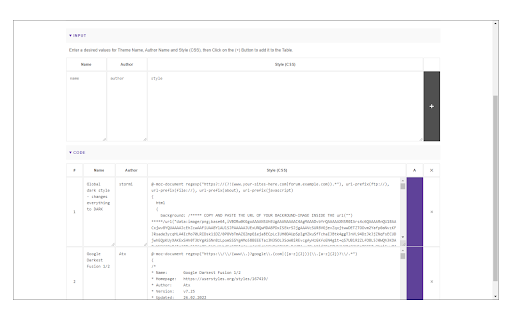
Once you install the addon, please visit userstyles.org and find your desired theme, then click on "Add this Theme" (appears only after you install Website Theme Manager). The theme will be automatically added to the extension's options page, where you can easily edit, remove or inactivate it.

Few features:
1. Enables you to easily manage (add, edit or remove) styles.
2. Enhances your browsing experience by allowing you to customize the way a website looks.
3. By using custom styles (CSS) you can change colors, fonts, and almost all HTML contents within a page; meaning completely redesigning the entire page.
4. To add styles, there are two options available:
   a. writing your custom style (CSS) or
   b. adding it from the userstyles.org site.
5. Toolbar button can easily enable or disable the extension.
6. An example of how to add a style is available on the options page (top-section).

To report bugs, please visit the addon's homepage (http://mybrowseraddon.com/website-theme-manager.html) and fill out the bug report form.
Technical
- Version
- 0.1.9
- Manifest
- V3
- Size
- 50.56KiB
- Min Chrome
- 88
- Languages
- 1
- Featured
- No
Metadata
- ID
- dhkeofcjnldbphkhkdgjbnhfiaholpal
- Developer ID
- u0578d563c46b9ab00e7b5234949da0da
- Developer Email
- [email protected]
- Created
- Oct 1, 2016
- Last Updated (Store)
- Jan 27, 2026
- Last Scraped
- Jun 7, 2026
- Website
- —
- Privacy Policy
- —
Similar extensions
Alternatives to Website Theme Manager, ranked by description similarity.

Custom Dark Mode
Customize your dark mode for the web!
2.0K
★ 3.8

Custom CSS Styler
Apply custom CSS to specific sites and their subdomains.
62
style customizer
You can customize the style of any website
5

Page to Sidebar
See your desired website in the browser side panel.
1.0K
★ 3.5

Website Customizer: Add Custom Style and CSS
This Chrome extension is designed to modify the visual presentation of websites by adding custom CSS.
664
★ 5.0

Dark Mode
A global dark theme for the web.
2.0M
★ 3.6

Stylish - Custom CSS for Any Website
Stylish – Custom CSS for Any Website is a lightweight tool that lets you create, preview, and manage your own CSS rules for any…
95

Dark Theme for YouTube™
A Dark and Smooth Theme for YouTube
10.0K
★ 3.6
Data sourced from the Chrome Web Store · last verified Jun 7, 2026.