
Website Customizer: Add Custom Style and CSS
This Chrome extension is designed to modify the visual presentation of websites by adding custom CSS.
As of May 2026, Website Customizer: Add Custom Style and CSS has 664 users and a 5.00/5 rating from 2 reviews in the Productivity category.
Usersup 5.9 percent+5.9%
664
664
Ratingno change0%
5.00
2 reviews
Reviewsno change0%
2
Version
1.0.2
Manifest V3
History
2 snapshotsTracking since Apr 26, 2026.
View as table
| Date | Users | Rating | Reviews | Version |
|---|---|---|---|---|
| Apr 26, 2026 | 627 | 5.00 | 2 | 1.0.2 |
| May 23, 2026 | 651 | 5.00 | 2 | 1.0.2 |
| Now | 664 | 5.00 | 2 | 1.0.2 |
Permissions & access
- Permissions
- storagetabs
- Host access
- None declared
Screenshots

About
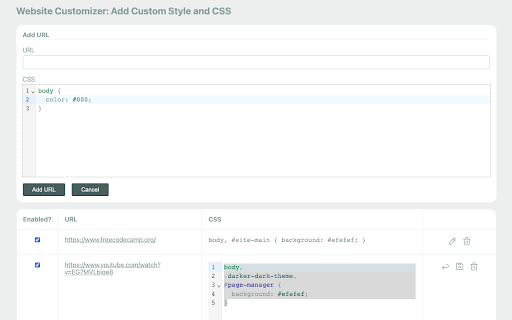
This Chrome extension is designed to modify the visual presentation of websites by adding custom CSS and styles. It provides users with the ability to customize the appearance of web pages according to their preferences. Through the extension's features, users can adjust various design elements, including colors, fonts, spacing, and layout. By leveraging the extension's capabilities, users can tailor the visual experience of websites to better suit their individual needs and preferences.

Features: ⭐

1. Add CSS for one or more site URLs.

2.  Add CSS to a group of URLs, such as an entire domain name.

3. Enable/disable CSS rules without removing them.

4. Manage URLs in the extension popup or as a list on the options page.

5. CSS code highlighting and line numbers.

6. Synchronization of data between devices.

7. Secure and Privacy-Focused 🛡️: privacy is a top priority. The extension does not track or store user data, ensuring a secure and private browsing experience.

How to Use: 📔

1. Start by installing the extension from the Chrome Web Store.

2. After installation, you should see the extension's icon in the Chrome toolbar, typically located in the top-right corner of your browser. It might look like a puzzle piece, a gear, or another icon, depending on your browser version and theme.

3. Click on it and pin the extension to the top bar.

4. Click on the extension icon to open the popup.

5. To manage all URLs, right click on the extension icon and click on options button.
Technical
- Version
- 1.0.2
- Manifest
- V3
- Size
- 1.45MiB
- Min Chrome
- 88
- Languages
- 1
- Featured
- No
Metadata
- ID
- fkalddeiajcbillpneihgciamnjpejnc
- Developer ID
- u3bc1f8255e2873f1f6ec0dfffcfc66fb
- Developer Email
- [email protected]
- Created
- Aug 24, 2023
- Last Updated (Store)
- Oct 13, 2023
- Last Scraped
- May 23, 2026
- Website
- —
- Support URL
- —
- Privacy Policy
- —
Similar extensions
Alternatives to Website Customizer: Add Custom Style and CSS, ranked by description similarity.

Stylish - Custom CSS for Any Website
Stylish – Custom CSS for Any Website is a lightweight tool that lets you create, preview, and manage your own CSS rules for any…
95

Custom CSS Styler
Apply custom CSS to specific sites and their subdomains.
62
style customizer
You can customize the style of any website
5

CSS Inspector
Activate this extension to view any information in a CSS-formatted pop-up with one click.
1.0K

Element Modifier Pro
Modify HTML element attributes, styles, and properties on any website
9

Website Editor
Edit webpage text directly
105
★ 5.0

ColorMate
Colorize text lines on websites based on custom rules
5
★ 5.0

Web à la Carte
Your web, your rules. Customize any website with split-screen viewing, smart search, element removal, and privacy protection.
35
★ 5.0
Data sourced from the Chrome Web Store · last verified May 23, 2026.