
Oversized Monitor Guru (OMG)
Transform your large monitor into a professional screen sharing experience!
As of May 2026, Oversized Monitor Guru (OMG) has 43 users and a 5.00/5 rating from 1 reviews in the Communication category.
Usersup 43.3 percent+43.3%
43
43
Ratingno change0%
5.00
1 reviews
Reviewsno change0%
1
Version
1.0
Manifest V3
History
5 snapshotsTracking since Apr 1, 2026.
View as table
| Date | Users | Rating | Reviews | Version |
|---|---|---|---|---|
| Apr 1, 2026 | 30 | 5.00 | 1 | 1.0 |
| Apr 21, 2026 | 35 | 5.00 | 1 | 1.0 |
| May 6, 2026 | 35 | 5.00 | 1 | 1.0 |
| May 17, 2026 | 40 | 5.00 | 1 | 1.0 |
| May 31, 2026 | 44 | 5.00 | 1 | 1.0 |
| Now | 43 | 5.00 | 1 | 1.0 |
Permissions & access
- Permissions
- storage
- Host access
- None declared
Screenshots



About
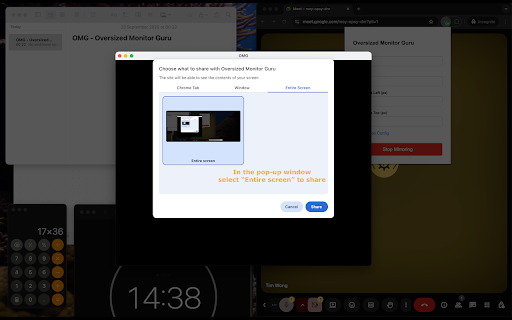
Oversized Monitor Guru (OMG) solves the frustrating problem of sharing content from massive displays in video conferences. When you have a large monitor, sharing your entire screen makes content appear tiny and unreadable for meeting participants.

**What it does**

- Creates a customizable mirror window of any portion of your screen.
- Allows you to share only the relevant content area instead of your entire display.
- Works seamlessly with Google Meet, Microsoft Teams, Slack, and other conferencing apps.
- Provides precise control over mirror size, position, and quality settings.

**How it works**

1. Click the OMG extension icon.
2. Set your desired mirror area (width, height, position).
3. Start mirroring to create a dedicated window.
4. Share the mirror window in your video conference instead of your full screen.

Perfect for developers sharing code, designers presenting mockups, analysts showing data, or anyone who needs to share specific content from a large display. Stop making your audience squint - make your presentations crystal clear!
Technical
- Version
- 1.0
- Manifest
- V3
- Size
- 416KiB
- Min Chrome
- 88
- Languages
- 1
- Featured
- No
Metadata
- ID
- dhghddapjaemcpdfnfgpmgcjojfmhbak
- Developer ID
- u059813ac0ceff81156e9d297384df2ff
- Developer Email
- [email protected]
- Created
- Sep 23, 2025
- Last Updated (Store)
- Sep 23, 2025
- Last Scraped
- May 31, 2026
- Website
- —
- Support URL
- —
- Privacy Policy
- —
Similar extensions
Alternatives to Oversized Monitor Guru (OMG), ranked by description similarity.

Screenchair
Share your screen with anyone.
30
★ 5.0

Google Meet Pantalla Completa
Enable full screen for Google Meet / Habilita pantalla completa en Google Meet
7

OnePgr
OnePgr Video Meetings & Messaging
OnePgr is a powerful communication tool that allows you to host video meetings, send messages,…
5
★ 5.0

OnePgr
OnePgr Video Meetings & Messaging
OnePgr is a powerful communication tool that allows you to host video meetings, send messages,…
11
★ 5.0

cameloop
Loop Your Camera in Meetings and Show Gifs Reaction by Using AI Hand Gestures Recognition
117
★ 5.0

Google Meet - Global Shortcuts
Control your microphone/camera, raised hand, and reactions in Google Meet meetings even when you're in other tabs
171
★ 4.0
CrankWheel Screen Sharing
Easier screen sharing. No app needed for viewers, even on their mobile. Record your screen or webcam.
50.0K
★ 4.8

Google Meet Spotlight
Feature each person separately in their own window during Google Meet.
5
Data sourced from the Chrome Web Store · last verified May 31, 2026.