
Screener Transcript Helper
Adds a button to ask questions about PDF transcripts found on Screener.in.
As of May 2026, Screener Transcript Helper has 31 users and a 5.00/5 rating from 3 reviews in the Workflow & Planning category.
Usersup 6.9 percent+6.9%
31
31
Ratingno change0%
5.00
3 reviews
Reviewsno change0%
3
Version
1.2
Manifest V3
History
4 snapshotsTracking since Apr 1, 2026.
View as table
| Date | Users | Rating | Reviews | Version |
|---|---|---|---|---|
| Apr 1, 2026 | 29 | 5.00 | 3 | 1.2 |
| Apr 21, 2026 | 28 | 5.00 | 3 | 1.2 |
| May 6, 2026 | 28 | 5.00 | 3 | 1.2 |
| May 31, 2026 | 29 | 5.00 | 3 | 1.2 |
| Now | 31 | 5.00 | 3 | 1.2 |
Permissions & access
- Permissions
- storage
- Host access
- https://*.screener.in/*, https://*.vercel.app/*
Screenshots
About
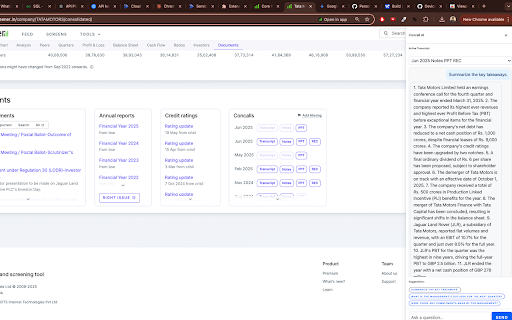
This project is a sophisticated AI-powered tool designed to enhance the user experience on the `screener.in` website by allowing users to "chat" with financial documents. The system consists of two main components: a frontend Chrome Extension and a backend Python API deployed on the cloud.

### Key Features

* **Integrated UI**: Injects a sleek, modern sidebar directly into the `screener.in` webpage, creating a seamless user experience.
* **Automatic Document Detection**: Automatically finds the 10 most recent "Concall" transcripts on the page and populates them in a dropdown for easy selection.
* **AI-Powered Chat**: Allows users to ask questions in natural language about the selected transcript and receive answers generated by the GPT-4 model.
* **Suggested Questions**: Provides users with one-click suggested questions to initiate the conversation with the document.
* **Cloud-Native Backend**: The API is designed to be deployed as a serverless function on Vercel for scalability and reliability.

### Frontend (Chrome Extension)

The frontend is a Chrome Extension built with JavaScript that modifies the `screener.in` website. Its core logic resides in `content.js`, which is responsible for injecting the sidebar UI, finding the relevant transcripts, handling user input from the chat interface, and communicating with the backend API. While it includes files for a browser popup (`popup.html`, `popup.js`), the primary interface is the sidebar.

### Backend (AI API)

The backend is a Python API built using the FastAPI framework. It exposes a single `/ask` endpoint that performs the following actions:
1.  Receives a PDF URL and a question from the frontend.
2.  Downloads the PDF content into memory.
3.  Uses the `PyMuPDF` library (`fitz`) to extract text from the in-memory data.
4.  Constructs a prompt containing the transcript text and the user's question.
5.  Sends the prompt to the OpenAI GPT-4 model to generate a relevant answer.
6.  Returns the answer to the frontend to be displayed in the chat window.

The API includes CORS middleware to allow requests from the Chrome extension.
Technical
- Version
- 1.2
- Manifest
- V3
- Size
- 22.7KiB
- Min Chrome
- 88
- Languages
- 1
- Featured
- No
Metadata
- ID
- dhblhhdhopbjbodknlkaajhbjefaoogf
- Developer ID
- ub873a1be0db881697309c06d66dc6032
- Developer Email
- [email protected]
- Created
- Jun 25, 2025
- Last Updated (Store)
- Jun 26, 2025
- Last Scraped
- May 31, 2026
- Website
- —
- Support URL
- —
Similar extensions
Alternatives to Screener Transcript Helper, ranked by description similarity.
ChatGPT+ Extension
Access OpenAI's API from anywhere on the web
1.0K
★ 5.0

FrogGPT
Connect to your openai.com account and use ChatGPT on any webpage.
26

ChatGPT for Chrome
Display ChatGPT (or Bard) response alongside search engine results
351
★ 4.3

SurfGPT: Chat with any website!
A ChatGPT powered extension which lets you ask contextual questions on any website.
573
★ 4.4

Search GPT for Chrome
Get ChatGPT responses on any website. AI replies work on Google, Gmail, & 10M+ websites. It's free & privacy first. GPT everywhere
10.0K
★ 4.8
ChatGPT UI Settings
Chrome extensions for configuring and improving the usability of the ChatGPT user interface.
92
★ 5.0

ChatGPT Assistant - GPT Search
Enhanced OpenAI ChatGPT directly Google search response. Get access to ChatGPT on any website. Chat GPT everywhere.
423
★ 5.0

AI Squared Extension
AI Squared extension built using the airjs SDK
80
★ 5.0
Data sourced from the Chrome Web Store · last verified May 31, 2026.