
AI Detector - WAIZZ
The most reliable AI Detector. Instantly check if any text was written by ChatGPT, Gemini & others LLM in 1 click.
As of May 2026, AI Detector - WAIZZ has 18 users in the Productivity category.
Usersup 12.5 percent+12.5%
18
18
Ratingno change0%
—
— reviews
Reviewsno change0%
—
Version
1.0
Manifest V3
History
3 snapshotsTracking since Apr 21, 2026.
View as table
| Date | Users | Rating | Reviews | Version |
|---|---|---|---|---|
| Apr 21, 2026 | 16 | — | — | 1.0 |
| May 6, 2026 | 14 | — | — | 1.0 |
| May 18, 2026 | 20 | — | — | 1.0 |
| Now | 18 | — | — | 1.0 |
Permissions & access
- Permissions
- activeTabscriptingstorage
- Host access
- https://api.waizz.net/v1/*, <all_urls>
Screenshots
About
100% FREE AI DETECTOR, UNLIMITED USE
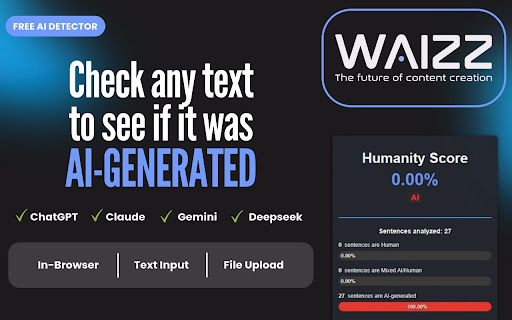
WAIZZ AI Detector is a completely free Chrome extension that checks whether a text has been written, entirely or partially, by a human or generated by artificial intelligence (ChatGPT, Gemini, Claude, or any other NLP Models). The analysis is performed from your browser’s sidebar, without leaving the page you’re viewing.

A PRECISE AND RELIABLE AI DETECTOR
Our algorithm detects the characteristic patterns of AI-generated text, sentence by sentence, and weighs them according to 8 algorithmic metrics that analyze the text as a whole, in order to provide the most accurate possible evaluation while minimizing false negatives and false positives.

THREE AVAILABLE ANALYSIS MODES
✅ Browser mode: select any text on a web page
✅ Text mode: paste content into the dedicated field in the interface
✅ File mode: upload a .txt, .pdf, or .docx document; the text is extracted automatically

EACH ANALYSIS GENERATES
• A weighted Humanity Score, indicating the estimated proportion of text written by a human → the higher the score, the stronger the probability that the text was written by a human
• Progress bars, showing the percentage of sentences detected as human, mixed (AI/human), or fully AI
• A detailed analysis area, where each sentence is color-coded according to its estimated category: Human, Mixed AI/Human, or AI

WHO IS THIS EXTENSION FOR?
• Content creators, bloggers, journalists: validate authenticity before publishing
• Teachers and trainers: verify assignments and submitted work
• Students: test your writing before submitting
• SEO, marketing, and communication professionals: assess the nature of web or commercial content
• Anyone concerned with verifying the authenticity of digital content

HOW TO USE WAIZZ AI DETECTOR
• Open the sidebar:  click the WAIZZ extension icon in your Chrome toolbar
• Choose your mode:
→ Browser: select a text on the web page
→ Text: click “Text” and paste your content
→ File: click “File” and select a .txt, .pdf, or .docx document from your computer
• (Optional) Change the language if it’s not your default
• Click Analyze: the button adapts: “Analyze Selection”, “Analyze Text”, or “Analyze File”
• View the results: Humanity Score, category, and detailed sentence-by-sentence analysis appear in the sidebar
TIP

Avoid analyzing short excerpts. The more complete the text, the more accurate the analysis will be.

100% FREE. NO ACCOUNT REQUIRED. UNLIMITED USE.
Add WAIZZ AI Detector to your browser and get a reliable analysis of your content’s authenticity.
Technical
- Version
- 1.0
- Manifest
- V3
- Size
- 767KiB
- Min Chrome
- 88
- Languages
- 7
- Featured
- No
Metadata
- ID
- dgiagegnjihjbdcllpgpnnhjmifbfkjf
- Developer ID
- u8dd55909161dce1af572d903ba5f3a1e
- Developer Email
- [email protected]
- Created
- May 7, 2025
- Last Updated (Store)
- May 7, 2025
- Last Scraped
- May 18, 2026
- Website
- waizz.net
- Support URL
- https://waizz.net/contact-us/
- Privacy Policy
- https://waizz.net/privacy-policy/
Similar extensions
Alternatives to AI Detector - WAIZZ, ranked by description similarity.

AI Text Detector
Analyze text patterns to help identify potential AI-generated content
9

AI Content Detector
Detect AI-generated content in web pages and custom text
25
★ 5.0

AI Content Detector - Copyleaks
Verify what content was written by a human or an AI chatbot with the AI Content Detector browser extension from Copyleaks.
200.0K
★ 4.1

AI Text Detector
Use AI text Detector as chatgpt checker: AI detection tool analyzes content on web pages and documents with chat gpt detector.
564
★ 5.0

AI or Not?
Analyze text to determine if it's AI-generated.
17

AI Content Detector - Free Plagiarism & AI Text Checker
Detect AI-generated content on webpages. Free AI detector for ChatGPT, GPT-4, Claude & more. Highlight AI text instantly.
73
★ 3.0

HumanText - AI Humanizer & Detector
Humanize AI text and detect AI content directly from any webpage. Works with ChatGPT, Claude, Gemini & more.
42

Trace GPT AI Detector by PlagiarismCheck.org
Check content, websites, and emails for AI presence with an accurate Trace GPT AI Detector by PlagiarismCheck.org
5.0K
★ 4.3
Data sourced from the Chrome Web Store · last verified May 18, 2026.