
AtCoder statement formatter
Chrome extension which help you copy formatted AtCoder statement
As of May 2026, AtCoder statement formatter has 16 users in the Workflow & Planning category.
Usersup 14.3 percent+14.3%
16
16
Ratingno change0%
—
— reviews
Reviewsno change0%
—
Version
1.0
Manifest V3
History
1 snapshotsTracking since Apr 24, 2026.
View as table
| Date | Users | Rating | Reviews | Version |
|---|---|---|---|---|
| Apr 24, 2026 | 14 | — | — | 1.0 |
| Now | 16 | — | — | 1.0 |
Permissions & access
- Permissions
- None declared
- Host access
- None declared
Screenshots
About
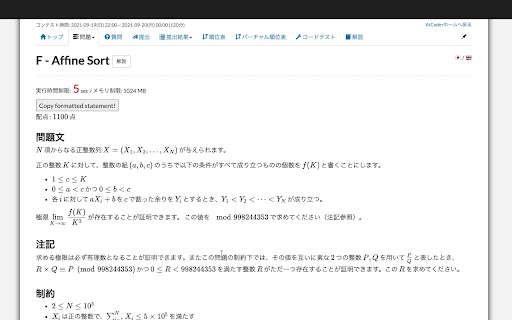
This extension adds a button to AtCoder problem which enables you to copy a formatted problem statement to your clipboard.
Technical
- Version
- 1.0
- Manifest
- V3
- Size
- 8.53KiB
- Min Chrome
- 88
- Languages
- 1
- Featured
- No
Metadata
- ID
- degekaggdanikgpjlcfkkdloajomjmkf
- Developer ID
- u8ce26d6c9fb1a41883b4944544d6c4a3
- Developer Email
- [email protected]
- Created
- Mar 19, 2023
- Last Updated (Store)
- Mar 19, 2023
- Last Scraped
- May 19, 2026
- Website
- —
- Support URL
- —
Similar extensions
Alternatives to AtCoder statement formatter, ranked by description similarity.

StackCopy
Adds a button for easily copying formatted code snippets from stackoverflow
6

ChatGPT: Copy Code Without Scrolling
Tired of scrolling up to 'Copy code' on ChatGPT? This extension adds a second button below code blocks for easy copying!
13

Jira Clipboard Helper
Copy Jira issue text and branch-ready names to your clipboard in one click.
32
★ 5.0

Codeforces Solutions
A chrome extension to get all submitted solutions of a particular problem.
How it works?
Download this extension.
Then browse any…
1.0K
★ 3.4

Jira Issue Copy
Easily copy a Jira issue id, title, or both, with the click of a button
10

Keep Problems
Save problem with link, name, difficulty, code and notes.
659
★ 4.8

ChatGPT CopyIt
ChatGPT CopyIt adds a copy to clipboard button end of each answer. Also it shows word and character counter.
579
★ 5.0

Quick URL copy
Copy current page URL and description to clipboard by hotkey (Ctrl+Alt+C)
83
★ 5.0
Data sourced from the Chrome Web Store · last verified May 19, 2026.