
DualPiP – PiP Player | ASR Live Captions · Subtitles & AI Translation
PiP player with ASR live captions, bilingual subtitles, AI translation, and danmaku. Supports YouTube, Netflix, Disney+, and more.
As of June 2026, DualPiP – PiP Player | ASR Live Captions · Subtitles & AI Translation has 20,000 users and a 4.75/5 rating from 174 reviews in the Workflow & Planning category.
Usersup 400.0 percent+400.0%
20.0K
20,000
Ratingdown 2.1 percent−2.1%
4.75
174 reviews
Reviewsup 27.0 percent+27.0%
174
Version
1.7.12
Manifest V3
90-day change · In the last 90 days this extension gained 16.0K users, 5 version updates, changed permissions.
History
15 snapshotsTracking since Apr 2, 2026.
View as table
| Date | Users | Rating | Reviews | Version |
|---|---|---|---|---|
| Apr 2, 2026 | 4.0K | 4.85 | 137 | 1.5.2 |
| Apr 6, 2026 | 4.0K | 4.85 | 142 | 1.5.2 |
| Apr 17, 2026 | 4.0K | 4.85 | 144 | 1.6.1 |
| Apr 22, 2026 | 5.0K | 4.83 | 149 | 1.6.1 |
| Apr 27, 2026 | 5.0K | 4.83 | 150 | 1.6.2 |
| May 7, 2026 | 5.0K | 4.82 | 153 | 1.6.2 |
| May 11, 2026 | 6.0K | 4.81 | 156 | 1.6.2 |
| May 15, 2026 | 6.0K | 4.82 | 157 | 1.6.2 |
| May 19, 2026 | 7.0K | 4.82 | 159 | 1.6.2 |
| May 23, 2026 | 7.0K | 4.82 | 160 | 1.6.2 |
| May 28, 2026 | 8.0K | 4.81 | 162 | 1.6.2 |
| Jun 2, 2026 | 9.0K | 4.81 | 162 | 1.6.2 |
| Jun 6, 2026 | 10.0K | 4.81 | 163 | 1.7.2 |
| Jun 11, 2026 | 10.0K | 4.81 | 163 | 1.7.4 |
| Jun 24, 2026 | 10.0K | 4.79 | 164 | 1.7.6 |
| Now | 20.0K | 4.75 | 174 | 1.7.12 |
Changelog
- Jun 24, 2026permissions
activeTab, commands, contextMenus, scripting, storage, unlimitedStorage, offscreen, declarativeNetRequestWithHostAccess, webRequest, tabCapture
activeTab, commands, contextMenus, scripting, storage, unlimitedStorage, offscreen, declarativeNetRequestWithHostAccess, webRequest
- Jun 2, 2026description
DualPiP – Picture-in-Picture Player with Dual Subtitles, Translation & Live Comments

Watch videos in Picture-in-Picture mode with dual subtitles, subtitle translation, live comments, thumbnail previews, and playback controls. Ideal for language learning, online courses, and multitasking.

# DualPiP v1.5 Release Notes

This update brings all-new in-page bilingual subtitles, letting you enjoy dual-language captions directly on web videos without entering Picture-in-Picture mode. We've also added multiple gesture controls and playback settings to significantly enhance your viewing experience.

--------------------------------------------------

What is DualPiP?

DualPiP is a Chrome extension designed for efficient video learning and an enhanced viewing experience.
It builds on the browser’s native Picture-in-Picture (PiP) functionality by adding advanced subtitle, translation, and interaction features, allowing you to clearly understand video content even in a floating window.

Whether you are watching foreign-language videos, online courses, TV shows, or live streams, DualPiP helps you stay focused and productive without switching tabs or interrupting your workflow.

--------------------------------------------------

Why choose DualPiP?

⚡ One-click Picture-in-Picture mode with support for major video platforms
🌍 Dual subtitles and subtitle translation, ideal for language learning and foreign-language content
💬 Live comments (danmaku) support, preserving interactive viewing experiences
🔒 Runs entirely locally with a privacy-first design and no data collection

--------------------------------------------------

Key Features

🎬 Enhanced Picture-in-Picture Player
Play videos in an independent floating window with full playback controls. Freely move and resize the window for true multitasking.

🌐 Dual Subtitles & Subtitle Translation
Automatically detects available subtitles and displays them in two languages, making it easier to understand foreign-language content across learning, educational, and international platforms.

🖼️ Timeline Thumbnail Preview
Hover over the progress bar in Picture-in-Picture mode to preview video thumbnails and quickly navigate to important moments.

💬 Live Comments (Danmaku)
Supports Bilibili, NicoNico, and selected live comment systems, displaying comments directly within the Picture-in-Picture window.

⚡ Keyboard Shortcuts & Optimized Controls
Configurable keyboard shortcuts and streamlined controls reduce mouse usage and improve overall viewing efficiency.

🛡️ Privacy & Security
All features run locally in your browser. No uploads, no tracking, and no analysis of your viewing activity.

--------------------------------------------------

Who is DualPiP for?

- Language learners and self-directed learners
- Viewers of online courses, lectures, and educational videos
- TV series, anime, and live stream enthusiasts
- Multitaskers who want to watch videos while working

--------------------------------------------------

With DualPiP, you can:

- Continue watching videos while coding, taking notes, or working
- Read and understand foreign-language subtitles directly in Picture-in-Picture mode
- Maintain a balance between productivity and entertainment

👉 Install DualPiP now and experience a more efficient way to watch videos.
What can the DualPiP Picture-in-Picture player do?

Play any video in a floating window with full controls and these features:

Subtitles:
• ASR Live Captions (PRO) — Auto-generate AI captions via speech recognition, powered by Deepgram or local Whisper
• Bilingual subtitles — Display two languages simultaneously with multiple translation engines
• Online search — Find and download from OpenSubtitles, SubDL, and more
• Local import — Load SRT/VTT/ASS/SSA/SUB files
• Style customization — Adjust font, size, color, position, and background

Translation:
• AI engines — 30+ providers including OpenAI, Claude, Gemini, and DeepSeek for context-aware results
• Traditional engines — Google Translate, Microsoft Translator, and Yandex
• Batch pre-translation — Process all content ahead of playback for zero wait

Playback:
• Full controls — Play/pause, volume, seek, speed, and frame-by-frame
• Gestures — Double-tap to seek, swipe for progress/volume/brightness, long-press for speed boost
• Timeline thumbnail preview and customizable keyboard shortcuts

Learning:
• Learning Mode — Subtitle list panel with split and collapsed layouts, double-click to jump
• AB Loop — Multi-loop management with audio fade-in/out and precise timing
• Smart merge — Automatically combine fragments into complete sentences

Interactive:
• Danmaku — Live comments from Bilibili, NicoNico, YouTube Live, Twitch, and Kick
• Side panel for chat messages and one-click video screenshots


How does ASR speech recognition work?

ASR is a PRO feature that auto-generates real-time AI captions for any web video. It supports Deepgram cloud (22+ languages, <300ms latency) and local Whisper servers.

Two capture modes:
• Streaming (WebSocket) — Ideal for livestreams, video calls, and real-time content
• Pre-download batch (HTTP) — Generate complete captions before playback for published videos

Uses a BYOK (Bring Your Own Key) architecture — requests go directly from your browser to the provider with no middleman. Generated captions fully integrate with Learning Mode, AB Loop, and AI translation for bilingual output.


What sites are supported?

Works with any website that has an HTML5 video element, including YouTube, Netflix, Disney+, and Bilibili for streaming; Coursera and Udemy for education; Twitch for live streams; and Zoom web for meetings.


Who is it for?

• Language learners — Real-time foreign-language captions with AI translation and AB loop practice
• Students — Auto-generated captions for online courses with learning tools
• Viewers of unsubtitled content — Captions for livestreams, uploads, and niche videos
• Anime, drama, and live stream fans — Danmaku overlay, bilingual display, speed control
• Multitaskers — Always-on-top floating window for working while watching

Install DualPiP for a more efficient video watching and language learning experience.
- Jun 2, 2026short_description
PiP video player with bilingual subtitles, AI translation, danmaku, and speed control. Supports YouTube, Netflix, Disney+, and more.
PiP player with ASR live captions, bilingual subtitles, AI translation, and danmaku. Supports YouTube, Netflix, Disney+, and more.
- Jun 2, 2026name
DualPiP – Picture-in-Picture Player | Subtitles & AI Translation
DualPiP – PiP Player | ASR Live Captions · Subtitles & AI Translation
- Jun 2, 2026permissions
activeTab, commands, contextMenus, scripting, storage, unlimitedStorage, offscreen, declarativeNetRequestWithHostAccess, webRequest
activeTab, commands, contextMenus, scripting, storage, unlimitedStorage, offscreen, declarativeNetRequestWithHostAccess, webRequest, tabCapture
Permissions & access
- Permissions
- activeTabcommandscontextMenusscriptingstorageunlimitedStorageoffscreendeclarativeNetRequestWithHostAccesswebRequest
- Host access
- <all_urls>
Screenshots

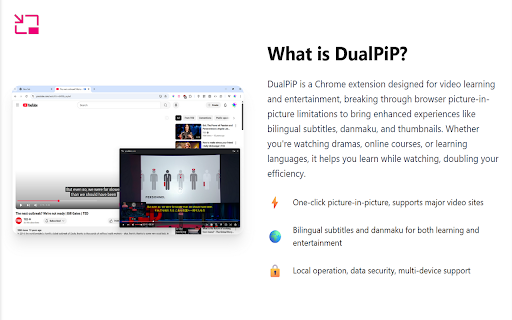

About
What can the DualPiP Picture-in-Picture player do?

Play any video in a floating window with full controls and these features:

Subtitles:
• ASR Live Captions (PRO) — Auto-generate AI captions via speech recognition, powered by Deepgram or local Whisper
• Bilingual subtitles — Display two languages simultaneously with multiple translation engines
• Online search — Find and download from OpenSubtitles, SubDL, and more
• Local import — Load SRT/VTT/ASS/SSA/SUB files
• Style customization — Adjust font, size, color, position, and background

Translation:
• AI engines — 30+ providers including OpenAI, Claude, Gemini, and DeepSeek for context-aware results
• Traditional engines — Google Translate, Microsoft Translator, and Yandex
• Batch pre-translation — Process all content ahead of playback for zero wait

Playback:
• Full controls — Play/pause, volume, seek, speed, and frame-by-frame
• Gestures — Double-tap to seek, swipe for progress/volume/brightness, long-press for speed boost
• Timeline thumbnail preview and customizable keyboard shortcuts

Learning:
• Learning Mode — Subtitle list panel with split and collapsed layouts, double-click to jump
• AB Loop — Multi-loop management with audio fade-in/out and precise timing
• Smart merge — Automatically combine fragments into complete sentences

Interactive:
• Danmaku — Live comments from Bilibili, NicoNico, YouTube Live, Twitch, and Kick
• Side panel for chat messages and one-click video screenshots


How does ASR speech recognition work?

ASR is a PRO feature that auto-generates real-time AI captions for any web video. It supports Deepgram cloud (22+ languages, <300ms latency) and local Whisper servers.

Two capture modes:
• Streaming (WebSocket) — Ideal for livestreams, video calls, and real-time content
• Pre-download batch (HTTP) — Generate complete captions before playback for published videos

Uses a BYOK (Bring Your Own Key) architecture — requests go directly from your browser to the provider with no middleman. Generated captions fully integrate with Learning Mode, AB Loop, and AI translation for bilingual output.


What sites are supported?

Works with any website that has an HTML5 video element, including YouTube, Netflix, Disney+, and Bilibili for streaming; Coursera and Udemy for education; Twitch for live streams; and Zoom web for meetings.


Who is it for?

• Language learners — Real-time foreign-language captions with AI translation and AB loop practice
• Students — Auto-generated captions for online courses with learning tools
• Viewers of unsubtitled content — Captions for livestreams, uploads, and niche videos
• Anime, drama, and live stream fans — Danmaku overlay, bilingual display, speed control
• Multitaskers — Always-on-top floating window for working while watching

Install DualPiP for a more efficient video watching and language learning experience.
Technical
- Version
- 1.7.12
- Manifest
- V3
- Size
- 2.59MiB
- Min Chrome
- 88
- Languages
- 12
- Featured
- Yes
Metadata
- ID
- ddkmobcljbfggkmibabekgpbighaogpn
- Developer ID
- ud04a7cb031c7308246883f7a9b8ca17f
- Developer Email
- [email protected]
- Created
- May 28, 2025
- Last Updated (Store)
- Jun 22, 2026
- Last Scraped
- Jun 24, 2026
- Website
- rabbitpair.com
- Privacy Policy
- https://www.rabbitpair.com/products/dualpip/privacy
Similar extensions
Alternatives to DualPiP – PiP Player | ASR Live Captions · Subtitles & AI Translation, ranked by description similarity.

PIPify Picture-in-Picture Extension (by vlablen)
PIPify app that seamlessly enables Picture-in-Picture mode, allowing you to watch videos in a floating window while multitasking.
257

Picture in Picture for Videos
Picture in Picture for floating video from any site
100.0K
★ 4.6

Picture-In-Picture For Chrome
Enable picture in picture for YouTube and Chrome. Best Floating PiP player for YouTube.
20.0K
★ 4.0

Picture in Picture Extension for Chrome
Picture in Picture Extension for Chrome enables you to view videos from a floating popup
633
★ 3.7

Picture in Picture Player - Floating Video
Keep your videos visible at all times while doing something else! PiP mode on all videos.
100.0K
★ 4.3

PiP - Picture in Picture Plus
Pop out video into a PIP Chrome Window. Works on all videos and websites. Watch video using Picture-in-Picture.
20.0K
★ 3.7

PIPX - Take Control of Picture-in-Picture, Automatically
Never lose your video again, Automatic Picture-in-Picture (PiP) mode when you switch tabs.
1.0K
★ 4.5

Picture in Picture - Floating player
Picture-in-Picture mode allows you to watch a video in a floating window with playback video and volume controls.
200.0K
★ 4.6
Data sourced from the Chrome Web Store · last verified Jun 24, 2026.