
Picture-In-Picture For Chrome
Enable picture in picture for YouTube and Chrome. Best Floating PiP player for YouTube.
As of June 2026, Picture-In-Picture For Chrome has 20,000 users and a 4.00/5 rating from 13 reviews in the Workflow & Planning category.
Usersno change0%
20.0K
20,000
Ratingno change0%
4.00
13 reviews
Reviewsno change0%
13
Version
1.1
Manifest V3
History
1 snapshotsTracking since May 3, 2026.
View as table
| Date | Users | Rating | Reviews | Version |
|---|---|---|---|---|
| May 3, 2026 | 20.0K | 4.00 | 13 | 1.1 |
| Now | 20.0K | 4.00 | 13 | 1.1 |
Permissions & access
- Permissions
- scriptingnotifications
- Host access
- <all_urls>
Screenshots
About
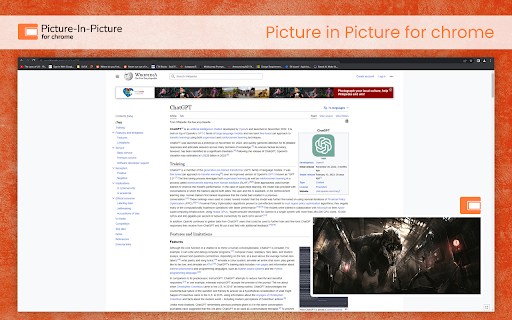
In 2025, juggling your favorite videos with work, browsing, or chatting is effortless with the Picture-in-Picture (PiP) for Chrome extension. The Picture-in-Picture (PiP) for Chrome extension allows you to watch videos in a floating window that stays on top of other windows, making multitasking easier than ever. Whether you're watching YouTube PiP mode, streaming on PiP for Netflix, or viewing content on other platforms, this extension ensures your favorite videos remain visible while you browse, work, or chat with friends.


Key Features

Floating Video Window: Enjoy videos in a small window that floats on top of other applications, perfect for multitasking with a floating video player Chrome.

Movable and Resizable: Adjust the size and position of the video window to fit your workspace, giving you flexibility in how you multitask.

Supports Popular Video Platforms: Works seamlessly with YouTube PiP mode, PiP for Netflix, Vimeo, and other video sites, allowing you to use it across your favorite platforms.

Simple to Use: Easily activate PiP for Chrome mode with one click for an uninterrupted viewing experience.

Free Extension: Completely free to use, with no hidden fees, making it accessible to everyone.


How to Use Picture-in-Picture Mode

Install the Extension: Press “Add to Chrome” to install Picture-in-Picture for Chrome Extension.

Open a Supported Video Site: Visit platforms like YouTube, Netflix, or Vimeo.

Start Playing a Video: Play any video on the site you are on.

Activate PiP Mode: Click the PiP button on the video player to watch in a floating window.


Benefits of Using PiP Mode

Enhanced Multitasking: Easily work, browse, or chat while keeping the video visible in a floating video player Chrome window.

Convenience: Keep videos playing even when you switch to another tab or application, allowing for continuous viewing.

Flexible Viewing: Compatible with major video sites, enabling you to watch a variety of content with ease.

Improved Focus: Minimize distractions by reducing the video to a corner of your screen while keeping the audio active.


Why Choose PiP for Video Multitasking?

With the Video multitasking Chrome extension, you can seamlessly switch between tasks while keeping videos on-screen in a floating video player Chrome. Whether it's YouTube PiP mode, PiP for Netflix, or other platforms, this extension allows you to enjoy your content without interrupting your workflow.

Install Picture-in-Picture for Chrome today and revolutionize the way you multitask in 2025!!


FAQs

1. Which websites does the PiP extension support?

The PiP extension works with most video platforms, including YouTube, Netflix, Vimeo, and many others.

2. Can I resize the PiP window?

Yes, you can adjust the window size and move it around to suit your preference.

3. Will the PiP extension affect my browsing speed?

No, the extension is designed to be lightweight and has minimal impact on browsing speed.

4. Is the PiP mode free to use?

Yes, PiP for Chrome is entirely free and accessible to all users.
Technical
- Version
- 1.1
- Manifest
- V3
- Size
- 41.0KiB
- Min Chrome
- 88
- Languages
- 1
- Featured
- Yes
Metadata
- ID
- dopdchianoijndklgjkckfcpdoaabcab
- Developer ID
- uf41a3ee63bc84a3bd060d2065d7c0e7e
- Developer Email
- [email protected]
- Created
- Mar 23, 2023
- Last Updated (Store)
- Jan 23, 2025
- Last Scraped
- Jun 2, 2026
- Website
- —
- Support URL
- —
- Privacy Policy
- —
Similar extensions
Alternatives to Picture-In-Picture For Chrome, ranked by description similarity.

Picture in Picture Extension for Chrome
Picture in Picture Extension for Chrome enables you to view videos from a floating popup
633
★ 3.7

Picture in Picture for Videos
Picture in Picture for floating video from any site
100.0K
★ 4.6

PIPify Picture-in-Picture Extension (by vlablen)
PIPify app that seamlessly enables Picture-in-Picture mode, allowing you to watch videos in a floating window while multitasking.
257

Picture in Picture Extension
Transform your video viewing experience with the Picture in Picture Extension.
1.0K
★ 5.0

Picture in Picture Player - Floating Video
Keep your videos visible at all times while doing something else! PiP mode on all videos.
100.0K
★ 4.3

Picture in Picture - floating video player
Watch videos while surfing the web with Picture in Picture (PiP) mode. Floating video player for Web!
400.0K
★ 4.5

Picture in Picture - PiP View
Watch videos in a floating PiP window (always on top of other windows) even when tab is switched.
70.0K
★ 3.9

Picture in Picture - Floating player
Picture-in-Picture mode allows you to watch a video in a floating window with playback video and volume controls.
200.0K
★ 4.6
Data sourced from the Chrome Web Store · last verified Jun 2, 2026.