
Google Docs Strikethrough Button
Add a one-click strikethrough button to Google Docs. Select text and toggle strikethrough instantly—no shortcuts to remember.
As of June 2026, Google Docs Strikethrough Button has 31 users in the Productivity category.
Usersup 121.4 percent+121.4%
31
31
Ratingno change0%
—
— reviews
Reviewsno change0%
—
Version
1.0.0
Manifest V3
History
9 snapshotsTracking since Apr 2, 2026.
View as table
| Date | Users | Rating | Reviews | Version |
|---|---|---|---|---|
| Apr 2, 2026 | 14 | — | — | 1.0.0 |
| Apr 17, 2026 | 13 | — | — | 1.0.0 |
| Apr 23, 2026 | 19 | — | — | 1.0.0 |
| Apr 27, 2026 | 25 | — | — | 1.0.0 |
| May 7, 2026 | 24 | — | — | 1.0.0 |
| May 11, 2026 | 31 | — | — | 1.0.0 |
| May 15, 2026 | 33 | — | — | 1.0.0 |
| May 24, 2026 | 37 | — | — | 1.0.0 |
| Jun 3, 2026 | 29 | — | — | 1.0.0 |
| Now | 31 | — | — | 1.0.0 |
Permissions & access
- Permissions
- activeTabscripting
- Host access
- https://docs.google.com/*
Screenshots
About
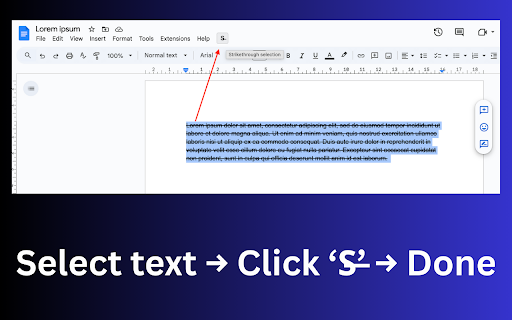
Docs Strikethrough Selection adds a simple toolbar button to Google Docs that lets you toggle google docs strikethrough on selected text with one click.

No menus. No formatting panels. No Docs API access.
Just select text and click the button.

This extension uses Google Docs’ native strikethrough shortcut, so formatting behaves exactly as if you pressed the shortcut yourself.

How It Works (Quick Start)

Open a Google Doc.

Select the text you want to cross out.

Click the “S̶” button in the Docs top toolbar.

Strikethrough toggles instantly.

That’s it.

Key Features

Toolbar button for strikethrough in Google Docs

Uses native keyboard shortcut (no document parsing)

Works on macOS, Windows, Linux, and ChromeOS

Lightweight, on-demand script injection (Docs only)

Visual feedback (OK / ERR badge after each action)

Why Use This Extension?

This extension is for people who:

Regularly edit text in Google Docs

Don’t want to memorize or reach for keyboard shortcuts

Want a single-purpose formatting button, not a full editor suite

Not for:

Users looking for Docs tutorials

Markdown or export workflows

Advanced formatting or styling tools

If you just want a faster way to cross out text—this does exactly that.

Permissions & Privacy

Runs only on docs.google.com

No access to document content

No tracking, analytics, or external requests

No Google account access or OAuth

FAQ

Does this change how Google Docs formats text?
No. It triggers Google Docs’ built-in strikethrough shortcut—nothing more.

Which shortcut does it use?

macOS: Cmd + Shift + X

Windows / Linux / ChromeOS: Alt + Shift + 5

Why not just use the shortcut?
If you forget shortcuts or prefer clicking, the toolbar button is faster and more visible.

Does it work on all documents?
Yes—any editable Google Doc where text selection is active.
Technical
- Version
- 1.0.0
- Manifest
- V3
- Size
- 23.43KiB
- Min Chrome
- 88
- Languages
- 1
- Featured
- Yes
Metadata
- ID
- dcgplbngldlpokjpblngpddafgeadkpl
- Developer ID
- u04961c32b1c2f6eeaf270a7753b74f29
- Developer Email
- [email protected]
- Created
- Feb 11, 2026
- Last Updated (Store)
- Feb 11, 2026
- Last Scraped
- Jun 3, 2026
- Website
- peipus.info
- Support URL
- peipus.info/google-docs-strikethrough/support
- Privacy Policy
- https://peipus.info/google-docs-strikethrough/privacy
Similar extensions
Alternatives to Google Docs Strikethrough Button, ranked by description similarity.

Apply Strikethrough Text
Right-click to strike through. Left-click to undo.
16

Save to Google Docs
Save selected text from any webpage directly to Google Docs with a simple right-click.
277

Google Docs Vim
Vim-style keyboard navigation and editing for Google Docs
2

Typewriter
Types out text on Google Docs
166
★ 3.7

New Doc for Google Docs™
Open a new Google Doc in a new tab in Chrome. Create Google Docs, Sheets, or Slides in Google Workspace, or access your Drive.
1.0K
★ 5.0

Vim for Google Docs
Customizable Vim keybindings for Google Docs.
4

Docs History Sidebar
Google Docsの左側に直近開いたドキュメントの履歴を表示します。
9

New Doc
Use New Doc - easily create Google doc, Sheets and open docs with a click. Easy workflow for create Form and new google doc (gdocs).
2.0K
★ 4.9
Data sourced from the Chrome Web Store · last verified Jun 3, 2026.