
New Doc
Use New Doc - easily create Google doc, Sheets and open docs with a click. Easy workflow for create Form and new google doc (gdocs).
As of May 2026, New Doc has 2,000 users and a 4.93/5 rating from 14 reviews in the Productivity category.
Usersno change0%
2.0K
2,000
Ratingno change0%
4.93
14 reviews
Reviewsno change0%
14
Version
0.7.4
Manifest V3
Permissions & access
- Permissions
- tabsstoragetabGroupsscripting
- Host access
- http://*/*, https://*/*
Screenshots


About
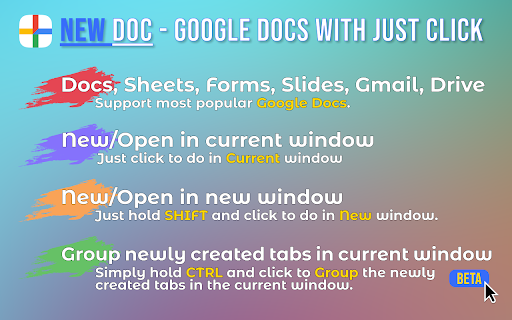
🚀 Discover the Power of the New Doc Extension! Are you tired of the cumbersome steps to start a new google doc? With just a few clicks, you can access all the tools you need. Perfect for anyone looking to enhance their work processes, making daily operations more effective. 🚀 With this app you can create Google doc files instantly. Boost your productivity and streamline your workflow today! ✨ Why Choose the New Doc Extension? 1️⃣ Instant Access: Open a new google doc with a single click. 2️⃣ This tool provides an effortless way to manage your tasks, ensuring that you stay focused on what really matters. 3️⃣ Simplified Navigation: Directly access Google Docs new and docs new without hassle. 4️⃣ With streamlined features, it supports a wide range of activities, making it suitable for both personal and professional use. 5️⃣ GDocs Integration: Work seamlessly with gdocs and manage your documents. 6️⃣ Versatile Creation: Easily create doc files, start an untitled spreadsheet, or begin a blank document. 7️⃣ Forms and Surveys: Use Google Forms Create to design surveys. 🌟 Top Features • Quick Start: Begin a new document or a in seconds. • Access your files with ease using the open google docs new. • New Sheets and Slides: Start an untitled spreadsheet without delays. • The interface is designed to help users easily navigate and complete their tasks. • Create Google document. • GMail open with a clik. 🛠️ How to Use the Extension 1. Install: Add the new Doc extension to your browser. 2. Create: Click the icon to start a new doc. 3. Explore: Use it to, open an untitled spreadsheet, or begin a blank document. 💡 Benefits of Using the Extension ✅ Efficiency: Create files without unnecessary steps. ✅ This extension offers seamless access, making it easier to start your projects without unnecessary steps. ✅ User-Friendly: Ideal for users learning how to use Google Docs. ✅ With intuitive features, you can save time and focus on what truly matters. ✅ Productivity: Start a new doc or Google Slide effortlessly. 🙋♂️ Who Can Benefit? 🔸 Students: Quickly start assignments with a new Doc. 🔸 Professionals: new doc files for reports and presentations swiftly. 🔸 Educators: Create google form quizzes. 🔸 Researchers: Design surveys using and learn how to create a survey in Google Forms. 🔸 Entrepreneurs: Use to gather customer feedback. 🔝 Top Tips for Maximizing the Extension — Utilize Templates: Start with a blank document or choose pre-made templates. — Learn More: Explore guides on how to make Google Docs. — Explore GDocs: Make the most of gdocs features for your projects. — Google form create is a convenient tool for designing forms quickly. — My Google docs provides easy access to all your documents in one place. — Learn how to make a google form to collect valuable data efficiently. — Gmail open with a clik. ❓ Frequently Asked Questions ➾ Q: How to create google doc files using this extension? A: Click the extension icon and select creating a Google Doc to open a new Doc instantly. ➾ Q: Can I create Google Form files as well? A: Yes! You can make a Form or learn how to create a Google Form directly. ➕ Additional Features ➤ Access new doc Google options for quick document creation. ➤ How to Make a Spreadsheet: Start a Google spreadsheet with ease. ➤ Googledoc and GDocs: Seamless integration for all your document needs. ➤ Forms Google and Google Poll: Create interactive forms and polls. ➤ Untitled Spreadsheet: Begin working on spreadsheets instantly. 🚀 👉 Get Started Today! Don't miss out on the convenience of the new Doc extension. New Doc files - start a new Google Doc with unparalleled ease. Boost your productivity now! 📝 Final Thoughts 🔹 Whether you're new to gdocs or an experienced user, the new Doc extension simplifies your workflow. 🔹 From learning to starting a new Google Sheet, this tool is essential. 🔹 This tool provides an effortless way to manage your tasks, ensuring that you stay focused on what really matters without getting bogged down by unnecessary complexities. 🔹 With streamlined features, it supports a wide range of activities, making it suitable for both personal and professional use. 🔹 The interface is designed to help users easily navigate and complete their tasks, reducing the time spent on repetitive actions and increasing overall efficiency. Download Now and Transform Your Document Creation Experience! 🎉 🚀 How to Start 1. Download: Add the new doc extension to your browser. 2. Learn More: Visit our site for tutorials on how to make a Google Doc and how to create a Google Doc. 3. Support: Need assistance? Our team is here to help. Join users who have transformed their workflow with the new Doc extension. What are you waiting for? Get started and make every click count! ☝ This product is not affiliated with or endorsed by Google Inc.
Technical
- Version
- 0.7.4
- Manifest
- V3
- Size
- 244KiB
- Min Chrome
- 88
- Languages
- 52
- Featured
- No
Metadata
- ID
- imcpnnkpkbbfmmkndampalbpgffoiieg
- Developer ID
- u5cd8544270b61663ad11e8645d091bff
- Developer Email
- [email protected]
- Created
- Nov 3, 2024
- Last Updated (Store)
- Dec 9, 2024
- Last Scraped
- May 19, 2026
- Website
- newdoc.app
- Support URL
- —
Similar extensions
Alternatives to New Doc, ranked by description similarity.

Google Docs New
Try Google Docs New: easily create Docs, Forms, Spreadsheets, and access Drive from your browser.
10.0K
★ 4.6

Create Google Doc
Easily create Google Doc from your browser bar. Paste without formatting into new Google Docs with just one click!
30.0K
★ 4.9

Create google doc for chrome
Use this extension to easily create Google Docs, Presentations, Drawings, and more right from your browser
6

New Doc for Google Docs™
Open a new Google Doc in a new tab in Chrome. Create Google Docs, Sheets, or Slides in Google Workspace, or access your Drive.
1.0K
★ 5.0

One-Click create Google Docs, Sheets, Slides & More
One-Click create Google Docs, Sheets, Slides & More
42
★ 5.0

Documents App
Use Documents App extension to open google docs quickly via the google drive app for easy access.
111
★ 5.0

Quick Create Google Workspace
Quickly access your favorite Google Workspace apps like Docs, Sheets, Slides, and more. Save time and boost your productivity!🚀
20.0K
★ 5.0

Google Docs Creator
Quick Google Docs creation - documents, spreadsheets, presentations and more
97
★ 5.0
Data sourced from the Chrome Web Store · last verified May 19, 2026.