
Banners Screenshots
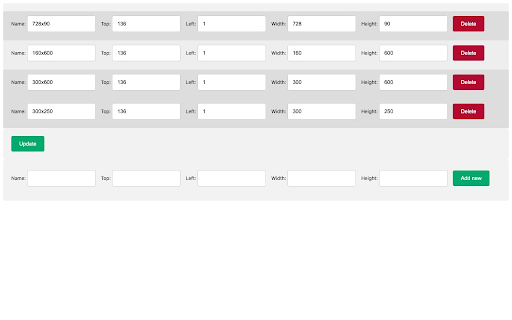
Making a predefined position ad size screenshots
As of May 2026, Banners Screenshots has 4 users and a 5.00/5 rating from 1 reviews in the Developer Tools category.
Usersno change0%
4
4
Ratingno change0%
5.00
1 reviews
Reviewsno change0%
1
Version
1.2
Manifest V3
History
2 snapshotsTracking since Apr 24, 2026.
View as table
| Date | Users | Rating | Reviews | Version |
|---|---|---|---|---|
| Apr 24, 2026 | 4 | 5.00 | 1 | 1.2 |
| May 19, 2026 | 5 | 5.00 | 1 | 1.2 |
| Now | 4 | 5.00 | 1 | 1.2 |
Permissions & access
- Permissions
- storagetabs
- Host access
- <all_urls>
Screenshots

About
You can predefine place and size of screenshots that you want to make.
Its designed with double click in mind but it is working on every website.
Screenshots are working on localhost as well.
You can use chrome Animation tab to chose time of the banner animation.

There are options to define your own place on the website where you want to make screenshots.
Technical
- Version
- 1.2
- Manifest
- V3
- Size
- 26.57KiB
- Min Chrome
- 88
- Languages
- 1
- Featured
- No
Metadata
- ID
- dcbcdjodlaghiimnkmheefhcdpooehmh
- Developer ID
- ua463f24b623e853904bf1cd14a2c1f1e
- Developer Email
- [email protected]
- Created
- Jan 12, 2023
- Last Updated (Store)
- Apr 16, 2024
- Last Scraped
- May 19, 2026
- Website
- —
- Support URL
- —
- Privacy Policy
- —
Similar extensions
Alternatives to Banners Screenshots, ranked by description similarity.

Screenshot with URL - Full Page Screenshot
Capture full page, visible & selected area screenshots with URL bar & hidden Bookmarks, record screen with inbuilt editor.
7.0K
★ 4.9

Screenshot a Tab
Capture viewport, full page, or element screenshots — like Chrome DevTools.
24
★ 5.0

WeDoo All-in-One Screenshots
Easily capture responsive screenshots for any website. Test full page or visible area on popular desktop, mobile, & tablet devices.
18
★ 5.0

SaveFullPage - Full Page Screenshot Tool
Capture screen of current page: Edit, crop, and save full-page screenshots as JPEG, PNG, or PDF—all in one easy-to-use tool
51
★ 5.0

ResponsiveShot
Capture full-page screenshots at any viewport size. Switch between device presets for quick responsive testing.
8

Website Full Page Screenshot
Capture a full-page screenshot of the current website.
12
★ 5.0
Capture
Web page capture tool — take screenshots, record videos with audio, and create smooth auto-scroll recordings with keyframe control.
371

Oro AI Screenshot Helper
Capture screenshot and DOM, send to OroAI Interview page
16
Data sourced from the Chrome Web Store · last verified May 19, 2026.