
Debate Template Hotkeys
Adds hotkeys to the functions of the Debate Template add-on
As of May 2026, Debate Template Hotkeys has 193 users and a 5.00/5 rating from 1 reviews in the Workflow & Planning category.
Usersup 2.7 percent+2.7%
193
193
Ratingno change0%
5.00
1 reviews
Reviewsno change0%
1
Version
0.0.0.1
Manifest V3
History
2 snapshotsTracking since Apr 24, 2026.
View as table
| Date | Users | Rating | Reviews | Version |
|---|---|---|---|---|
| Apr 24, 2026 | 188 | 5.00 | 1 | 0.0.0.1 |
| May 19, 2026 | 198 | 5.00 | 1 | 0.0.0.1 |
| Now | 193 | 5.00 | 1 | 0.0.0.1 |
Permissions & access
- Permissions
- None declared
- Host access
- None declared
Screenshots
About
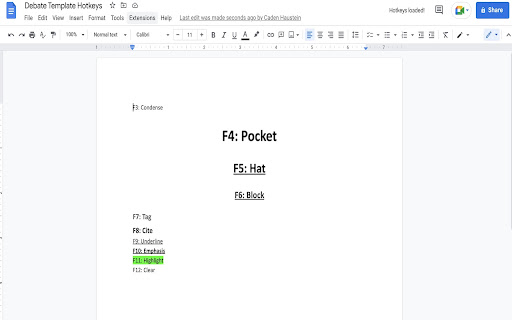
This extension adds hotkeys to your Debate Template add-on experience so you can use Debate Template just like Verbatim. It removes the need for installing complicated scripts like Tampermonkey or JS Injecters to enjoy hotkeys for Debate Template options.

The hotkeys, matching Verbatim, are:
F3: Condense
F4: Pocket
F5: Hat
F6: Block
F7: Tag
F8: Cite
F9: Underline
F10: Emphasis
F11: Highlight
F12: Clear

Note: not affiliated with Debate Template
Technical
- Version
- 0.0.0.1
- Manifest
- V3
- Size
- 12.19KiB
- Min Chrome
- 88
- Languages
- 1
- Featured
- No
Metadata
- ID
- dblhgaiiainfelbfcgckndnlgdbnojkk
- Developer ID
- ude07554200864369c796aa6fa33f3328
- Developer Email
- [email protected]
- Created
- Dec 2, 2022
- Last Updated (Store)
- Dec 2, 2022
- Last Scraped
- May 19, 2026
- Website
- —
- Privacy Policy
- —
Similar extensions
Alternatives to Debate Template Hotkeys, ranked by description similarity.

Todoist Shortcuts (GMail / vim inspired)
Adds a comprehensive suite of keyboard shortcuts to Todoist. More info: https://github.com/mgsloan/todoist-shortcuts
2.0K
★ 4.9

Tab Helper
Helper Extension for Tabroom
108
★ 5.0

Debate Card Cutter
An extension to cut and format cards easily
1.0K
★ 3.0

Whereby Helper
Whereby Helper adds features that enhance your Whereby.com experience.
NOTE: Whereby Helper extension is not affiliated or…
79
★ 5.0

QuoteMe
Add quotation marks around text blocks or words and sentences: Select the range you want to quote and press the toolbar button.
15

Shortleaf
Custom keyboard shortcuts for Overleaf.
841
★ 4.8

GPT-Hotkeys
Various hotkeys for ChatGPT, including editing, sending, and canceling messages.
4
Vimflowy
Vim shortcuts for Workflowy
101
★ 5.0
Data sourced from the Chrome Web Store · last verified May 19, 2026.