
QuoteMe
Add quotation marks around text blocks or words and sentences: Select the range you want to quote and press the toolbar button.
As of May 2026, QuoteMe has 15 users in the Workflow & Planning category.
Usersup 7.1 percent+7.1%
15
15
Ratingno change0%
—
— reviews
Reviewsno change0%
—
Version
2.0.2
Manifest V3
History
2 snapshotsTracking since Apr 24, 2026.
View as table
| Date | Users | Rating | Reviews | Version |
|---|---|---|---|---|
| Apr 24, 2026 | 14 | — | — | 2.0.2 |
| May 19, 2026 | 11 | — | — | 2.0.2 |
| Now | 15 | — | — | 2.0.2 |
Permissions & access
- Permissions
- storagescriptingactiveTabcontextMenus
- Host access
- None declared
Screenshots


About
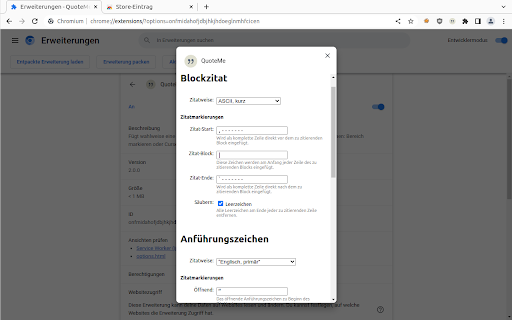
This WebExtension adds both a toolbar button and two keyboard shortcuts ([Alt]+[B] and [Alt]+[M]). It has two major modes, the first one is adding quotation marks around lines of text in a multiline text field (<textarea> ) of any web page. The typical usecases are text comments or bug reports which do not support html, markdown or other means of formatting text. If you want to visually separate your own comments from citations or code segments, you typically want to add a visual marker, like -------. This add on simplifies adding those markers. The type of markers is configurable.

The other mode is adding regular text (inline) quotes like “To be, or not to be”. Again, the user can choose the type of quotes. To quote a single word, just place the text cursor in the word. For longer texts, mark them. The typical usecase is to enter typographically correct quotes.
Technical
- Version
- 2.0.2
- Manifest
- V3
- Size
- 30.29KiB
- Min Chrome
- 88
- Languages
- 2
- Featured
- No
Metadata
- ID
- ppolaacbaabajodbdebkkoenkmpljego
- Developer ID
- u25072305492c079e56a64f652cb2e877
- Developer Email
- [email protected]
- Created
- Mar 25, 2020
- Last Updated (Store)
- Jun 6, 2023
- Last Scraped
- May 19, 2026
- Website
- —
- Support URL
- https://github.com/fjl5/quoteme/issues
- Privacy Policy
- —
Similar extensions
Alternatives to QuoteMe, ranked by description similarity.

Surround it!
Easily enclose text with quotation marks, brackets or any characters of your choice.
61
★ 3.4

MarkQuote
Copy webpage selections as Markdown quotes with reference source link.
—

Shortleaf
Custom keyboard shortcuts for Overleaf.
841
★ 4.8
bbCodeInsert
Insert BBCode, HTML, Markdown, vBulletin and Goodreads tags. Use selected text and prompts. Custom tags and keyboard shortcuts.
780
★ 4.0

TextWrap
Extension to wrap highlighted text in punctuation similar to code editors
38
★ 5.0

MauroCuts
Create text shortcuts and automate frequently used text
4
★ 5.0

Marky
Mark texts in webpages
—
★ 5.0

Markie - Copy as Markdown
It's super simple. Copy any selected content as Markdown.
89
Data sourced from the Chrome Web Store · last verified May 19, 2026.