
Lumin: PDF Editor, Edit, Sign, Merge, Share and Print PDFs
View, edit, and share PDF documents.
As of June 2026, Lumin: PDF Editor, Edit, Sign, Merge, Share and Print PDFs has 100,000 users and a 3.59/5 rating from 9,041 reviews in the Productivity category.
Usersdown 50.0 percent−50.0%
100.0K
100,000
Ratingno change0%
3.59
9.0K reviews
Reviewsdown 0.1 percent−0.1%
9.0K
Version
6.1.0
Manifest V3
90-day change · In the last 90 days this extension lost 100.0K users, 3 version updates.
History
12 snapshotsTracking since Apr 21, 2026.
View as table
| Date | Users | Rating | Reviews | Version |
|---|---|---|---|---|
| Apr 21, 2026 | 200.0K | 3.59 | 9.1K | 5.1.9 |
| May 6, 2026 | 200.0K | 3.59 | 9.1K | 5.1.9 |
| May 11, 2026 | 200.0K | 3.59 | 9.0K | 6.0.0 |
| May 13, 2026 | 200.0K | 3.59 | 9.0K | 6.0.0 |
| May 15, 2026 | 200.0K | 3.58 | 9.0K | 6.0.0 |
| May 18, 2026 | 200.0K | 3.59 | 9.0K | 6.0.0 |
| May 23, 2026 | 200.0K | 3.58 | 9.0K | 6.0.0 |
| May 26, 2026 | 100.0K | 3.58 | 9.0K | 6.0.0 |
| May 31, 2026 | 100.0K | 3.58 | 9.0K | 6.0.1 |
| Jun 11, 2026 | 100.0K | 3.59 | 9.0K | 6.0.1 |
| Jun 16, 2026 | 100.0K | 3.59 | 9.0K | 6.0.1 |
| Jun 23, 2026 | 100.0K | 3.58 | 9.0K | 6.1.0 |
| Now | 100.0K | 3.59 | 9.0K | 6.1.0 |
Changelog
- May 6, 2026description
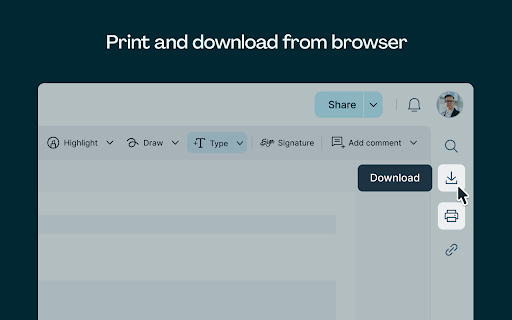
The PDF extension that actually extends: with Lumin you can read, sign, edit and print PDFs straight from your Chrome browser.

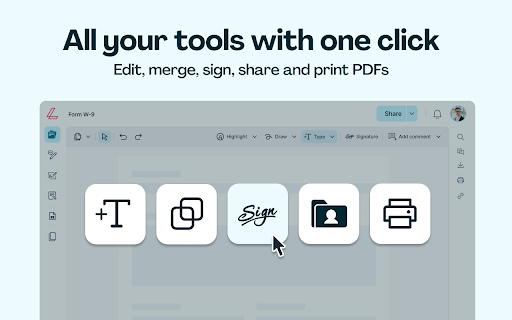
Lumin puts all the PDF editing tools you need in one place, so you can make more impact with less admin.

Join over 100 million users worldwide to access shortcuts for your favourite tools:

EXTENSION FEATURES:
- edit PDFs
- merge PDFs
- eSign or send PDFs for signature

Lumin is cloud-based and fully integrated with Google Workspace, so you can edit PDFs from your mobile, tablet or desktop.

HOW TO GET STARTED:
1. Download the Lumin extension for Chrome
2. Drag and drop any PDF into your browser to read it instantly
3. Sign in to select and use the tools you need easily

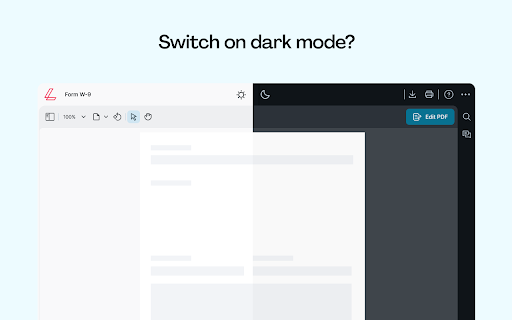
Night owls, we see you! You can turn on dark mode to read in comfort.

Lumin is designed to be user-friendly, so using these tools should feel like second nature. If it doesn’t, let us know! We’re always trying to improve.
Lumin PDF Editor is a free Chrome extension that turns your browser into a full PDF workspace. Open any PDF in Chrome and Lumin loads it automatically. No account needed to get started.

100 million people use Lumin every day to read, mark up, edit and sign PDF files. Here is everything you get:

NO ACCOUNT NEEDED
Open any PDF in Chrome and start working right away.
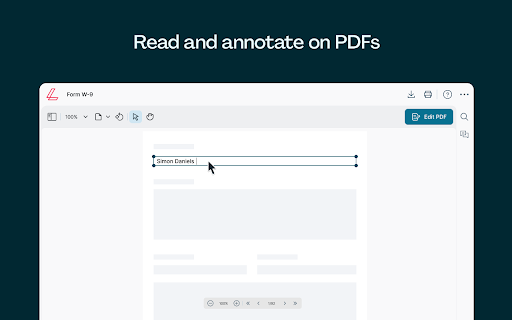
- Highlight, annotate, and comment on any PDF
- Draw or type directly onto the page
- Save your changes without signing in
- Build fillable forms with text fields, checkboxes, and signature fields
- Sign any PDF or send it to others for signature

FREE WHEN YOU CREATE AN ACCOUNT
Upload to Lumin storage and unlock these tools for free.
- Merge multiple PDFs into one file
- Compress a PDF to shrink its file size
- Convert PDF to Word, Excel, PowerPoint, JPG, and more
- Convert images and Office files into PDF
- Access your files from any device, anytime

7 DAY FREE TRIAL
Try the full toolkit free when you sign up.
- Edit text and images inside any PDF
- Redact sensitive content permanently
- Lock a PDF with a password or unlock a secured file
- Connect to Google Drive and Google Workspace

WHAT'S NEW
- Annotate PDF files in Chrome without an account
- Lumin automatically replaces the default Chrome PDF viewer
- Open PDF files from your computer directly in Lumin
Permissions & access
- Permissions
- storagetabswebRequestwebNavigationdeclarativeNetRequestWithHostAccess
- Host access
- <all_urls>
Screenshots

About
Lumin PDF Editor is a free Chrome extension that turns your browser into a full PDF workspace. Open any PDF in Chrome and Lumin loads it automatically. No account needed to get started.

100 million people use Lumin every day to read, mark up, edit and sign PDF files. Here is everything you get:

NO ACCOUNT NEEDED
Open any PDF in Chrome and start working right away.
- Highlight, annotate, and comment on any PDF
- Draw or type directly onto the page
- Save your changes without signing in
- Build fillable forms with text fields, checkboxes, and signature fields
- Sign any PDF or send it to others for signature

FREE WHEN YOU CREATE AN ACCOUNT
Upload to Lumin storage and unlock these tools for free.
- Merge multiple PDFs into one file
- Compress a PDF to shrink its file size
- Convert PDF to Word, Excel, PowerPoint, JPG, and more
- Convert images and Office files into PDF
- Access your files from any device, anytime

7 DAY FREE TRIAL
Try the full toolkit free when you sign up.
- Edit text and images inside any PDF
- Redact sensitive content permanently
- Lock a PDF with a password or unlock a secured file
- Connect to Google Drive and Google Workspace

WHAT'S NEW
- Annotate PDF files in Chrome without an account
- Lumin automatically replaces the default Chrome PDF viewer
- Open PDF files from your computer directly in Lumin
Technical
- Version
- 6.1.0
- Manifest
- V3
- Size
- 22.75MiB
- Min Chrome
- 88
- Languages
- 1
- Featured
- No
Metadata
- ID
- dbkidnlfklnjanneifjjojofckpcogcl
- Developer ID
- u93e2a10c3eb01f0aadbdd5423594f61f
- Developer Email
- [email protected]
- Created
- Jun 3, 2013
- Last Updated (Store)
- Jun 12, 2026
- Last Scraped
- Jun 23, 2026
- Website
- luminpdf.com
- Support URL
- https://help.luminpdf.com
- Privacy Policy
- https://www.luminpdf.com/privacy-policy/
Similar extensions
Alternatives to Lumin: PDF Editor, Edit, Sign, Merge, Share and Print PDFs, ranked by description similarity.

Smallpdf—Edit, Convert, Compress, & AI Summarize PDF
Easy-to-use PDF tools to compress, convert, merge, chat to, split, e-sign, and edit PDF files in your browser.
3.0M
★ 4.6

Smart PDF - Professional Tools
Premium PDF Tools: Merge (Grid), Watermark, Page Numbers, Convert, Edit.
35
★ 5.0

PDF Sign
Boost productivity with PDF Sign editor: Easily sign documents online and fill forms. Streamline workflow with a pdf signer tool.
651
★ 5.0
Foxit PDF Editor Cloud: Edit and Convert
Improve your productivity and simplify online PDF processing with Foxit's Chrome extension.
10.0K
★ 2.8

Lumie
Easily adjust the brightness levels of any website
25
★ 5.0

PDF Dark Mode
View the PDF documents in dark mode.
10.0K
★ 2.5

SmallPDF Free Chrome Extension
With SmallPDF Free you can easily manage PDFs and images from your browser.
2.0K
★ 3.7

Free PDF Editor & Reader — Compress, Merge, Convert PDFs · PDFly
Edit PDF, convert PDF to Word, merge, split & compress PDF files. Free PDF editor, reader, e-sign & AI tools — all in one.
2.0K
★ 4.2
Data sourced from the Chrome Web Store · last verified Jun 23, 2026.