Silly Redirect for Zoom Meetings
A web extension that redirects meetings to the web client.
As of May 2026, Silly Redirect for Zoom Meetings has 278 users and a 5.00/5 rating from 2 reviews in the Accessibility category.
Usersdown 53.8 percent−53.8%
278
278
Ratingno change0%
5.00
2 reviews
Reviewsno change0%
2
Version
4.0.0
Manifest V3
History
2 snapshotsTracking since Apr 24, 2026.
View as table
| Date | Users | Rating | Reviews | Version |
|---|---|---|---|---|
| Apr 24, 2026 | 602 | 5.00 | 2 | 4.0.0 |
| May 19, 2026 | 237 | 5.00 | 2 | 4.0.0 |
| Now | 278 | 5.00 | 2 | 4.0.0 |
Permissions & access
- Permissions
- activeTabstorage
- Host access
- *://*.zoom.us/*, *://*.zoomgov.com/*
Screenshots
About
Unofficial web extension for Zoom meetings.

This project was intended to make it easier to redirect Zoom meetings links to the web client page.
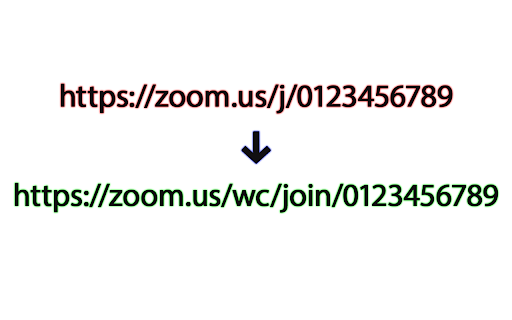
This browser addon works by replacing a portion of the url with "/wc/join" so that it loads the meeting joining page. For example https://zoom.us/j/0123456789 would be converted to https://zoom.us/wc/join/0123456789.
The web client is preferable over the desktop app because of the restriction that web browsers places on web pages, protecting your computer against malicious attacks and unauthorized access of your machine.

Silly Redirect for Zoom Meetings does NOT collect any data of any kind.

This software is released under the terms of the GPL-3.0 License.

Source code: https://github.com/EdoardoTosin/Silly-Redirect-for-Zoom-Meetings

Zoom and the Zoom logo are trademarks of Zoom Video Communications, Inc., registered in the U.S. and other countries.
Technical
- Version
- 4.0.0
- Manifest
- V3
- Size
- 106KiB
- Min Chrome
- 88
- Languages
- 29
- Featured
- Yes
Metadata
- ID
- dammgkhaofolinipgnjjiocadmmhidch
- Developer ID
- u930913d85a4db2fb765cb0c48467430f
- Developer Email
- [email protected]
- Created
- Sep 5, 2023
- Last Updated (Store)
- Nov 10, 2023
- Last Scraped
- May 19, 2026
- Website
- —
- Privacy Policy
- —
Similar extensions
Alternatives to Silly Redirect for Zoom Meetings, ranked by description similarity.

Scroll Zoom
Zoom web pages with the left or right mouse button and the scroll wheel.
3.0K
★ 4.3

Command+Scroll Zoom
Smothly zoom in and out web pages using Cmd+Scroll
25
★ 5.0

Roblox URL Launcher
Joins a game, specific server or opens studio basing on url parameters.
20.0K
★ 2.9

Zoom for Google Chrome
Zoom in or out on web content using the zoom button and mouse scroll wheel for more comfortable reading. That to each percent value.
300.0K
★ 4.2

Google Meet Zoom In Zoom Out
Google Meet Zoom In Zoom Out allows to zoom in-out the content shared by others in Google Meet
1.0K
★ 4.9

Super Zoom + Tab Finder
Super Zoom + Tab Finder allows to zoom in-out the content shared by others in Google Meet and finds your browser tabs
74
★ 5.0

Mac Command Scroll
Zoom with cmd+scroll
95
★ 4.0

Zoom Block
Disable zooming by default. Re-enable zooming on a per-tab basis by clicking the Zoom Block icon.
10.0K
★ 3.9
Data sourced from the Chrome Web Store · last verified May 19, 2026.