
Printer for Google Chrome 2.0
Prints the current page opened in Chrome with a single click.
As of May 2026, Printer for Google Chrome 2.0 has 2,000 users and a 4.25/5 rating from 20 reviews in the Developer Tools category.
Usersno change0%
2.0K
2,000
Ratingno change0%
4.25
20 reviews
Reviewsno change0%
20
Version
1.0.1
Manifest V3
Permissions & access
- Permissions
- storage
- Host access
- None declared
Screenshots

About
⬇️Easy to set up ⬇️:


1. 🆓 and very easy to operate.
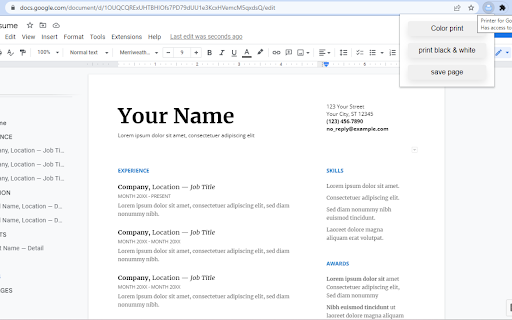
2. Place a print 🖨 button inside your web browser. So you can easily print a page with one click.
3. Choose the style and the Print button design. 🖨(color, black and white)
4. Double-click on the print icon 🖨 to save the file in HTML or PDF, or to open the Options page.


✨Features ✨:


1. Choose between the regular Print button or the Material Design Print button.
2. Or customize your own design Print button.
3. Supports both the TOUCH screen 🖥and DESKTOP screens with the mouse.🖱
4. Print button works for Windows, Mac, Linux, and Google Chromebooks.


Our extension lets you print faster the opened tab on your current browser with one single click.
Technical
- Version
- 1.0.1
- Manifest
- V3
- Size
- 15.38KiB
- Min Chrome
- 88
- Languages
- 1
- Featured
- No
Metadata
- ID
- dakpnihnhmgcllccmbgcfhkbkmaojebe
- Developer ID
- u3f80b718c5a865ab29f9c182cfda903c
- Developer Email
- [email protected]
- Created
- Oct 9, 2022
- Last Updated (Store)
- Oct 9, 2022
- Last Scraped
- May 19, 2026
- Website
- —
- Support URL
- —
- Privacy Policy
- —
Similar extensions
Alternatives to Printer for Google Chrome 2.0, ranked by description similarity.

Print Fast
Allows applications and websites to send print data to the Windows Print Fast application for thermal printing.
42

Print Extension
Extension to print HTML data from a web app Directly
71
★ 5.0

Screenshot On Click
Screenshot On Click
18

QR Code Generator
Generate QR codes for the current tab's URL
3

One Screenshot - One Click Screenshot (Current and Full Page)
Take a screenshot of the current page and full page and save it to downloads in just one click.
1.0K
★ 4.0

Screenshot a Tab
Capture viewport, full page, or element screenshots — like Chrome DevTools.
24
★ 5.0

Web Developer Tool for Chrome
Web developer toolbox for your browser.
10.0K
★ 4.8

Easy Color Picker
A beautiful, professional color picker with Hex, RGB, and transparency support
10
★ 5.0
Data sourced from the Chrome Web Store · last verified May 19, 2026.