
The Bridge: Global Context AI
Professional AI communication coach. Adapts your tone for LinkedIn, Email, and Social Media with real-time analysis.
As of June 2026, The Bridge: Global Context AI has 7 users and a 4.75/5 rating from 4 reviews in the Communication category.
Usersup 40.0 percent+40.0%
7
7
Ratingno change0%
4.75
4 reviews
Reviewsno change0%
4
Version
1.3
Manifest V3
History
4 snapshotsTracking since Apr 2, 2026.
View as table
| Date | Users | Rating | Reviews | Version |
|---|---|---|---|---|
| Apr 2, 2026 | 5 | 4.75 | 4 | 1.3 |
| Apr 17, 2026 | 6 | 4.75 | 4 | 1.3 |
| May 19, 2026 | 7 | 4.75 | 4 | 1.3 |
| Jun 6, 2026 | 6 | 4.75 | 4 | 1.3 |
| Now | 7 | 4.75 | 4 | 1.3 |
Permissions & access
- Permissions
- sidePanelstorageidentitycontextMenus
- Host access
- https://analyzetone-nsiykta3vq-uc.a.run.app/*
Screenshots


About
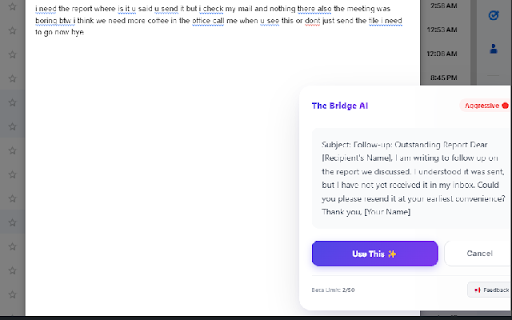
The Bridge: Global Context AI - Your Intelligent Communication Co-Pilot 🚀
The Bridge is not just a rewriter; it’s your intelligent communication partner that bridges the gap between your raw thoughts and polished, professional delivery. Whether you’re writing a critical email, a LinkedIn post, or a sensitive WhatsApp message, The Bridge ensures your tone is perfect every time.

✨ What's New in Version 1.1?
Visual Tone Radar: See exactly how your message lands with our new real-time graph measuring Professionalism, Friendliness, Clarity, and Constructiveness.
Digital Lawyer Mode ⚖️: Faced with an unfair situation? Activate the "Digital Lawyer" to instantly draft firm, legally-sound, and assertive replies that protect your rights.
Shield Mode 🛡️: Set boundaries effectively with one click.
Enhanced WhatsApp Support: Now works seamlessly on complex chat platforms with our new "Phantom Typing" technology.
🌟 Key Features:
🧠 Smart Context Detection
Automatically understands where you are writing (LinkedIn, Gmail, Facebook, WhatsApp) and adapts the tone to match the platform's culture perfectly.

🎯 One-Click Rewrite
Turn "this is garbage" into "This does not meet our quality standards" instantly. Convert casual notes into executive summaries without thinking.

📊 Advanced Tone Analysis
Don't guess how you sound. The new Radar Chart visualizes your communication style before you hit send, ensuring you strike the right balance between friendly and professional.

💬 Contextual Awareness
Right-click on any text or selection to use "Generate Reply with The Bridge". It reads the conversation context to suggest the most appropriate response.

🔒 Privacy First
Your drafts and context are processed securely and never stored. We bridge the gap, we don't keep your data.

Download The Bridge today and communicate with confidence!
Technical
- Version
- 1.3
- Manifest
- V3
- Size
- 121KiB
- Min Chrome
- 88
- Languages
- 1
- Featured
- No
Metadata
- ID
- daaaapikebhlafagbkadhbpdnhjekcfe
- Developer ID
- uff9270142f2bfabb2f80ba13a9b43fc4
- Developer Email
- [email protected]
- Created
- Jan 22, 2026
- Last Updated (Store)
- Feb 12, 2026
- Last Scraped
- Jun 6, 2026
- Website
- —
- Support URL
- —
Similar extensions
Alternatives to The Bridge: Global Context AI, ranked by description similarity.

Professionally AI Email Writer
Automatically rephrases emails in Gmail for a more professional tone.
1.0K
★ 3.8

Social Layer
Pause before you send. Social Layer helps you avoid misunderstandings in Gmail by suggesting a moment of reflection.
—

ProMessage AI
Generate smart AI-powered replies, refine drafts, and boost your messaging on LinkedIn, WhatsApp, Facebook, and more.
7
★ 5.0

WhatsAi - WhatsApp AI writting assistant
The ultimate AI copilot for WhatsApp Web that mirror your tone and style using full chat context.
28
★ 5.0

SmartDraft AI - Your Writing Assistant
Polish, rewrite, and respond to messages anywhere using AI — from emails to chats.
—

Diplomacy AI - Professional Tone Assistant
Helps you write more diplomatically by detecting risky phrases.
—

Wordara - Smarter Prompts And Writing
Simplify your AI prompts with one click using advanced AI optimization
90
★ 4.9

Waiter AI
AI-powered message variations for Social Media!
27
★ 5.0
Data sourced from the Chrome Web Store · last verified Jun 6, 2026.