
Wordara - Smarter Prompts And Writing
Simplify your AI prompts with one click using advanced AI optimization
As of June 2026, Wordara - Smarter Prompts And Writing has 90 users and a 4.88/5 rating from 25 reviews in the Communication category.
Usersup 16.9 percent+16.9%
90
90
Ratingno change0%
4.88
25 reviews
Reviewsno change0%
25
Version
1.3.6
Manifest V3
History
8 snapshotsTracking since Apr 18, 2026.
View as table
| Date | Users | Rating | Reviews | Version |
|---|---|---|---|---|
| Apr 18, 2026 | 77 | 4.88 | 25 | 1.3.6 |
| Apr 28, 2026 | 76 | 4.88 | 25 | 1.3.6 |
| May 8, 2026 | 74 | 4.88 | 25 | 1.3.6 |
| May 12, 2026 | 84 | 4.88 | 25 | 1.3.6 |
| May 18, 2026 | 118 | 4.88 | 25 | 1.3.6 |
| May 24, 2026 | 82 | 4.88 | 25 | 1.3.6 |
| May 31, 2026 | 85 | 4.88 | 25 | 1.3.6 |
| Jun 6, 2026 | 93 | 4.88 | 25 | 1.3.6 |
| Now | 90 | 4.88 | 25 | 1.3.6 |
Permissions & access
- Permissions
- storagescriptingtabscontextMenus
- Host access
- <all_urls>
Screenshots


About
🚀 Wordara: Supercharge Your Writing & AI Conversations with One-Click AI Magic

Tired of bloated prompts, complicated sentences, or unclear text anywhere? Wordara instantly rewrites and optimizes whatever you select — whether you're chatting with AI or writing in Google Docs, Notion, Word, emails, forums, or any text field on the web.

One highlight → one click → perfectly simplified, rephrased, or transformed text.

✨ Now works everywhere text exists:
- All major AI platforms
- Google Docs & Google Sheets
- Microsoft Word Online (Office 365)
- Notion, Gmail, Outlook, Slack, Discord
- Literally any text box or editor on the web

✨ Key Features
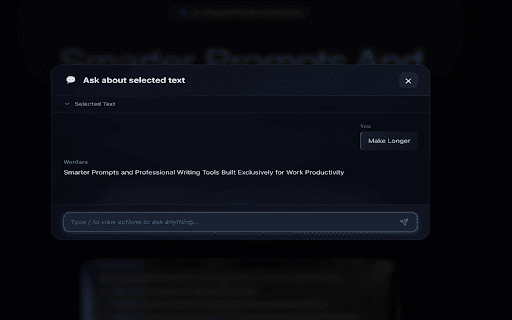
- Instant Rewrite on Selection: Just highlight any text anywhere and tap the floating ✨ button (or right-click → Wordara) for instant results.
- Smart One-Click Actions: Choose from built-in actions like:
  → Simplify
  → Rephrase Professionally
  → Make Friendly / Casual
  → Expand Ideas
  → Fix Grammar & Clarity
  → Make Shorter / Make Longer
  → Translate
  …or create unlimited custom actions for your exact needs!
- Floating Magic Button: Appears automatically whenever you select text — no need to copy/paste.
- Works Inside Google Docs Too: Select a paragraph in Docs → ✨ button appears → get a cleaner, sharper version instantly (replaces selection or inserts with one click).
- Quota Tracking & Unlimited Pro: Free tier included, real-time usage indicators, unlimited on Pro plans.
- Full Dashboard Control: Pin your favorite actions, set defaults, sync across devices at wordara.cc.

🎯 How It Works (Takes 10 Seconds)
1. Install the free Chrome/Edge extension.
2. Log in once (free account available).
3. Highlight any text anywhere online → ✨ floating button appears.
4. Click or choose your action → beautifully rewritten text appears.
5. One-click replace selection or copy → done!

Perfect for:
- Writers who want clearer drafts in Google Docs instantly
- Students simplifying complex notes or articles
- Professionals polishing emails and reports
- Anyone frustrated with bad AI outputs from messy prompts

🛡️ 100% Private & Secure
All processing via encrypted API calls. Nothing stored without consent. No tracking, no ads.

Join tens of thousands who’ve already ditched prompt engineering headaches and bad writing forever.

Install Wordara now and turn any selected text into gold with a single click! ✨
Technical
- Version
- 1.3.6
- Manifest
- V3
- Size
- 968KiB
- Min Chrome
- 88
- Languages
- 1
- Featured
- No
Metadata
- ID
- omnpknjnfgngpdoanodjfnhfdbokjckl
- Developer ID
- u1b13dc5f57c19dc8c57f481e3941100f
- Developer Email
- [email protected]
- Created
- Oct 16, 2025
- Last Updated (Store)
- Jun 1, 2026
- Last Scraped
- Jun 6, 2026
- Website
- —
- Support URL
- https://wordara.cc/
- Privacy Policy
- https://wordara.cc/legal/privacy
Similar extensions
Alternatives to Wordara - Smarter Prompts And Writing, ranked by description similarity.

Reword This
AI-Powered Text Rewriting Chrome Extension
12
★ 5.0

OpalDraft AI Writing Assistant: Grammar Checker, Translator & Paraphraser
AI writing assistant in every text box. Write better with instant grammar fixes, tone changes & smart suggestions.
3
★ 5.0

BetterWords.AI
Write better everywhere with one click. Fix, improve clarity, extend, and adjust tone using AI.
4

SparkNote AI – Writing & Summary Assistant
AI-powered email writing, rewriting, and summarizing with a floating window and modern UI.
3

Rewordify-AI
Rewrite and polish text with AI in any input box or editor. Improve your writing instantly on any website.
15

Quillbot: AI Writing Assistant to Grammar Check, Paraphrase & Translate
Write better emails, essays and messages with Quillbot's Grammar Checker, Paraphrasing Tool, Generative AI, Summarizer and more!
5.0M
★ 4.7

JustRewrite – AI Writing Assistant
Rewrite, paraphrase, and perfect any text in seconds with AI
5
★ 5.0

Voltaire - AI Writing Tools
Your AI Writing Sidekick
32
★ 5.0
Data sourced from the Chrome Web Store · last verified Jun 6, 2026.