
Popup Dict (Dictionary.com/Youglish/Cambridge Dict)
Look up words instantly while you browse. Highlight text to see popups from multiple dictionaries – simple and fast.
As of May 2026, Popup Dict (Dictionary.com/Youglish/Cambridge Dict) has 316 users and a 4.29/5 rating from 7 reviews in the Productivity category.
Usersup 6.4 percent+6.4%
316
316
Ratingno change0%
4.29
7 reviews
Reviewsno change0%
7
Version
1.0.9
Manifest V3
History
2 snapshotsTracking since Apr 24, 2026.
View as table
| Date | Users | Rating | Reviews | Version |
|---|---|---|---|---|
| Apr 24, 2026 | 297 | 4.29 | 7 | 1.0.9 |
| May 19, 2026 | 305 | 4.29 | 7 | 1.0.9 |
| Now | 316 | 4.29 | 7 | 1.0.9 |
Permissions & access
- Permissions
- storage
- Host access
- None declared
Screenshots

About
Feel free to leave your feedback here: https://forms.gle/6SCyfAc3jKCKhyPb6
I will reply in 3 days if an email is provided!

Current Features
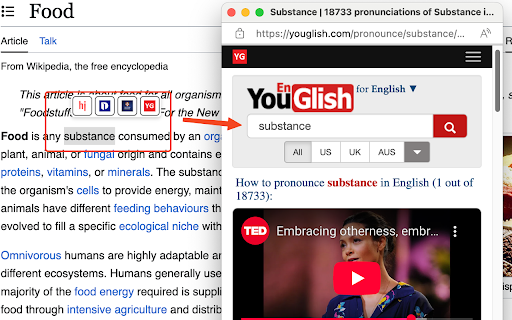
- Floating dictionary buttons appear when text is selected
- Support for four dictionary websites:
  - Dictionary.com
  - Howjsay.com
  - Cambridge Dictionary
  - Youglish.com
- Individual dictionaries can be enabled or disabled
- Configurable timing options:
  - Option to show buttons immediately or after holding mouse
  - Adjustable delay duration to prevent accidental triggers
- Compact UI with website icons as buttons
- Privacy-focused with minimal permissions
- Small popup window for dictionary lookups

Open sourced on Github: https://github.com/leonwongdev/pronunciation-ext

Change log:
v1.0.9
- Users can now choose whether popup buttons appear immediately or after holding mouse for a customized duration

v1.0.8
- Added options to enable / disable dictionaries.

v1.0.7
- Rename the extension from Dictionary Search to Popup Dict

v1.0.6
- Remove active tab permission

v1.0.5:
- Fixed inconsistent icon size

v1.0.4:
- Used website icons as buttons to reduce the menu size.
Technical
- Version
- 1.0.9
- Manifest
- V3
- Size
- 22.37KiB
- Min Chrome
- 88
- Languages
- 1
- Featured
- Yes
Metadata
- ID
- clhkbghopdclagfplhknlhcpnjefpacd
- Developer ID
- uc4761714f2cd211113fe57d1611f8113
- Developer Email
- [email protected]
- Created
- Sep 5, 2023
- Last Updated (Store)
- Mar 12, 2025
- Last Scraped
- May 19, 2026
- Website
- —
- Support URL
- https://forms.gle/6SCyfAc3jKCKhyPb6
- Privacy Policy
- —
Similar extensions
Alternatives to Popup Dict (Dictionary.com/Youglish/Cambridge Dict), ranked by description similarity.

All-in-One Cambridge Dictionary
Instantly access 30+ Cambridge dictionaries on any website. Look up words via popup, right-click menu, hotkeys, or a floating icon.
10.0K
★ 4.5

Dictionary
View definitions with a click as you browse the web.
23
★ 5.0

GhostDictionary
Show English word meanings with hover+keys, speak text, and translate selected passages.
8
★ 5.0

Dictionary+ : v3 multilingual pro dictionary
View noun, verb, adjective definitions with example. Etymology, synonyms and antonyms of word. Translate text in 137+ languages
152
★ 5.0

Google Dictionary (by Google)
View definitions easily as you browse the web.
3.0M
★ 4.4

Context Lookups
This extension adds configurable lookup options for the context menu of selected text.
121
★ 5.0

My AI Translator
A revolutionary open-source browser translation extension that provides native-like reading experience for everyone
2
Collocation Dictionary Lookup
Seamlessly look up collocations on any site. Access results instantly via popup, right-click menu, or a floating icon.
682
★ 5.0
Data sourced from the Chrome Web Store · last verified May 19, 2026.