
Context Lookups
This extension adds configurable lookup options for the context menu of selected text.
As of June 2026, Context Lookups has 121 users and a 5.00/5 rating from 4 reviews in the Productivity category.
Usersdown 2.4 percent−2.4%
121
121
Ratingno change0%
5.00
4 reviews
Reviewsno change0%
4
Version
5.1
Manifest V3
History
5 snapshotsTracking since Apr 19, 2026.
View as table
| Date | Users | Rating | Reviews | Version |
|---|---|---|---|---|
| Apr 19, 2026 | 124 | 5.00 | 4 | 5.1 |
| May 4, 2026 | 123 | 5.00 | 4 | 5.1 |
| May 13, 2026 | 125 | 5.00 | 4 | 5.1 |
| May 25, 2026 | 121 | 5.00 | 4 | 5.1 |
| Jun 7, 2026 | 127 | 5.00 | 4 | 5.1 |
| Now | 121 | 5.00 | 4 | 5.1 |
Permissions & access
- Permissions
- storagecontextMenus
- Host access
- None declared
Screenshots


About
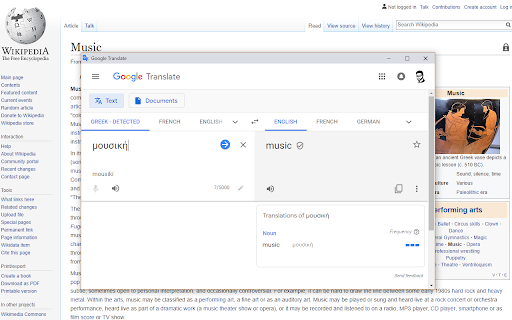
Quickly search information as you browse.  Just select the text you want to look up, bring up the right-click/long-press context menu, and select the configured lookup option that you want.

Need to quickly check the definition of "bi-weekly" when someone emails you about a meeting?  Curious about the literal meaning of "je ne sais quoi" when it comes up in an article?  Want to know who exactly "Robert Walpole" is when someone mentions them in a comment?

Context Lookups has you covered!  Get up to speed or satisfy your curiosity in no time at all, then be on your merry way.  You can set the results to appear as regular webpages, or make things extra convenient with simplified popup windows.

This much can already be done with just the default lookups, but the possibilities go far beyond that.  Copy the search query URL base of whatever website you want to use, and create a context menu item for it in the extension popup, it's that simple.  Just remember to save your changes!

Here are a few more to try:

Unit Conversion
- Use "https://www.google.com/search?q=convert+" as the URL base.

Synonyms/Antonyms
- Use "https://www.thesaurus.com/browse/" as the URL base.

Rhymes
- Use "https://www.rhymezone.com/r/rhyme.cgi?typeofrhyme=perfect&Word=" as the URL base.

Note that ampersand characters (&) in context menu labels are used to assign shortcut keys.  To make a letter within the label the shortcut key for the option (while it's shown), simply put an ampersand in front of it.  For example, set the label as "Rh&ymes" to make a context menu option "Rhymes" with the shortcut key 'y'.  To put an ampersand in the actual label, simply include it twice, as in "Synonyms && Antonyms" to get a label of "Synonyms & Antonyms".

This is my first extension, so any feedback is appreciated.

NOTE: Due to browser limitations, results displayed in a popup are unfortunately restricted to the primary display.  If using multiple displays, try to keep the browser window using the extension on the primary display.  Alternatively, you can set the results to display as normal pages instead.

Version 2:
Now supports parent menus!

Version 3:
Updated to use Manifest version 3.  Apologies for any resultant issues I might have missed.  After a couple revisions, I think I've got it working with pre-existing saved data, but if you still encounter issues, I recommend saving your loaded configurations from the extension popup to update the saved data.

Opening as a regular window popup is now supported, by simply selecting the center of the slider.

Changed the default definition lookup to a simple Google search query, as this has better fallback behavior when a definition isn't found in the primary source.

Version 4:
New features and quality of life improvements:
- Import and Export from/to a file (remember to save after importing!).
- A much larger number of menu items are supported than before (working around browser limitations).
- Internal scrolling, for retaining easy access to button controls.
- Now indicates when you have unsaved changes.
- Encountered errors now get displayed, though hopefully this won't be needed.  :)

Added a link to my portfolio site with my other projects.

Version 5:
- Now available for multiple browsers!
- Various updates and improvements.
- Better accessibility support.
- Dark mode, applied in accordance with the browser theme.
- Updated the default translation lookup to work with the latest Google Translate URL structure.
- You can now do configurations in an options page rather than the extension popup.
Technical
- Version
- 5.1
- Manifest
- V3
- Size
- 104KiB
- Min Chrome
- 88
- Languages
- 1
- Featured
- No
Metadata
- ID
- pdpcaajpbemllmagmijafgcnpmlbhhjd
- Developer ID
- u34bed5e8f5d6ec713460f38ec4f3f9a6
- Developer Email
- [email protected]
- Created
- Jan 18, 2019
- Last Updated (Store)
- Jul 19, 2025
- Last Scraped
- Jun 7, 2026
- Support URL
- —
- Privacy Policy
- —
Similar extensions
Alternatives to Context Lookups, ranked by description similarity.

Trufflepiggy - Quick Search
The all-in-one search tool: select and search. Find on multiple websites at once. Easy anonymous setup. Cross-browser sync.
2.0K
★ 4.3

LookStuffUp — Instant definitions, translations & AI summaries
Instant definitions, translations & AI summaries for any selected text. Private, on-device AI.
38
★ 5.0

Context Menu Search
Use the right-click menu to search for selected text in different search engines
100.0K
★ 4.5

Trufflepiggy - Context Search
The context search for all of us: quick, easy & fully customizable. Perfect for translations, price comparisons, image searches,…
1.0K
★ 4.5

lookup stuff (lostu)
Lookup stuff by @Gyzkard
8
★ 5.0

Contextual Lookup: Understand Anything with AI | Gemini, ChatGPT & More
Your AI copilot for instant contextual understanding. Explains text, code & acronyms using Gemini, ChatGPT, DeepSeek & more.
25
★ 5.0

Selection Search
Search for the selected text in search engines
40.0K
★ 4.7

Context Split Search
Search selected text in Side Panel, Split Screen, or Open in New Tab.
13
★ 5.0
Data sourced from the Chrome Web Store · last verified Jun 7, 2026.