AnkiDroid Flashcards
Memorize anything with AnkiDroid!
As of May 2026, AnkiDroid Flashcards has — users and a 2.31/5 rating from 140 reviews.
Usersno change0%
—
—
Ratingup 0.4 percent+0.4%
2.31
140 reviews
Reviewsdown 0.7 percent−0.7%
140
Version
2.8.4
Manifest V2
History
2 snapshotsTracking since Apr 24, 2026.
Not enough history yet for this metric — the chart fills in as we collect more snapshots.
View as table
| Date | Users | Rating | Reviews | Version |
|---|---|---|---|---|
| Apr 24, 2026 | — | 2.30 | 141 | 2.8.4 |
| May 19, 2026 | — | 2.30 | 141 | 2.8.4 |
| Now | — | 2.31 | 140 | 2.8.4 |
Permissions & access
- Permissions
- unlimitedStoragenotificationsclipboardReadaccessibilityFeatures.readclipboardWritealarmsstorageoverrideEscFullscreenfullscreenaudioCapture
- Host access
- https://clients2.google.com/
Screenshots


About
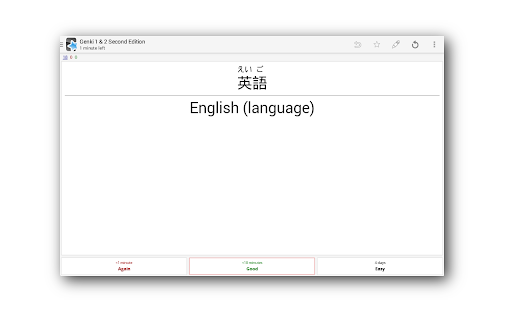
AnkiDroid lets you learn flashcards very efficiently by showing them just before you will forget. It is fully compatible with the spaced repetition software Anki (including synchronization), which is available for Windows, Linux and MacOS.
Study all sorts of things wherever and whenever you want. Make good use of idle times on bus trips, in supermarket queues or any other waiting situation!
Create your own flashcard decks or download free decks compiled for many languages and topics (more than 6000 available).
Add material through the desktop application Anki or directly through Ankidroid. The application even supports adding material automatically from a dictionary!

ChromeOS specific notes:
- If you have the Play Store on your Chromebook, obtaining AnkiDroid through the Play Store is recommended going forward
- AnkiDroid via the Chrome Web Store relies on "ARC" (the App Runtime for Chrome) which ChromeOS will download automatically if you have no other ARC apps installed. This is a large download (500MB or so) and is outside of our control. It is a one-time download.
- The only way to obtain AnkiDroid decks on ChromeOS is via synchronization with the Anki cloud system
- The ARC system sometimes has internal failures on app updates. This is out of AnkiDroid's control, but if you uninstall all ARC apps, ARC itself will uninstall, then you can reinstall cleanly

Key features:
- supported flashcard contents: text, images, sounds, LaTeX
- spaced repetition (supermemo 2 algorithm)
- text-to-speech integration
- more than 6000 premade decks
- progress widget
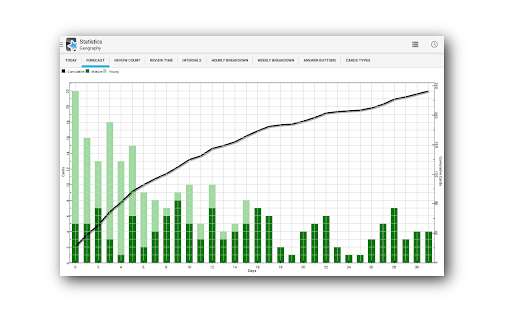
- detailed statistics
- syncing with AnkiWeb
- open source

Additional features:
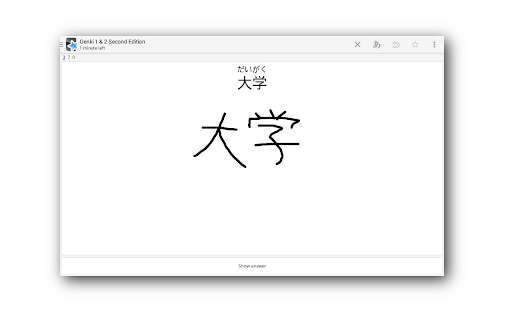
- write answers (optional)
- whiteboard
- card editor/adder
- card browser
- tablet layout
- import existing collection files (via Anki Desktop)
- dictionary integration (ColorDict, GoldenDict, Leo.org, Aedict, diverse web dictionaries)
- add cards by intent from other applications like dictionaries
- custom font support
- full backup system
- navigation by swipe, tap, shake
- fully customisable
- dynamic deck handling
- night mode
- 27 localisations
Technical
- Version
- 2.8.4
- Manifest
- V2
- Size
- 6.11MiB
- Min Chrome
- 23
- Languages
- 43
- Featured
- No
Metadata
- ID
- ckmbkodkbmkmdjdimeiddeljndcneifo
- Developer ID
- ucfa4a8379e420cca2d11fcc734d6b9b6
- Developer Email
- [email protected]
- Created
- Oct 16, 2014
- Last Updated (Store)
- Nov 11, 2018
- Last Scraped
- May 19, 2026
- Website
- —
- Support URL
- https://ankidroid.org/docs/help.html
- Privacy Policy
- —
Similar extensions
Alternatives to AnkiDroid Flashcards, ranked by description similarity.

Anki New Tab Reviewer
Review Anki flashcards on your Chrome new tab page.
28

Flashcard Maker App: Spaced Repetition Learning
Select words on any webpage, translate instantly, and add to flashcards. Learn vocabulary while browsing with spaced repetition.
36
★ 5.0

AnkiLingoFlash
Automatically generate Anki flashcards with pronunciation guide and mnemonic for language learning.
141
★ 5.0

Anki Tool
Effortlessly convert any web content into Anki flashcards for smarter, faster learning.
4.0K
★ 4.6

Deki: Freestyle Flashcards + AI
Floating flashcards: side panel, popup, or standalone. Generate AI prompts, review your way. Ad-free, offline-first. Learn anything.
46
★ 5.0

Anki Highlight Helper
Easily create Anki cards from highlighted text in your browser.
980
★ 4.9

AnkiExpress
Fast capture Anki flashcards
92
★ 3.0

MicroBloom - Micro-Learning New Tab
Transform your new tab into a micro-learning opportunity with flashcards and spaced repetition
32
★ 5.0
Data sourced from the Chrome Web Store · last verified May 19, 2026.