
Anki Highlight Helper
Easily create Anki cards from highlighted text in your browser.
As of June 2026, Anki Highlight Helper has 980 users and a 4.88/5 rating from 8 reviews in the Workflow & Planning category.
Usersup 5.3 percent+5.3%
980
980
Ratingno change0%
4.88
8 reviews
Reviewsno change0%
8
Version
1.5
Manifest V3
History
4 snapshotsTracking since Apr 19, 2026.
View as table
| Date | Users | Rating | Reviews | Version |
|---|---|---|---|---|
| Apr 19, 2026 | 931 | 4.88 | 8 | 1.5 |
| May 13, 2026 | 961 | 4.88 | 8 | 1.5 |
| May 26, 2026 | 952 | 4.88 | 8 | 1.5 |
| Jun 7, 2026 | 955 | 4.88 | 8 | 1.5 |
| Now | 980 | 4.88 | 8 | 1.5 |
Permissions & access
- Permissions
- activeTabcontextMenusstoragetabsscripting
- Host access
- <all_urls>
Screenshots

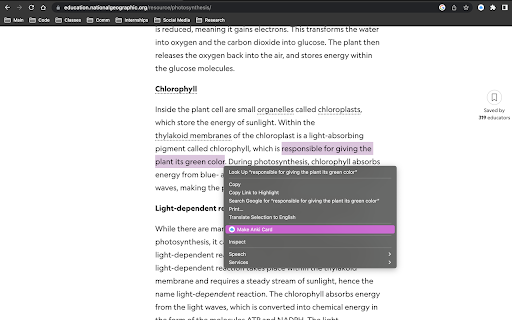
About
Elevate Your Learning with Anki Highlight Helper!  (Setup instructions below)

Anki Highlight Helper is designed for students, educators, and lifelong learners who want to maximize their study efficiency. This intuitive Chrome extension integrates smoothly with Anki, enabling you to generate flashcards quickly and easily from any webpage.

With Anki Highlight Helper, your study sessions become more productive, allowing you to capture key information in just a few clicks. Whether you're browsing articles, research papers, or online textbooks, this tool ensures that you never miss an important detail.

----------Features----------
✅ One-Click Card Creation – Select text, right-click, and choose “Make Anki Card” to instantly add flashcards.
✅ Deck & Note Type Selection – Choose from your existing Anki decks and note types.
✅ Persistent Preferences – Your last-used deck and note type are saved for a seamless experience.
✅ Cloze Deletion Support – Easily generate Cloze cards without manual formatting.
✅ Dynamic Fields – Automatically adapts to different note types, ensuring a flexible workflow.

----------Setup----------
⚠️NECESSARY STEPS⚠️
1) Open the Anki desktop application.
2) Navigate to Tools > Add-ons > Get Add-ons.
3) Enter the code 2055492159 to download and install the AnkiConnect add-on.
4) Go to Tools > Add-ons and find AnkiConnect in the list.
5) Select AnkiConnect and click Config.
6) Update the address field from "http://localhost" to "*".
7) Save your changes and restart Anki to apply the configuration.

Support:
Need help? Contact us at [email protected].

Privacy:
We respect your privacy. No personal data is collected.

Support Us: Your participation helps support the development and maintenance of this free extension.

Version History:
v1.1: Improved setup instructions and error handling.
v1.2: Enhanced security and optimized extension permissions.
v1.3: General optimizations and minor bug fixes.
v1.4: Major UI update – improved design, persistent deck/note type selection, added Cloze card support, and dynamic field loading to accommodate different note types.
Technical
- Version
- 1.5
- Manifest
- V3
- Size
- 18.0KiB
- Min Chrome
- 88
- Languages
- 1
- Featured
- Yes
Metadata
- ID
- gadgjbkjjnchcfddakikflcnnlanjcfm
- Developer ID
- ud35cc5c48b3e823ca57db6e7042d552e
- Developer Email
- [email protected]
- Created
- Jul 19, 2023
- Last Updated (Store)
- Aug 25, 2025
- Last Scraped
- Jun 7, 2026
- Website
- —
- Support URL
- —
- Privacy Policy
- —
Similar extensions
Alternatives to Anki Highlight Helper, ranked by description similarity.

Anki Quick Adder
This extension provides the ability to create anki cards directly from Google Chrome on your Anki Desktop.
5.0K
★ 4.2

Quick Anki Adder
Quick Anki card adder with translate, animated picture (.gif), and text-to-speech (TTS ) resources.
599
★ 1.9

Highlighter Guru
Highlight and save text easily in Chrome! This extension helps you mark important stuff and store it neatly in folders for later.
109
★ 4.2

Automated Flashcards
Automate language flashcard creation and practice.
14

Paperclips Copilot
Autogenerate flashcards from anything you read on the web (for Anki, Quizlet, and more)
2.0K
★ 4.3

Web Highlights: PDF & Web Highlighter + Notes & AI Summary
Productivity Highlighter & Annotation Tool for Websites & PDFs with AI Summary - free, easy to use, no sign-up required.
200.0K
★ 4.8

Thought Saver
Tap into the superpower of remembering anything forever by using this incredibly efficient tool for learning.
281
★ 4.6

HelpMeResearch
A highlight extension
2
★ 5.0
Data sourced from the Chrome Web Store · last verified Jun 7, 2026.