Quizwiz - Ace Your HW & Exams, Now With AI
Ask AI and rapidly search those last-minute homework and exam questions!
As of June 2026, Quizwiz - Ace Your HW & Exams, Now With AI has 10,000 users and a 3.19/5 rating from 27 reviews in the Education category.
Usersno change0%
10.0K
10,000
Ratingno change0%
3.19
27 reviews
Reviewsno change0%
27
Version
2.0.21
Manifest V3
90-day change · In the last 90 days this extension 1 version update, changed permissions.
History
2 snapshotsTracking since Apr 24, 2026.
View as table
| Date | Users | Rating | Reviews | Version |
|---|---|---|---|---|
| Apr 24, 2026 | 10.0K | 3.19 | 27 | 2.0.20 |
| May 19, 2026 | 10.0K | 3.19 | 27 | 2.0.20 |
| Now | 10.0K | 3.19 | 27 | 2.0.21 |
Changelog
- May 19, 2026short_description
Ask ChatGPT and rapidly search those last-minute homework and exam questions!
Ask AI and rapidly search those last-minute homework and exam questions!
- May 19, 2026permissions
contextMenus, storage, scripting, cookies, identity, identity.email, offscreen
contextMenus, storage, scripting, cookies, identity, identity.email
Permissions & access
- Permissions
- contextMenusstoragescriptingcookiesidentityidentity.email
- Host access
- <all_urls>
Screenshots


About
Updates
v2.0.0:
    • 🔥🆕 Massive upgrade to the extension 🆕🔥
    • ChatGPT AI so you can ask more nuanced questions! 🤖
    • Enhanced rapid fire mode → search 100+ questions at once⚡
    • Hugely improved search algorithm to find every answer out there🔍
    • Pin the extension popup on the page, no more going back and forth between your homework and the extension 💪
    • Dark mode so you can save your eyes during those late-night study sessions🌙
    • Parallel searching for when you're under a time crunch!⏱️
    • 🪄Rebrand from Quizlit to Quizwiz🪄
v2.0.2: Fixed bug with popup not opening
v2.0.3: Fixed searching due to external changes :)
v2.0.4: Update to prepare for advanced searching + enhanced AI coming soon. Also added status updates directly in extension and our affiliate program link! 🚀
v2.0.7: Make searching better + fix highlight-search and AI :)
v2.0.9: Fuzzy search now has our NEW Confidence Level to maximize answers 🔥

★★★★★★★★★★★★★★★★★★★★★★★★★★★★★★★★★★★★★★★★★★★

Hey there! 👋

Quizwiz is an extension to help you snag those last-minute homework and exam questions..

We've got loads of features included to make your assignments easy as 🥧!

★ Manual mode:
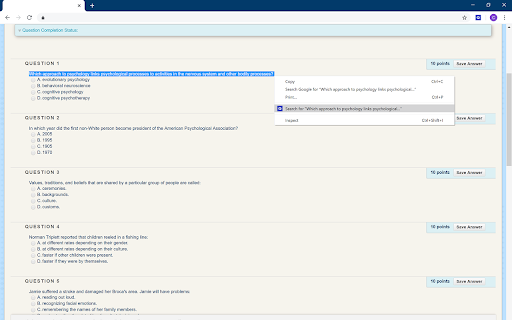
• Highlight a question on the page, right-click, and press Search.
or
• Type / copy-paste your question into the search box.

★ Rapid Fire mode:
Click (⚡).
    • If the CSS selector option isn't filled, you'll be prompted to click a question on the page.
    • Otherwise, the specified CSS selector will be used.
This mode will get all questions on the page and search them!

★ Ask the AI:
After searching a question, you'll have the option to get more advanced, nuanced answers with the help of modern AI. Click the button labeled "Ask the AI, powered by ChatGPT" and watch the magic unfold.

★ Open popup!
If this button is clicked, the popup will appear on your current page with ability to search questions and see answers directly without needing to click the extension.

★ Options:
Clear list: If enabled, will clear answer list before each search.

Show bubbles: If enabled, will show search button next to each question on page (make sure the CSS selector option is filled).

CSS selector: Click the target to select a question on the page or type the CSS selector of a question.

Search style:
    • Most answers, but slower: gets all possible answers, but is the slowest.
    • More answers, mid speed: a good balance between # of answers and speed.
    • Fewer answers, but fastest: gets the fewest answers, but is the fastest.

Match style: Will match questions where your question:
    • Equal: exactly equals questions found.
    • Substring: is contained within questions found.
    • Superstring: contains questions found.
    • Fuzzy: is somewhat like questions found.

Results limit: Specifies max number of flashcard sets to search.

★ Extras:
Omnibox: You can also search for questions using the omnibox in the address bar. Type quizwiz, then press space or tab, and finally type / copy-paste your question!

Keybinds: Want to go even faster? Built-in keybinds let you rapidly open the extension popup or search a question! Change keybinds by navigating to chrome://extensions/shortcuts. Default keybinds are:
    • Activate the extension: Ctrl+Q
    • Search highlighted question: Ctrl+Shift+Q

Legal

This software is intended strictly for use as a study tool to aid student comprehension. It is strictly disallowed to use this software as a tool to facilitate cheating of any kind whatsoever on materials including but not limited to homework, quizzes, tests, exams, and alike.
Technical
- Version
- 2.0.21
- Manifest
- V3
- Size
- 1.01MiB
- Min Chrome
- 88
- Languages
- 1
- Featured
- Yes
Metadata
- ID
- cjpmpjddogcacgckmamjhmjlflfjikdh
- Developer ID
- u143b4e7ed98603bbd83156f1afe2d134
- Developer Email
- [email protected]
- Created
- May 10, 2020
- Last Updated (Store)
- May 9, 2026
- Last Scraped
- Jun 12, 2026
- Website
- —
- Support URL
- https://quizwizapp.com/contact
- Privacy Policy
- https://quizwizapp.com/privacy
Similar extensions
Alternatives to Quizwiz - Ace Your HW & Exams, Now With AI, ranked by description similarity.

WinkWink - Ace Your Studies & Questions, Using Quizlet
Ask WinkWink and rapidly find answers to quiz and study questions!
22

QuizWhiz
Drag the area of question and click ask to get answer
131
★ 4.3

Homework Helper - Study, Quiz, & Test Answers Solver with AI
Get INSTANT answers to homework, quizzes, and tests. Private. ALL websites work including Canvas, BlackBoard, McGrawHill, D2L
1.0K
★ 3.7

TestWhiz: AI for quizzes and assignments 📚
Ace your next quiz, or assignment with TestWhiz, the Chrome extension designed to make studying smarter, not harder.
596
★ 5.0

Study Brainiac - AI Educational Content Generator
Transform any webpage into personalized learning materials.
36
★ 5.0

Quiz Boost AI - Smart Test Assistant, Exam Helper & Homework Quiz Solver
Smart AI based test assistant, quiz resolver, homework helper. Solve online tests, pass exams, improve skills for skill assessments
56
★ 5.0

Wizard - Quiz Solver Canvas AI Extension
Get answers & explanations to your Canvas Quizzes, Homeworks and Tests with a single click.
546
★ 3.0

InstantIQ: AI Quiz Solver (6 Modes)
Instant quiz answers in <5 sec. 6 AI modes: Solve, Explain, Translate, Calculate, Extract, Rewrite. Dual AI on any platform.
84
★ 5.0
Data sourced from the Chrome Web Store · last verified Jun 12, 2026.