
QuizWhiz
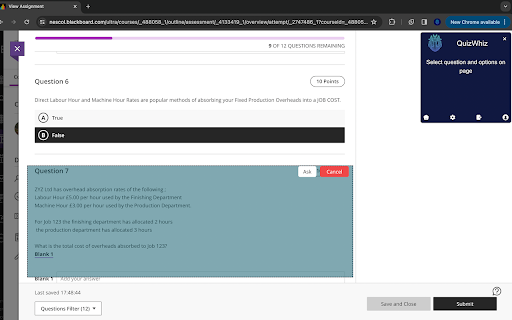
Drag the area of question and click ask to get answer
As of May 2026, QuizWhiz has 131 users and a 4.33/5 rating from 3 reviews in the Education category.
Usersdown 7.1 percent−7.1%
131
131
Ratingno change0%
4.33
3 reviews
Reviewsno change0%
3
Version
1.0
Manifest V3
History
2 snapshotsTracking since Apr 26, 2026.
View as table
| Date | Users | Rating | Reviews | Version |
|---|---|---|---|---|
| Apr 26, 2026 | 141 | 4.33 | 3 | 1.0 |
| May 23, 2026 | 133 | 4.33 | 3 | 1.0 |
| Now | 131 | 4.33 | 3 | 1.0 |
Permissions & access
- Permissions
- activeTabscriptingstorage
- Host access
- https://quizwhizs.com/*
Screenshots


About
QuizWhiz is Your AI-Powered Study Companion. Welcome to QuizWhiz – the ultimate AI-powered tool crafted to empower students and professionals on their academic and certification journeys. Our extension is a robust ally in tackling quizzes, homework, and in-depth research across various subjects. Key Features: Smart Detection: Automatically recognizes quiz formats across 20+ major quiz websites. Smart Highlight : Highlight any text and right click to get the answer. QuickSnap Feature: Instantly capture any quiz question for a rapid response. AI-Powered Solutions: Harness the power of advanced AI for precise, quick answers. User-Friendly Interface: Simple and intuitive, QuizWhiz makes quiz-solving an effortless task. Enhanced Learning Experience: Not just answers, but a tool to improve your understanding and performance. Flexible Plans: From our free QuizKick Plan to the comprehensive QuizMaster Plan, there’s a perfect fit for everyone. With QuizWhiz, you are not just getting an extension; you're gaining a smart study companion that understands your needs. Whether you are a student aiming for academic excellence or a professional seeking to refine your knowledge,QuizWhiz is your go-to solution. Try it now and experience a smarter way to tackle quizzes! 🌟 Quick Start with QuizWhiz, 1️⃣ Click the "Add to Chrome" button on the Chrome Web Store page to install QuizWhiz. 2️⃣ Once installed, click on the QuizWhiz icon in your browser to connect to your account. 3️⃣ To find answers, simply select the question or text on a webpage, right-click, and choose QuizWhiz to get your solution. 4️⃣ Alternatively, use the QuickSnap feature: draw a canvas around the question, quiz, problem, or exercise, and QuizWhiz will provide you with the answer. 🎯Contact us: Mail: [email protected] Website: quizwhizs.com
Technical
- Version
- 1.0
- Manifest
- V3
- Size
- 153KiB
- Min Chrome
- 88
- Languages
- 1
- Featured
- No
Metadata
- ID
- ngonolnhlffcmincboijpacecmgijpde
- Developer ID
- ubc33e38b768b5c508fbe4349ec3e75cd
- Developer Email
- [email protected]
- Created
- Feb 14, 2024
- Last Updated (Store)
- Mar 4, 2024
- Last Scraped
- May 23, 2026
- Website
- —
- Support URL
- —
- Privacy Policy
- https://quizwhizs.com/privacypolicy
Similar extensions
Alternatives to QuizWhiz, ranked by description similarity.

QuizWhiz
An AI assistant that can read text and screenshot-based quizzes.
4

TestWhiz: AI for quizzes and assignments 📚
Ace your next quiz, or assignment with TestWhiz, the Chrome extension designed to make studying smarter, not harder.
596
★ 5.0

QuizMaster AI – Instant Quiz Solver
AI-powered quiz solver with page scanning. Solves multiple MCQs instantly for students.
395
★ 5.0

SnapQuizX
An AI-powered browser extension for active learning and knowledge retention from web content.
27

AI Quiz Solve - Homework & Quiz Helper
AI quiz solver & homework helper. Instant answers with explanations for Canvas, Blackboard, Moodle, Google Forms & 20+ platforms.
469
★ 5.0

Quiz Boost AI - Smart Test Assistant, Exam Helper & Homework Quiz Solver
Smart AI based test assistant, quiz resolver, homework helper. Solve online tests, pass exams, improve skills for skill assessments
56
★ 5.0

Quiz Answer Assistant
Get quick answers for quiz questions with text selection
98
★ 3.0

Wizard - Quiz Solver Canvas AI Extension
Get answers & explanations to your Canvas Quizzes, Homeworks and Tests with a single click.
546
★ 3.0
Data sourced from the Chrome Web Store · last verified May 23, 2026.