
JSONBeautifyinator
Format, validate, minimize JSON text. Includes interactive tree view, format conversion (YAML/XML/CSV), and split-pane full editor.
As of June 2026, JSONBeautifyinator has 45 users and a 5.00/5 rating from 1 reviews in the Developer Tools category.
Usersdown 13.5 percent−13.5%
45
45
Ratingno change0%
5.00
1 reviews
Reviewsno change0%
1
Version
2.0
Manifest V3
90-day change · In the last 90 days this extension 1 version update.
History
6 snapshotsTracking since Apr 1, 2026.
View as table
| Date | Users | Rating | Reviews | Version |
|---|---|---|---|---|
| Apr 1, 2026 | 52 | 5.00 | 1 | 1.1 |
| Apr 21, 2026 | 49 | 5.00 | 1 | 1.1 |
| May 6, 2026 | 47 | 5.00 | 1 | 1.1 |
| Jun 4, 2026 | 48 | 5.00 | 1 | 1.1 |
| Jun 8, 2026 | 48 | 5.00 | 1 | 2.0 |
| Jun 15, 2026 | 50 | 5.00 | 1 | 2.0 |
| Now | 45 | 5.00 | 1 | 2.0 |
Changelog
- Jun 4, 2026description
JSONBeautifyinator is a powerful and user-friendly tool that allows you to easily format, validate, and minimize JSON text. With our tool, you can ensure that your JSON data is correctly formatted, valid, and optimized. This tool is an essential addition to your workflow.

By installing our JSON tool, you'll be able to easily manipulate JSON text, making it more readable and efficient. You can quickly format JSON to make it more visually appealing, validate JSON to ensure that it meets your requirements, and minimize JSON to reduce file sizes and optimize performance. Our tool is simple to use, intuitive, and provides all the features you need to work with JSON data effectively.
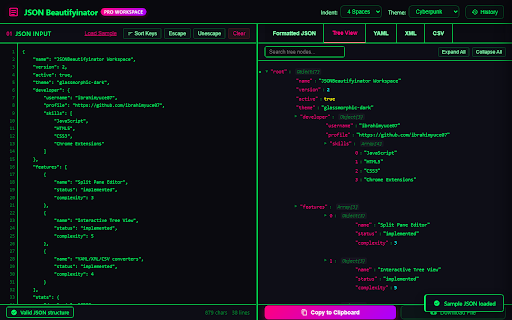
JSONBeautifyinator is a privacy-focused JSON formatter, validator, and converter that runs entirely offline. It provides a compact browser popup for quick tasks and a split-pane tab editor for larger payloads.

Features:
-Format and minimize JSON text with custom indentation options.
-Color themes including dark, light, cyberpunk, and monochrome.
-Interactive tree view with search filtering, node count indicators, and a JSON path copy helper.
-Validator that displays the exact line and column numbers of syntax errors with click-to-jump navigation.
-Built-in converters for YAML, XML, and CSV.
-Recursive alphabetical key sorting.
-Local history panel that caches the last 10 formatted entries.
-Drag-and-drop file loading.
-Escape and unescape tools for code integration.

Privacy & Security: All parsing and rendering is done locally inside your browser. The extension requires no special permissions and makes zero network requests, making it safe for sensitive data.
- Jun 4, 2026short_description
Format, validate, and minimize JSON text with ease.
Format, validate, minimize JSON text. Includes interactive tree view, format conversion (YAML/XML/CSV), and split-pane full editor.
Permissions & access
- Permissions
- None declared
- Host access
- None declared
Screenshots



About
JSONBeautifyinator is a privacy-focused JSON formatter, validator, and converter that runs entirely offline. It provides a compact browser popup for quick tasks and a split-pane tab editor for larger payloads.

Features:
-Format and minimize JSON text with custom indentation options.
-Color themes including dark, light, cyberpunk, and monochrome.
-Interactive tree view with search filtering, node count indicators, and a JSON path copy helper.
-Validator that displays the exact line and column numbers of syntax errors with click-to-jump navigation.
-Built-in converters for YAML, XML, and CSV.
-Recursive alphabetical key sorting.
-Local history panel that caches the last 10 formatted entries.
-Drag-and-drop file loading.
-Escape and unescape tools for code integration.

Privacy & Security: All parsing and rendering is done locally inside your browser. The extension requires no special permissions and makes zero network requests, making it safe for sensitive data.
Technical
- Version
- 2.0
- Manifest
- V3
- Size
- 1.45MiB
- Min Chrome
- 88
- Languages
- 1
- Featured
- Yes
Metadata
- ID
- cjpjodifcjmhpomnahbfamdbilaalpkd
- Developer ID
- u7fc704e0fc593dde79efa3919706b6a5
- Developer Email
- [email protected]
- Created
- Apr 16, 2023
- Last Updated (Store)
- Jun 4, 2026
- Last Scraped
- Jun 15, 2026
- Website
- —
- Support URL
- —
- Privacy Policy
- —
Similar extensions
Alternatives to JSONBeautifyinator, ranked by description similarity.

JSON Formatter and Validator
Format and validate JSON with advanced features
3

JSON Formatter & Validator
Validate, format, beautify, and parse your JSON data instantly. Free online JSON validator, formatter, beautifier, and parser.
34
★ 5.0

Tuvito JSON
Beautify and format JSON.
2

Jsonify
A Chrome extension for JSON manipulation, analysis, and beautification.
15
★ 5.0

JSON Beautifier
Format, highlight, and inspect JSON with syntax coloring, collapsible tree view, minify toggle, copy, and light/dark theme.
16

JSON Formatter - Beautifier
JSON Formatter come Beautify will help developer to understand and analyze quickly JSON data. Speedup development tools.
26
★ 5.0

JSON Formatter
Tool for formatting json data, into a pretty human readable format.
10.0K
★ 1.9

JSON Formatter & Beautifier
makes it simple to read JSON Code for browser
79
★ 5.0
Data sourced from the Chrome Web Store · last verified Jun 15, 2026.