
Salesforce Dependent Picklist Import/Export (Free)
Import/Export dependent picklist values from Salesforce.
As of June 2026, Salesforce Dependent Picklist Import/Export (Free) has 660 users and a 5.00/5 rating from 4 reviews in the Productivity category.
Usersup 5.6 percent+5.6%
660
660
Ratingno change0%
5.00
4 reviews
Reviewsup 33.3 percent+33.3%
4
Version
0.0.3
Manifest V3
History
5 snapshotsTracking since Apr 18, 2026.
View as table
| Date | Users | Rating | Reviews | Version |
|---|---|---|---|---|
| Apr 18, 2026 | 625 | 5.00 | 3 | 0.0.3 |
| Apr 28, 2026 | 650 | 5.00 | 3 | 0.0.3 |
| May 15, 2026 | 640 | 5.00 | 3 | 0.0.3 |
| May 24, 2026 | 654 | 5.00 | 3 | 0.0.3 |
| Jun 3, 2026 | 651 | 5.00 | 3 | 0.0.3 |
| Now | 660 | 5.00 | 4 | 0.0.3 |
Permissions & access
- Permissions
- activeTabcontextMenustabs
- Host access
- None declared
Screenshots

About
Import/Export Dependent Picklist Values for Salesforce
🚀 Boost Your Salesforce Productivity 🚀

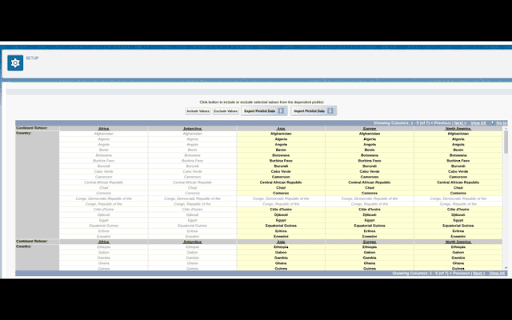
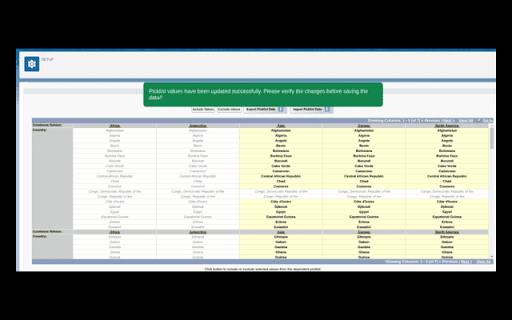
Take control of your Salesforce dependent picklist values with ease. This Chrome extension lets you import and export dependent picklist values seamlessly, all with a user-friendly interface and enhanced UI for a smooth experience. Whether you're an admin, developer, or business user, managing picklist values has never been this easy!

🔑 Key Features:

🗂️ Import Dependent Picklist Values: Effortlessly import dependent picklist values into your Salesforce environment with just a few clicks.
📤 Export Picklist Values: Export your Salesforce picklist data for backup, manipulation, or data migration purposes.
🎨 Enhanced UI: Enjoy a modern, intuitive interface with a clean and streamlined design that improves your workflow.
🖱️ One-click Integration: Easy integration with Salesforce for faster data management without switching tabs or tools.
🔒 Secure: Keeps your data safe and secure during imports and exports.
💡 Why Use This Extension?

Simplify Tasks: Spend less time on manual data entry and more time focusing on what matters.
Reduce Errors: The easy-to-use interface ensures fewer mistakes when managing complex picklist data.
Customizable: Tailor your import/export actions to meet your specific Salesforce configuration needs.
This extension is a must-have for Salesforce admins, developers, and users managing picklist values. Get started today and experience the easiest way to import/export dependent picklists in Salesforce!
Technical
- Version
- 0.0.3
- Manifest
- V3
- Size
- 31.81KiB
- Min Chrome
- 88
- Languages
- 1
- Featured
- No
Metadata
- ID
- cjfgpeakgpojmkogpkhpnkkneffcoobh
- Developer ID
- u3de87c6bd8c7ad9c1560d28c96288807
- Developer Email
- [email protected]
- Created
- Oct 28, 2024
- Last Updated (Store)
- Dec 19, 2025
- Last Scraped
- Jun 3, 2026
- Website
- shivamkapasia.dev
- Privacy Policy
- —
Similar extensions
Alternatives to Salesforce Dependent Picklist Import/Export (Free), ranked by description similarity.

Salesforce Field Master
Enhances Quick Find, exports to Excel, and provides bulk updates for custom fields
104
★ 5.0

ZaapIT for Salesforce
Eliminate duplicates & improve data quality like never before - ZaapIT for Salesforce
350
★ 4.9

One Click Salesforce Object Manager
🚀 Navigate to Salesforce's Object Manager with a Single Click! 🚀
Are you a Salesforce admin or developer tired of navigating…
57

Salesforce Record Redirector
Quickly navigate to Salesforce records by pasting their IDs
16
★ 5.0

Salesforce Attachment Manager
Manage Salesforce Attachments - view, download, and delete attachments across your Salesforce org
25

Workbench
Use Workbench directly from chrome to visualize record details and analyze User access, profile, permissions, etc
4.0K
★ 5.0

SFPrelodr — Salesforce Data Load Template Generator
Generate perfect Salesforce data-load templates in 30 seconds. Built-in validation stops errors before they happen. Free to try.
9

SF 15 to 18
Convert Salesforce 15 char Id's to 18
192
Data sourced from the Chrome Web Store · last verified Jun 3, 2026.